AI credits
The Credits tab in Settings — how many AI credits you have left this month, what each action costs, and exactly where the ones you spent went.
Every cloud-AI action in Dhaga costs credits. /app/settings → Credits
is the page that tells you how many you have left, where the rest went, and
what you did to spend them.
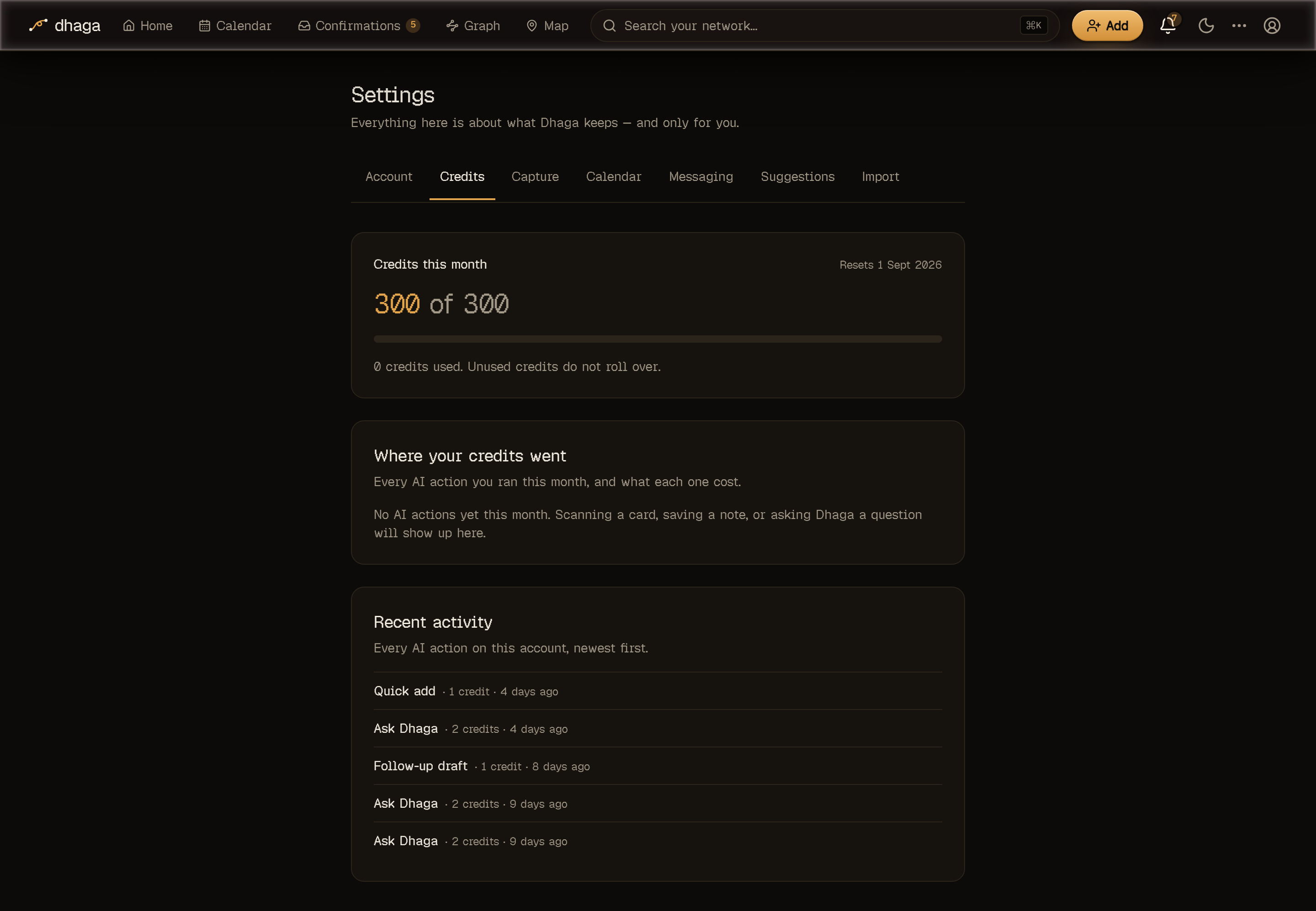
How many are left
The first card is the headline: credits remaining out of your total for the month, a bar showing how much of it you have used, and the date the counter resets. Allowances do not roll over — a fresh month starts from the full number.
Every plan has an allowance, including the free one: a free account gets 10 credits a month. That is ten card scans, or five scans and five notes, or five questions to Ask Dhaga — enough to keep capturing with AI, not enough to lean on it all month.
If your plan has no monthly ceiling, the card says Unlimited and shows what you have used so far instead of a number left.
If something has been added to your allowance, the card breaks it down rather than just showing a bigger number:
- Monthly allowance — what your plan (or this instance's configuration) includes.
- Promotion this month — replaces the line above when whoever runs the instance is running a promotional month.
- Credits added for you — a one-off grant, e.g. after something went wrong on their side. Grants are always added on top; they never rewrite what you spent.
Where your credits went
The second card is the breakdown for the current month: one row per kind of action, how many of them you ran, and what they cost. The rows add up to the total — that is the same number your monthly cap is measured against, so nothing is counted twice or quietly left out.
Credits are charged per action, not per model call — a card scan that takes two round-trips behind the scenes is still one scan:
| Action | Credits |
|---|---|
| Card scan | 1 |
| Quick add (pasted text or a signature) | 1 |
| Note (text) | 1 |
| Voice transcription | 1 |
| Follow-up draft | 1 |
| Question about a person | 1 |
| Forwarded batch | 1 |
| Sector suggestions (per 10 contacts) | 1 |
| Page capture | 2 |
| Ask Dhaga (a question) | 2 |
| Pre-meeting brief | 2 |
| Connector lookup | 2 |
| Sector web search (per company) | 4 |
| Goal match, requested now | 8 |
| Deep research (enrich from the web) | 20 |
| Watchlist scan (nightly) | Free |
| Contact check (nightly) | Free |
| Goal match (nightly) | Free |
| Message routing | Free |
| Note answered in chat | Free |
A photo note costs 2 — reading the image and extracting from the resulting text happen as two separate actions.
A chat turn with the WhatsApp/Telegram bot costs 1 credit however many
messages you sent in that burst and however many steps Dhaga took to answer —
ten forwards read together are one turn, not ten. A turn that is settled without
calling Claude costs nothing, and the first photo in a turn is included (each
further photo is one card_scan credit). Message routing — working out
whether what you just sent the bot is a note, a question, a correction or a
reminder — is free, so being understood never costs you anything. See Messaging capture.
Answering "who is this about?" in the chat is free too. When Dhaga cannot work out who a forwarded message is about it asks, and replying in WhatsApp or Telegram runs the same processing that a Note does — facts, connections and reminders — at no charge. You are answering our question, not asking a new one, and you have already paid for the forwarded batch that raised it. Answering the same card in the app costs the usual 1 credit for that note.
Deep research is the expensive one on purpose: it pays for live web searches on top of the model, which is what makes it cost far more than the reading and writing around it. It runs on a person or a company, and either way it is one action at the same 20 credits.
Suggesting sectors is priced two ways, because it is two different jobs. Pressing Suggest sectors — on People, on Companies, or on a selection — works out each person's sector from what you already have, in batches of ten, and costs 1 credit per 10 contacts, rounded up: one contact costs 1 credit, eleven cost 2. Dhaga tells you the exact figure and how many contacts it will actually touch before you agree to it, and people it would skip — already placed, marked as a service, or carrying nothing to go on — are taken off the bill rather than charged for. The work runs overnight.
Searching the web for a company is the other one, and it's the paid tier: on the Unplaced companies page, Search the web reads live results to place companies the nightly pass couldn't recognise, at 4 credits per company. That price is per company, not per batch. Neither is limited to a paid plan — both are bounded only by the credits you have.
Watchlist scans are free. They appear in the breakdown marked Free rather than being hidden, so a month of nightly scanning is visible and accounted for without costing you anything. You never asked for any individual scan — how many people you can watch is what limits them instead.
Contact checks and goal matches are free for the same reason. A contact check is the nightly read of one contact to work out whether it is a person you could message or a shop your address book dragged in; a goal match weighs one contact against the goal you wrote in your own words. You never asked for either judgement about any particular person, so neither is billed — what limits them is a ceiling on how many contacts a single night's sweep may look at, not your allowance. A whole imported address book is worked through over a few nights that way, and every one of those actions still shows up in the breakdown marked Free rather than being hidden.
Asking for a goal match now is the exception, and it costs 8 credits. Setting or rewording a goal is always free and never runs the model — the nightly pass picks it up, and it takes two nights for the first people to land: one night sends the goal off to be matched, the next brings the people back. If you don't want to wait, Request now — on your goal tile on Home, or on the Goal page — runs the match while you watch, weighing up to 40 people in that one press, and Dhaga tells you what it costs before it spends anything. It shows up in the breakdown as Goal match (requested), separately from the free nightly ones, so you can always see which of the two you paid for.
Credits aren't the only gate
Deep research costs more than a free month holds, and deep research and pre-meeting briefs are Pro-and-up features anyway — having credits left over doesn't unlock them. What a free allowance realistically buys is card scans, notes, quick add, follow-up drafts and questions to Ask Dhaga.
Enrich from public web says so up front: on a plan without it the button is greyed out reading "Enrichment requires a Pro or Power plan." — the same sentence you'd have got after clicking. A self-hosted instance has no plan and is never greyed for one.
Recent activity
The last card is a plain list of your AI actions — "Card scan · 1 credit · 2 hours ago" — newest first. It starts by showing your most recent actions, and a Load more button at the bottom fetches further back, so you can page all the way through your entire usage history, not just what you did this week. It is not limited to the current month either, so opening the page on the 1st still shows you what you last did.
This page is yours alone
Everything here is derived from your own usage records. Whoever runs the instance has a separate admin screen for setting allowances and granting credits — it never shows them what you asked or what you captured.
Running out
When the month's credits are gone, you find out before you click: the AI buttons are greyed out, with the reason sitting next to them — "You're out of AI credits this month — all 10 used. They reset on the 1st." — and a See credits link back to this page. Nothing fails silently, and nothing is charged for an action you didn't get.
Greyed out until the counter resets: Extract contact on the paste tab, Scan card, Ask Dhaga, Brief me, Draft follow-up, Enrich from public web, and Request now on your goal (the goal itself still saves, and tonight's free pass still runs). Suggest sectors and Search the web still open their dialog — so you can see what it would cost and how many contacts it would touch — but the confirm button reads Out of AI credits instead of running.
Everything that doesn't spend credits keeps working exactly as before — manual capture and editing, adding a fact or a follow-up by hand, attaching a file to a person or a company, search by name, the graph, import, export, and voice dictation (which runs on your own device). Adding photos to a card-scan tray still works too; only the Scan button itself is greyed.
Notes are deliberately never greyed out, typed or photo — writing something down must not depend on having credits. What you had already typed is never thrown away either: save a note with an empty balance and it still saves — you just get told what didn't happen: "Note saved. You're out of AI credits this month, so facts weren't extracted." (a photo note says "Photo note saved…"). You can add facts by hand, or re-run extraction on that note once the counter resets.
Seeing "No monthly AI credits on this plan — upgrade to enable AI actions" instead? That is a cap of 0, which only happens when whoever runs the instance has deliberately set your allowance there. It is not what a free account normally looks like.
On a self-hosted enterprise deployment, a configured default seeds the monthly allowance — it applies until an admin sets a number in the app, and from then on the stored number is the one that counts. See Self-hosting.