Recruiting & executive search
By Anchit Shrivastava ·
A Staff role opens that matches what a passive candidate told you six weeks ago. Dhaga remembered her terms, her timing, and which call each came from.
The moment this earns its keep
A client opens a Staff seat — remote, real architectural ownership. You screened someone six weeks ago who described that job almost word for word, and told you she wouldn't interview seriously until her team's launch shipped at the end of Q2. Both details are still exact, both trace back to the call they came from, and neither of them was in your head.
The fact the placement turns on
Meet Sofia Delgado, a Staff Engineer at Fernwood Labs — a seeded demo contact playing the passive senior candidate who'd never turn up in an ATS.
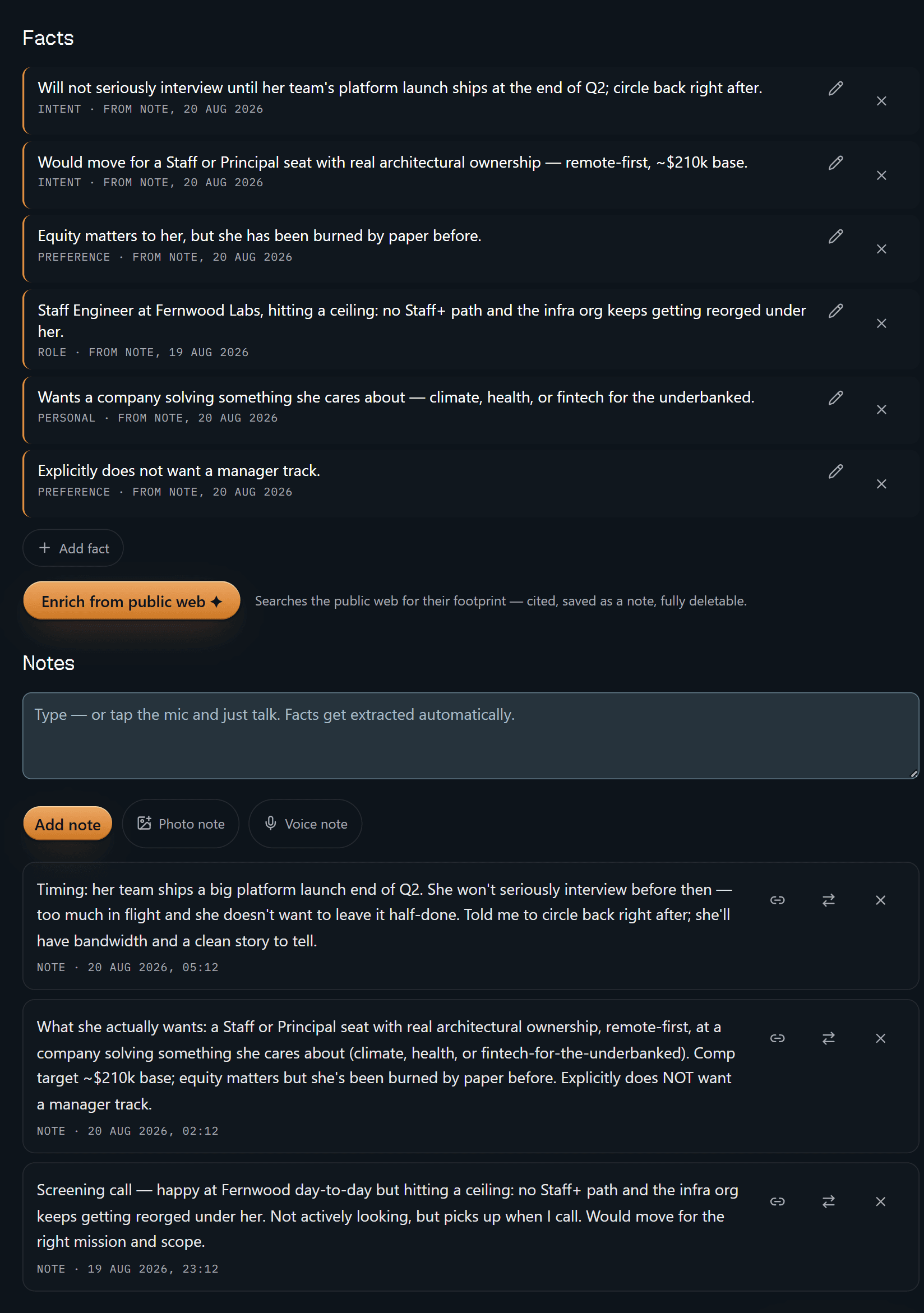
Six facts, each with a receipt: the kind of fact it is, the words from note, and the date of the note it came out of — 20 Aug for most of them, 19 Aug for the one that came out of the screening call. "Will not seriously interview until her team's platform launch ships at the end of Q2" isn't a hunch from a conversation you half remember; it's a line you can trace to the note sitting a few centimetres below it. Delete that note and the facts derived from it are tombstoned with it. A comp number or a timing constraint with nothing behind it is exactly the sort of thing that loses a placement, so Dhaga doesn't keep one.
The one button on that screen that reaches outside your own notes says so plainly: searches the public web for their footprint — cited, saved as a note, fully deletable. Nothing happens until you press it.
That is the whole product in one screen. The rest is convenience.
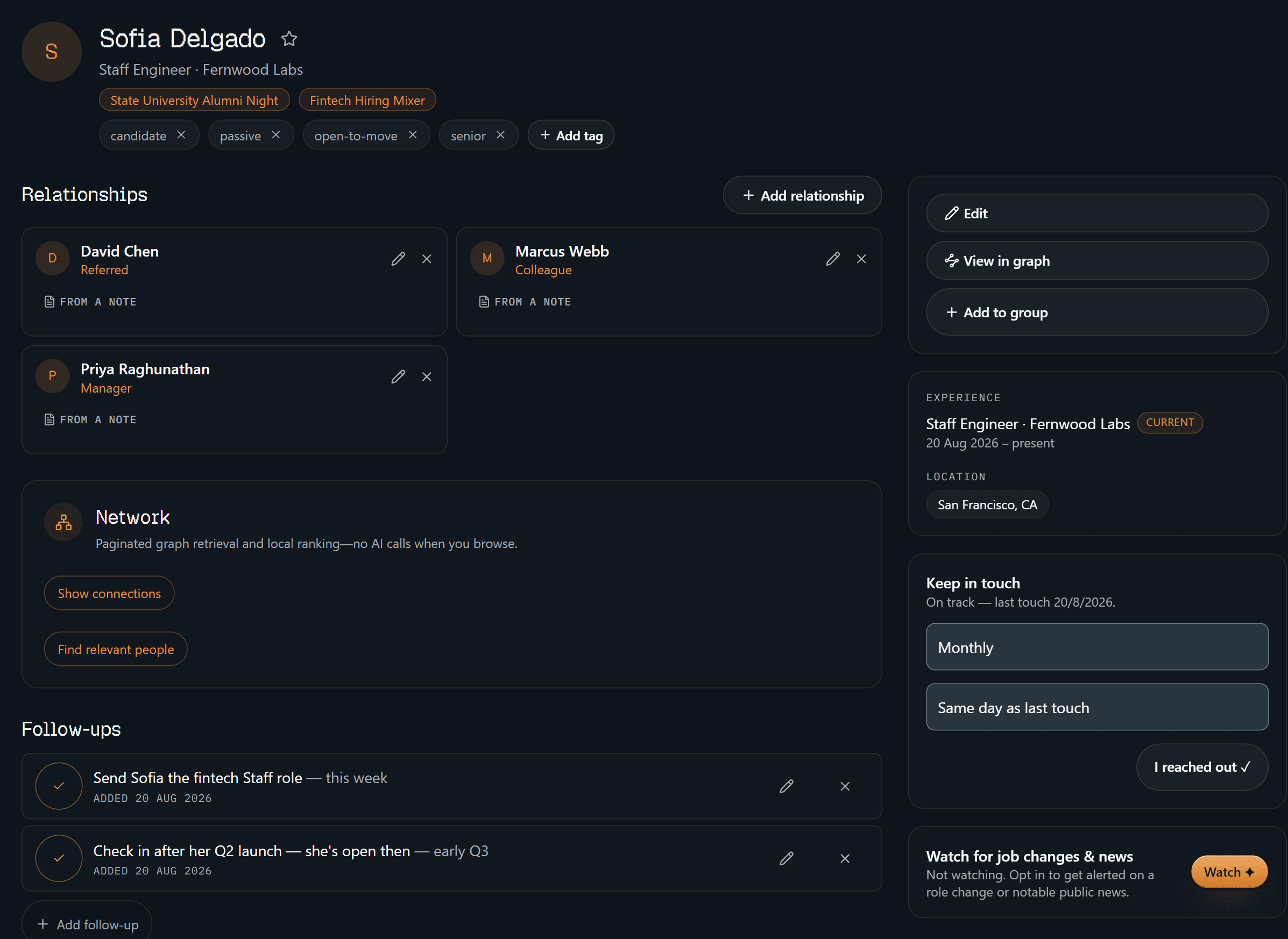
The identity half is the boring, load-bearing one: tagged candidate, passive, open-to-move, senior, chipped with the two events you've both been at, and her current seat and city on the right. The three relationships carry the same receipt the facts do — from a note — so "referred", "colleague" and "manager" are things someone told you, not guesses. Two follow-ups sit underneath: send her the fintech Staff role this week, check in after her Q2 launch. Keep-in-touch is set to monthly and currently on track. And the watch control at the bottom right reads not watching, because it always starts off.
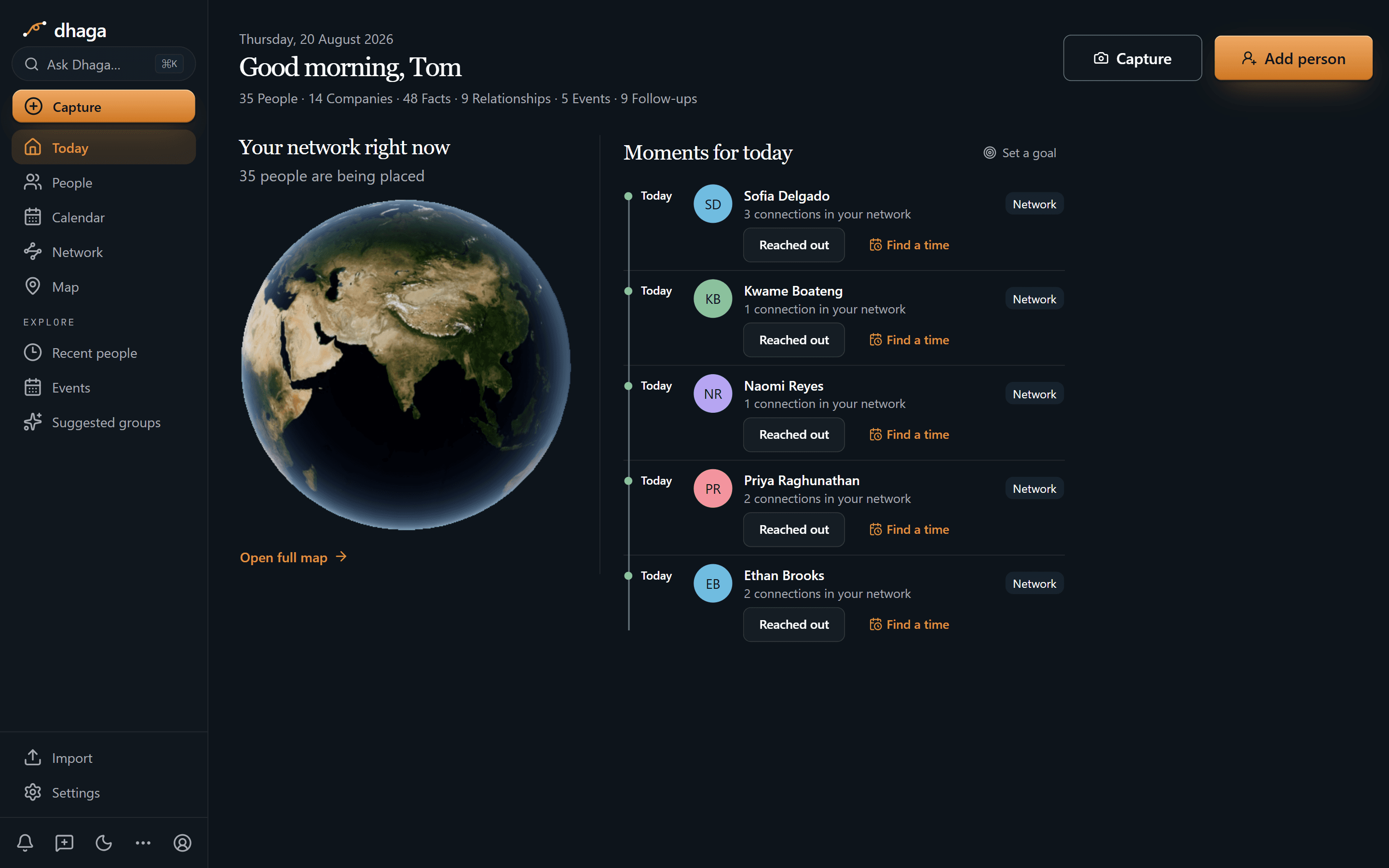
Sofia leads today's moments on the cadence you set for her, alongside four other
people you meant to stay close to; each row offers "Reached out" or "Find a
time". The strip along the top is the book at a glance — 35 people, 14
companies, 48 facts, 9 relationships, 5 events, 9 open follow-ups. Nothing here
is a to-do that lost its context: every row is a person. What you owe each of
them lives on their profile and in one Day/Week/Month view at /app/plan.
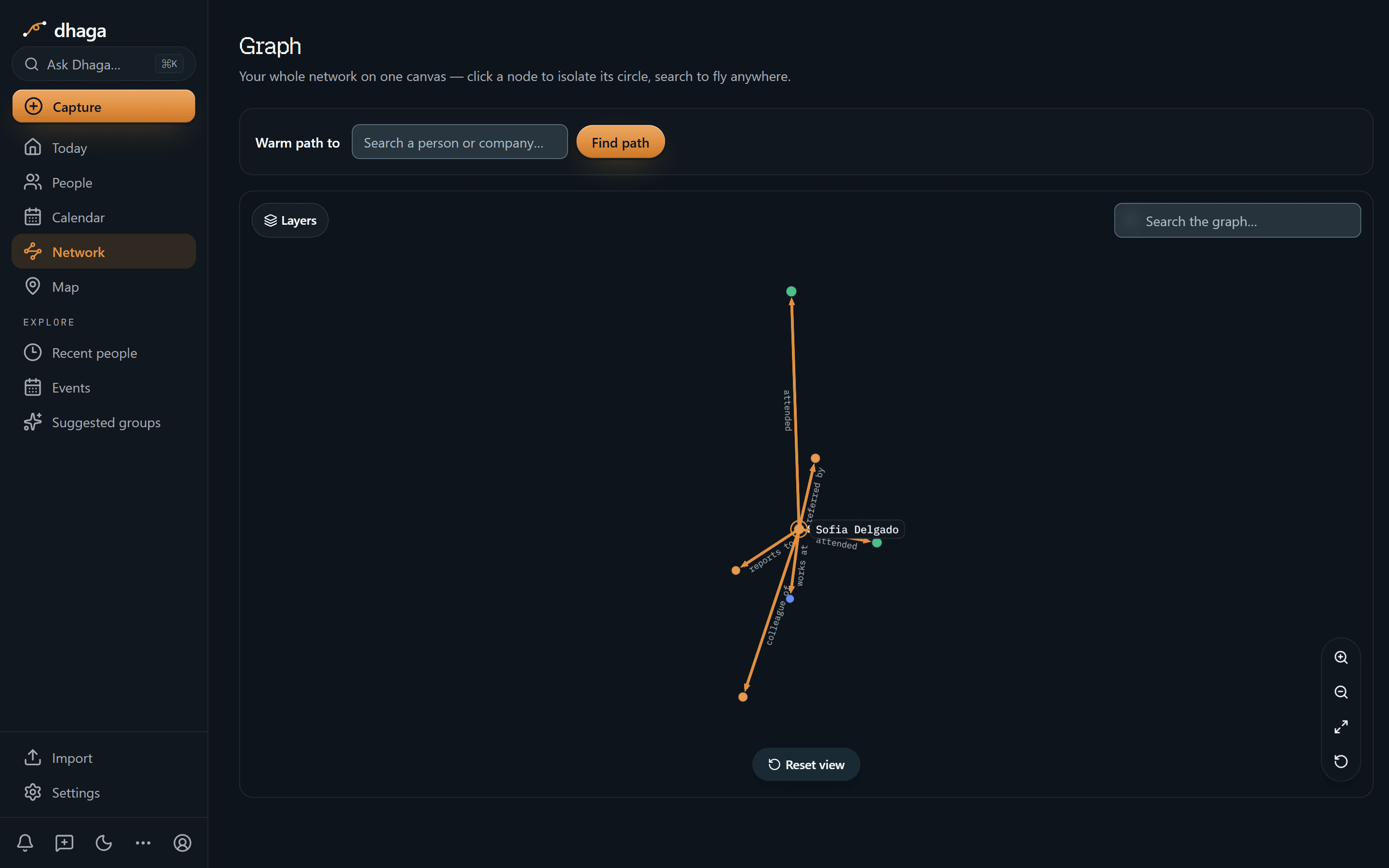
One hop out from Sofia and every edge is named: reports to, works at, colleague of, referred by, and attended twice over — the two events where your paths crossed. The neighbours are unlabelled dots at this zoom; click one and it becomes the centre with its own circle, read the same way. That's the difference between "someone referred her" and knowing which thread to pull.
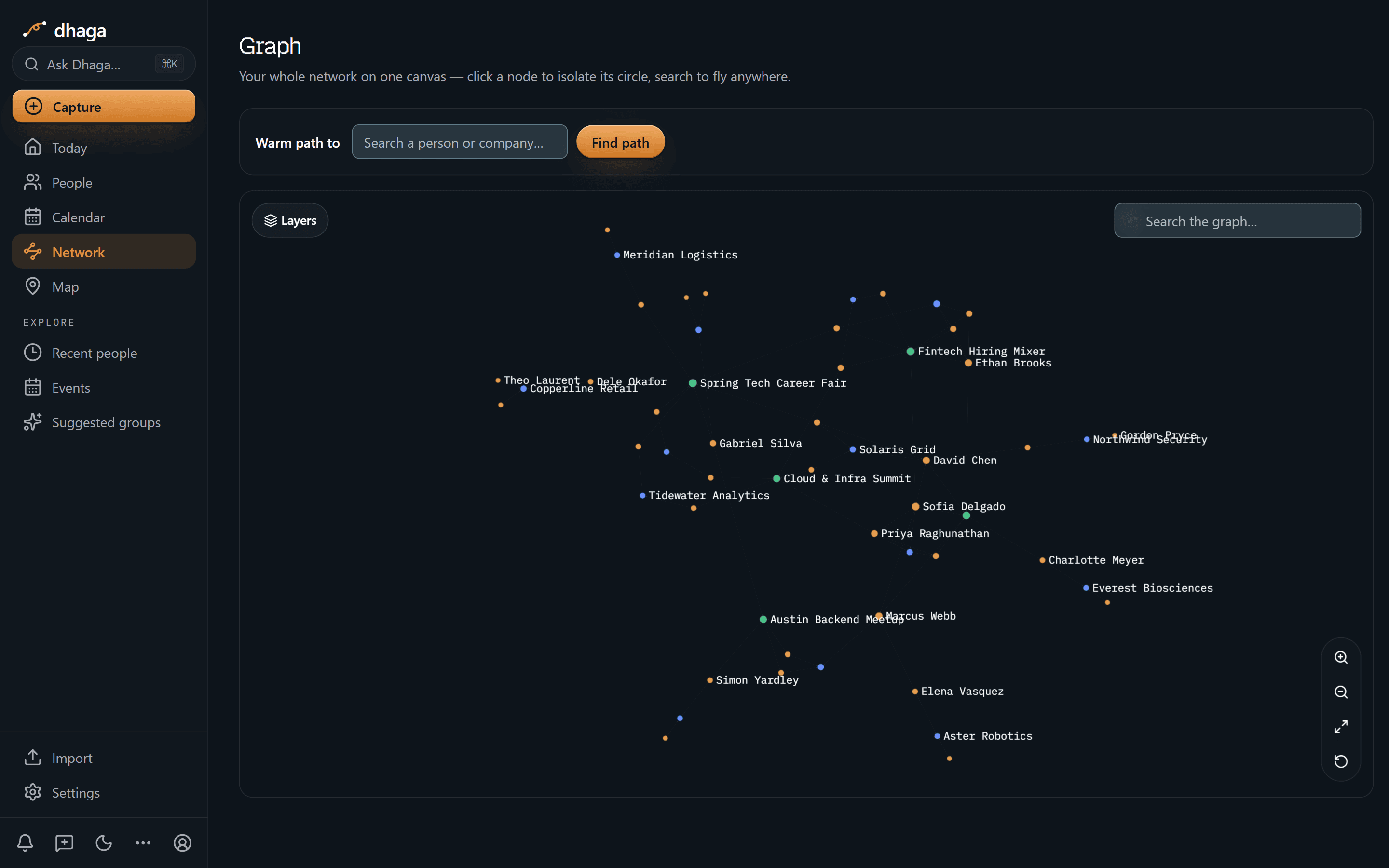
Zoom out and candidates, the companies they're at, and the events you met them at sit on one canvas with the hubs labelled. Events are nodes in their own right rather than a tag — the hiring mixer and the career fair are things in the network, the same as the people who went to them.
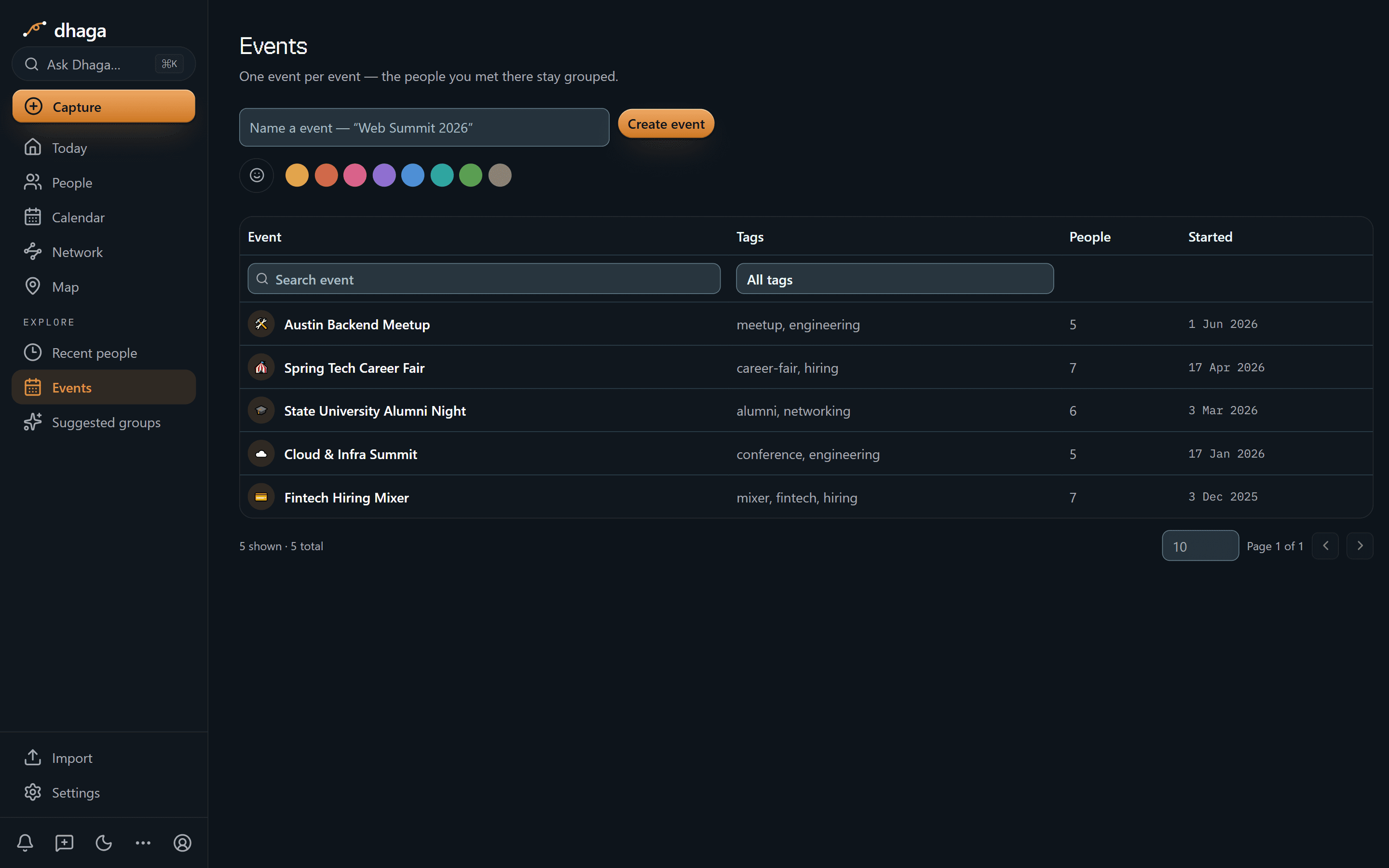
Fintech Hiring Mixer, seven people, December 2025. Spring Tech Career Fair, seven, April. The alumni night that shows on Sofia's profile, six. So "we met at the mixer" stays a fact rather than a hunch.
The 60-second version
- "Which backend engineers wanted remote?" → Ask Dhaga in plain English, answered only from your own screening notes.
- Details fade a week after the call → browser voice capture right after it, while the answers are still exact.
- A candidate's real answer came over WhatsApp → forward it and it lands as a note on their profile.
- Meetup cards you never type up → scan front and back in one go, merged into one contact.
- "Did they actually say that?" → every fact and every relationship keeps a receipt back to its source note.
- Silver-medalists and past placements go cold → keep-in-touch cadence surfaces anyone you've drifted from, on today's list and at
/app/plan. - Candidates and hiring managers tracked separately → one graph holding both sides, and the referral edges between them.
- You already shortlist inside Claude or Cursor → point them at your own graph over MCP.
Getting it in
- Voice, in the browser, straight after the screening call — spoken while it's fresh.
- Card or badge scan at a meetup, front and back, into one contact.
- WhatsApp and Telegram — forward the thread or DM the bot; every inbound message is listed at
/app/settings/messaging/log(guide). - Browser extension and web quick-add while you're sourcing.
- Import a book of contacts from vCard or CSV, or sync Google and Outlook.
Getting it out
Ask in plain English, answered only from your own notes:
- "Which backend engineers did I talk to who wanted remote?"
- "Who's waiting out a vesting cliff, and when does it end?"
- "Who have I not contacted in nine months?"
If you never captured it, Dhaga tells you it doesn't know instead of inventing a comp expectation. A confidently wrong detail loses a placement.
Or point your own AI tools at it. Dhaga runs an MCP server, so Claude, Cursor or ChatGPT can read your graph directly — build the shortlist or draft the client update in the tool you already work in, over your real screening history rather than a pasted summary. It's on Pro and above, and reading costs no AI credits. How to connect it.
The candidates worth placing never apply
Between "not looking" and "just resigned" there are two years where the whole relationship lives in your memory. Capture makes that survivable: one voice note after each call — the seat she'd move for, the track she doesn't want, the month she's free — becomes structured facts on the profile, each with a receipt.
Six months later, when the right role opens, you can find her and remember why she's a fit, and put her own terms back in front of her without guessing. That's the difference between sourcing from scratch and making a call that lands.
Two sides, one network
You aren't running one pipeline. The engineer you placed two years ago is now a lead with a team to build, and every reason to hire through the recruiter who got their own move right. The finalist who came second is perfect for the next search.
Because Dhaga is a graph, both sides sit in one place with the links intact: who referred whom, who used to report to whom, which manager you've placed three people with. Duplicate detection catches the same person arriving twice from an import and a badge scan, so the book doesn't rot as it grows.
What we don't do
- We are not an ATS. Requisitions, pipelines, scorecards and compliance stay in the system your clients expect. Dhaga holds the people and the context, not the process.
- We don't monitor your book. Role-change and news alerts do exist — for a recruiter that's the signal that matters — but one contact at a time and opt-in: turn on Watch for someone and a once-a-day sweep looks for a role change or notable public news, taking watched contacts in rotation. A hit arrives as an alert you can dismiss, or keep as a note with its source link and delete whenever you like. It needs a Pro or Power plan, stops at five watched contacts, and anyone you didn't tick is never looked up. Everything else, Dhaga knows because you told it.
- No full mobile app yet — web, extension and WhatsApp/Telegram are the capture surfaces.
What it costs
The free tier is real: 10 AI credits a month, and manual capture stays unlimited. Pro is ₹499/month, or $4.99 internationally, with Power above it. /pricing is the one place that shows what you would pay today, including any offer running there.
One placement pays for a lifetime of this. Start free and capture your next screening call by voice.
Discussion
B2B sales & account executives
Your CRM tracks the deal, not the eight people who decide it — and when your champion changes companies, it files your warmest lead as a dead contact.
Venture capital & angel investors
You passed on her at pre-seed. Her Series A closes this week, oversubscribed. Dhaga holds why you passed, who can get you back in, and each one's note.