Community builders & super-connectors
By Anchit Shrivastava ·
Forty good conversations in one evening, and by the car park half are 'the one who did supply chains, I think'. That's where your best intros go to die.
The moment this earns its keep
Someone asks you who they should meet. You say a name in half a second and you're right — because a member told you months ago exactly who she was looking for, and the thing holding her wording, the note it came from and the date on it wasn't you.
The intro you can actually stand behind
Meet Maya Okonkwo, founder of Thermrail — a seeded demo contact playing the member who walks in already knowing half the room.
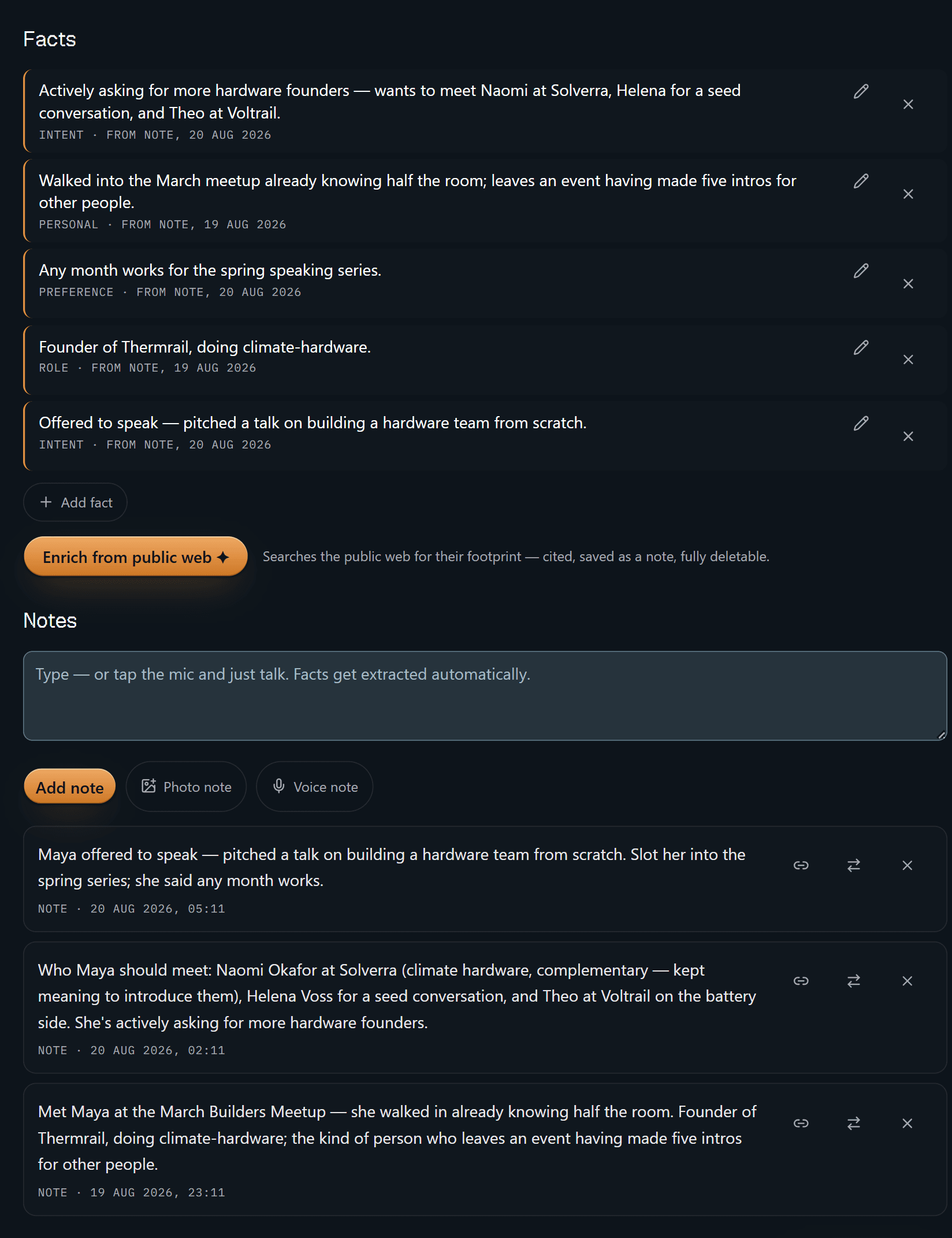
Five facts, and every one carries a receipt: what kind of fact it is, then
FROM NOTE and the date of the note it was pulled out of. "Actively asking for
more hardware founders — wants to meet Naomi at Solverra, Helena for a seed
conversation, and Theo at Voltrail" is stamped 20 Aug, and the note a screen
below it — 20 Aug, 02:11 — is the one you typed, in your own words, naming
exactly those three people. The dates differ from fact to fact because the
notes do.
That's the difference between an intro you offer and an intro you can stand behind. You aren't going on a feeling that she's "into hardware"; you can open the sentence you wrote. Delete the note and the facts derived from it are tombstoned with it. A claim with no source isn't worth keeping.
Nothing on that screen went looking for her, either. The one control that searches the public web is a button you press — "cited, saved as a note, fully deletable", as it says next to itself.
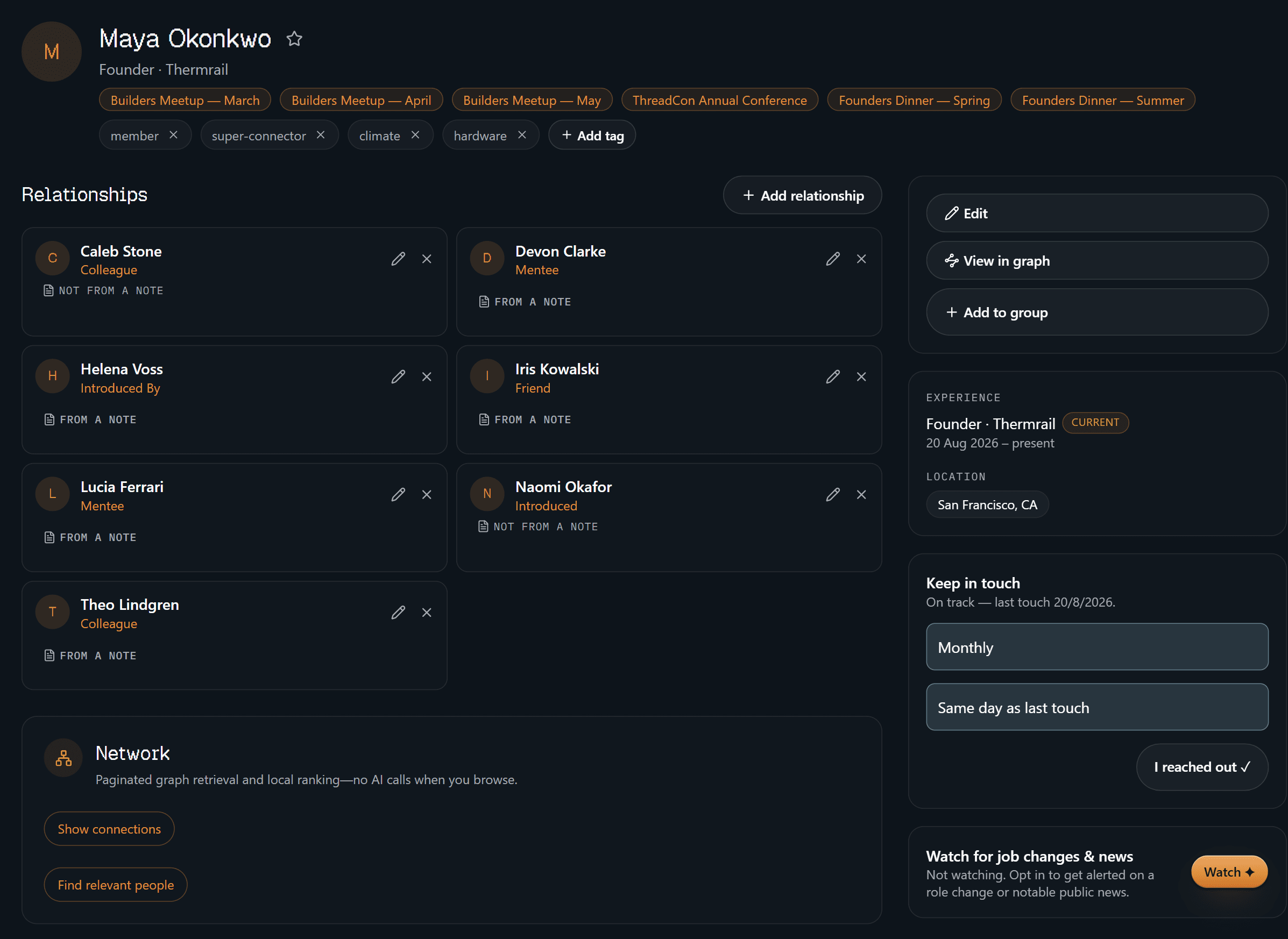
The identity block is the boring, load-bearing half: founder at Thermrail, the
six events she's turned up to, the tags you sort her by — member,
super-connector, climate, hardware — and seven relationships, five of them
stamped FROM A NOTE. The two that read NOT FROM A NOTE are the ones typed
in by hand, and they say so rather than quietly passing themselves off as
remembered. Keep-in-touch runs monthly and currently reads on track.
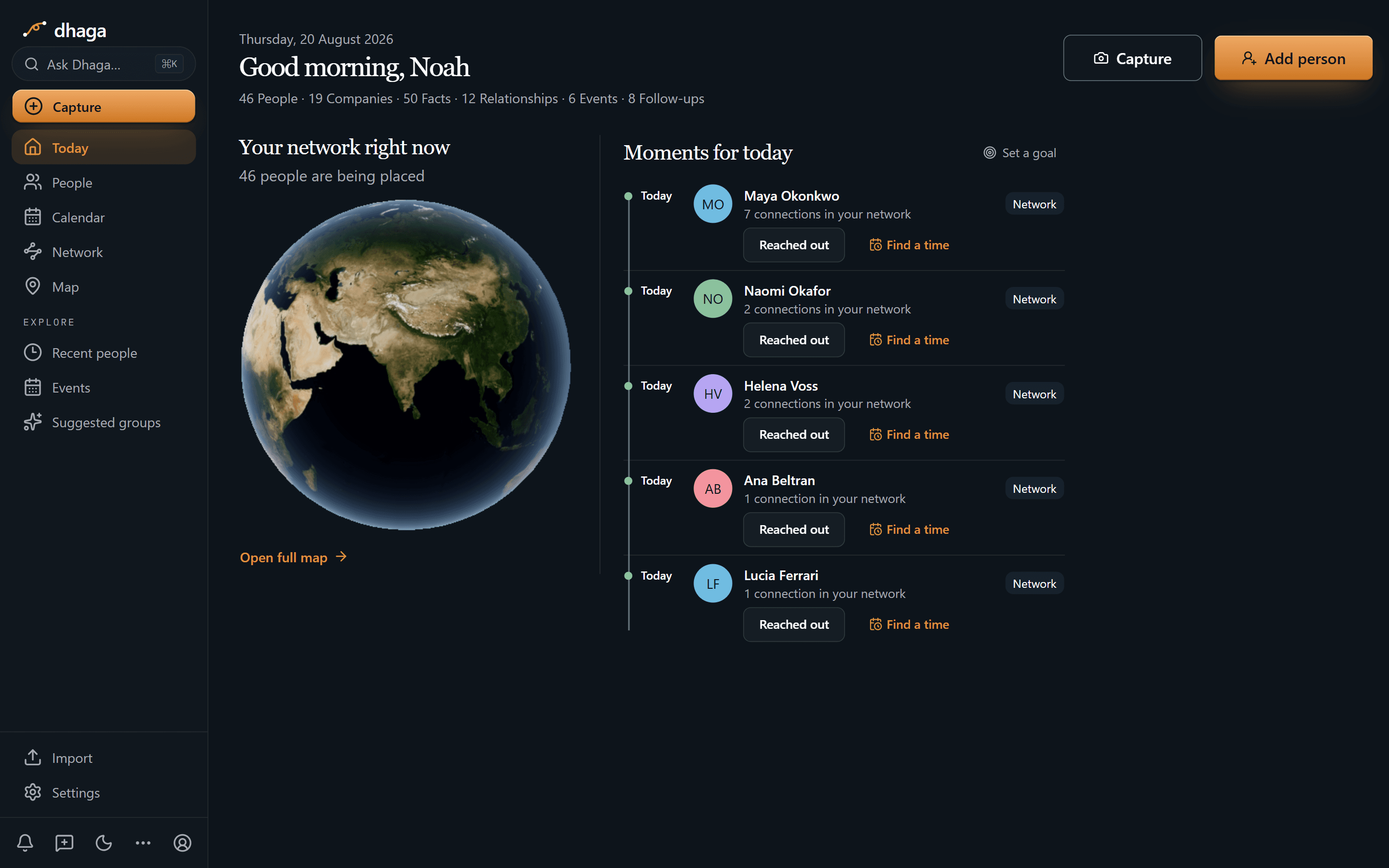
Five people are up today on the cadence you set for each of them, Maya at the
top with seven connections already in your graph, and one tap to log that you
reached out or to find a time. The strip along the top is the graph at a glance
— 46 people, 19 companies, 50 facts, 12 relationships, 6 events, 8 follow-ups.
This screen is the cadence half only: what you actually owe each of those
eight people sits on their profile and in one Day/Week/Month view at
/app/plan.
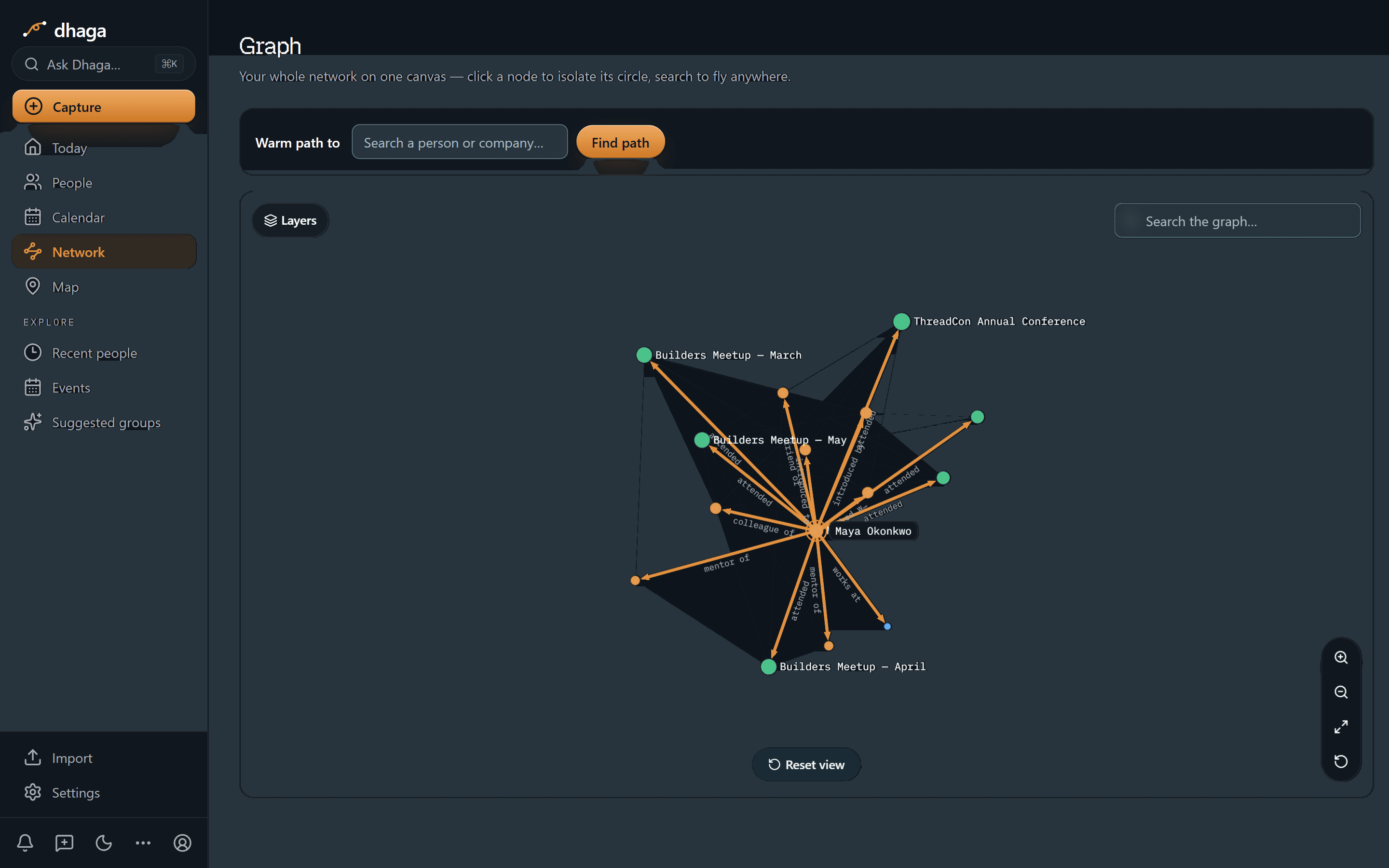
One hop out from Maya, and the lines are labelled with what they are: attended, colleague of, mentor of, introduced, introduced by, friend of, works at. The named nodes here are the rooms — Builders Meetup March, April and May, and ThreadCon — with the people around her as unlabelled dots until you click one and it becomes the centre of its own circle, read the same way. That's the connective tissue you normally hold in your head, drawn.
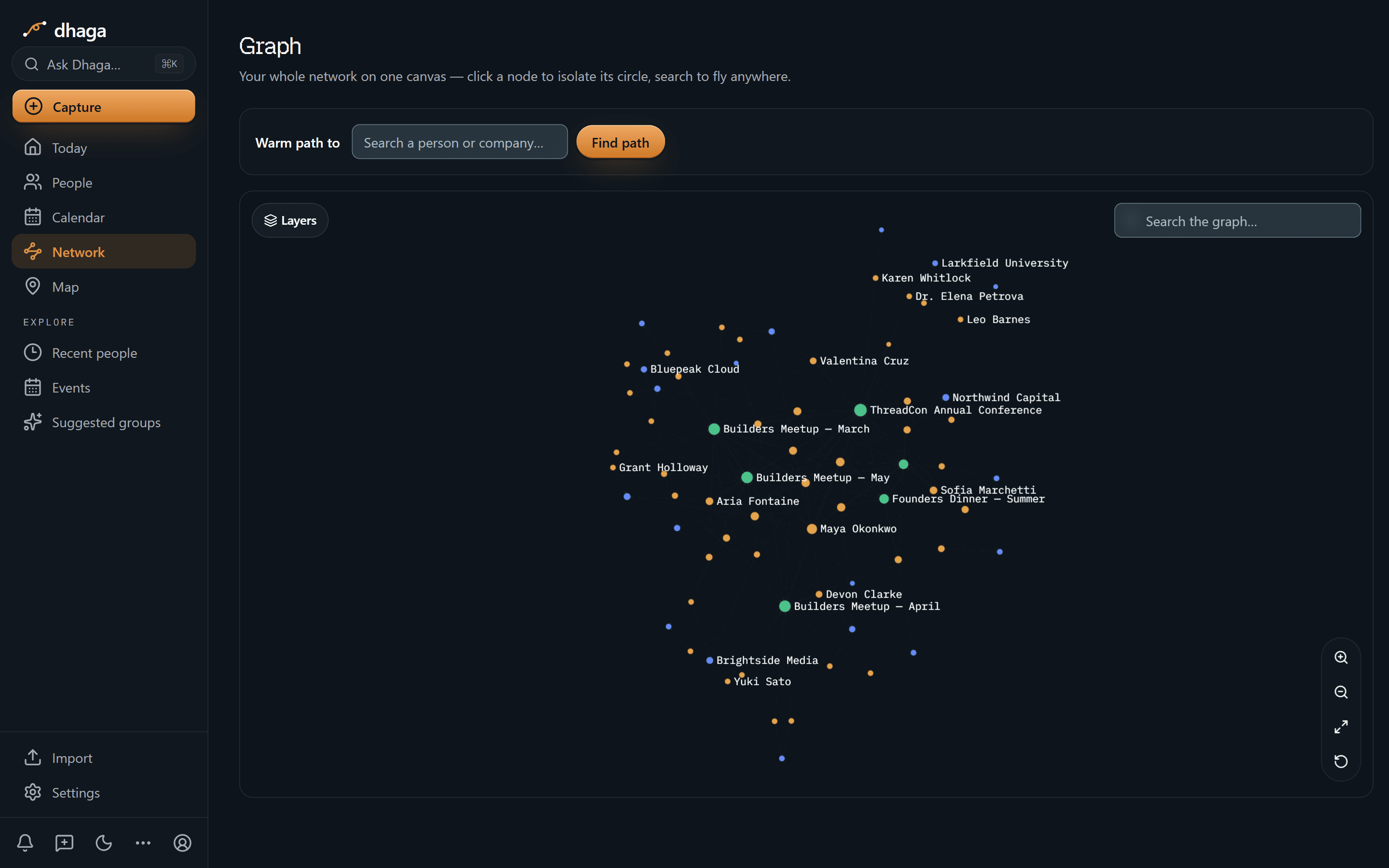
Zoom out and the hubs are named — the meetups and the summer founders' dinner in green, people like Grant Holloway, Sofia Marchetti, Aria Fontaine and Yuki Sato around them, companies and a university threaded through. It's a fair picture of what a community actually is: several rooms with overlapping guest lists.
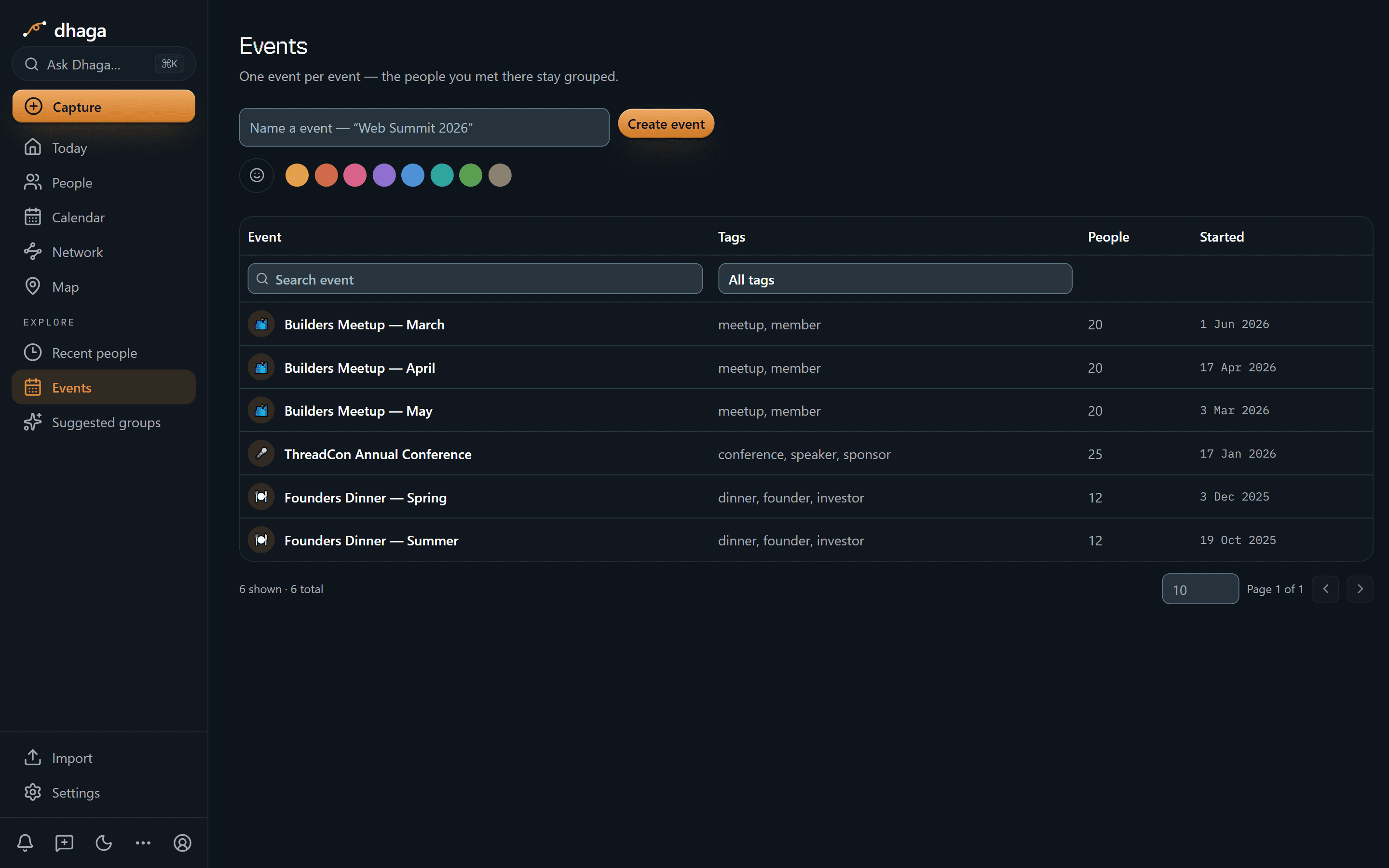
Events are first-class objects, not a tag: three Builders Meetups at 20 people each, ThreadCon at 25, two founders' dinners at 12, each carrying its own tags. So "we met at the March meetup" stays a fact rather than a hunch.
The 60-second version
- "Who should I introduce to this new founder?" → Ask Dhaga in plain English, answered only from your own notes.
- Forty new faces in one evening → scan badges and cards, front and back, into one contact each.
- You'll never type up the ones you didn't scan → browser voice capture in the corridor, straight into a note.
- The follow-up happened on WhatsApp → forward it and it lands as a note on the right member.
- "Where do I know this person from?" → events are first-class: every member hangs off the meetup you met at.
- The intro you promised and didn't make → a follow-up tied to that person, surfaced on
/app/planand in the daily brief. - Members go quiet between events → keep-in-touch cadence flags anyone past their interval.
- You already draft in Claude or Cursor → point them at your own graph over MCP.
Getting it in
- Badge or card scan at the door, front and back, into one contact.
- Voice, in the browser, while the conversation is still warm — talk it out and it lands as a note.
- WhatsApp and Telegram — forward the thread or DM the bot; every inbound message is listed at
/app/settings/messaging/log(guide). - Browser extension and web quick-add for the tabs you left open.
- Import an attendee list from CSV or vCard, or sync Google and Outlook contacts.
Getting it out
Ask in plain English, answered only from your own notes:
- "Who in my network is into climate and hardware?"
- "Who should I introduce to the founder I just met who's raising a pre-seed?"
- "Who haven't I spoken to since the spring meetup?"
It never invents a connection you didn't observe, and when it doesn't know it says so instead of guessing. When it says two people should talk, you can open the note it learned that from — your own words, dated. That's what makes your intros worth taking.
Or point your own AI tools at it. Dhaga runs an MCP server, so Claude, Cursor or ChatGPT can read your graph directly — draft the intro email or plan the seating for the next dinner in the tool you already work in, over your real member notes instead of a pasted list. It's on Pro and above, and reading costs no AI credits. How to connect it.
The morning after the meetup
An event is where you meet the most people and retain the least. Dhaga is built for that specific hour: scan at the door, voice-note in the corridor, import the attendee list the next morning.
Then it holds together. Events are their own objects, so a member's whole history — March meetup, ThreadCon, the founders' dinner — sits on one canvas. Duplicate detection catches the same person arriving from a badge scan and an attendee CSV. Groups and tags let you slice the "climate + hardware" cluster that formed across three separate months without you noticing.
The intros you promised
The reputation risk isn't forgetting a name, it's the intro you offered and never made. Those promises evaporate because they live in a conversation, not a list.
Capture the promise against the person and it becomes a follow-up on
/app/plan, in the same view as your own events and a connected calendar. The
daily brief puts it in front of you the morning it's due. Follow-up drafts turn
"I owe Maya an intro to Naomi" into a sent email in two minutes instead of a
guilt you carry for a month.
What we don't do
- We're not an events platform. Ticketing, RSVPs and email blasts stay wherever you run them.
- We don't monitor your member list. Job-change and news alerts do exist, but one person at a time and opt-in: tick Watch on someone and a once-a-day job works through the people you ticked, looking for a role change or notable public news. It needs a Pro or Power plan, stops at five watched contacts, and a hit arrives as an alert you can dismiss or file as a note — with its source link — rather than something written into your graph behind your back. Everyone you didn't tick is never looked up.
- No full mobile app yet — web, extension and WhatsApp/Telegram are the capture surfaces.
What it costs
The free tier is real: 10 AI credits a month, and manual capture stays unlimited. Pro is ₹499/month, or $4.99 internationally, with Power above it. /pricing is the one place that shows what you would pay today, including any offer running there.
Your community is the thing you built. Start free and capture the next room before it blurs.
Discussion
Nonprofit fundraising & development officers
A donor tells you at lunch why literacy matters to her. Eighteen months later, Dhaga still knows what she said — and which note she said it in.
Guides
Practical guides to networking and running a personal CRM — capture people, keep relationships warm, follow up on time, query your own graph.