Nonprofit fundraising & development officers
By Anchit Shrivastava ·
A donor tells you at lunch why literacy matters to her. Eighteen months later, Dhaga still knows what she said — and which note she said it in.
The moment this earns its keep
Over lunch a prospect mentions she taught first grade for six years, and that this — not the campaign, not the org — is why she gives. That one sentence is worth more than everything else in her file, and eighteen months from now the person drafting her invitation may not be you. Dhaga keeps the sentence, and keeps the note it came out of, so whoever stewards her next opens with the right thing instead of a template.
The fact the relationship turns on
Margaret Ellsworth is a seeded demo contact — a retired CEO in cultivation for a youth-literacy gift.
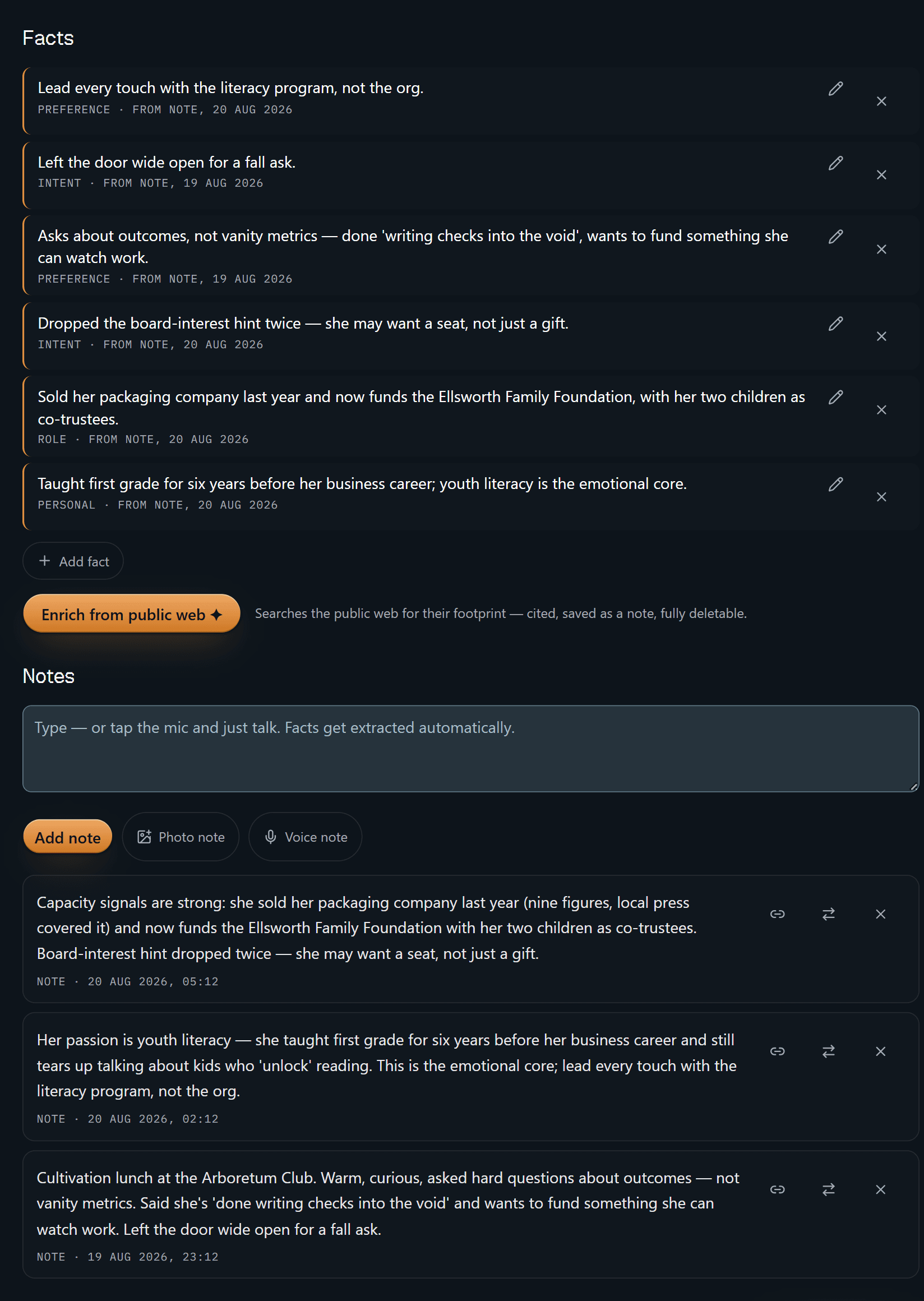
Every fact carries a receipt. "Lead every touch with the literacy program, not
the org" is stamped FROM NOTE, 20 AUG 2026; "Left the door wide open for a
fall ask" points at a different note, from the day before. Scroll a little and
those notes are right there — the lunch debrief, the conversation where she
talked about kids who "unlock" reading. Nothing on this screen is a claim you'd
have to take on trust: each line says where it came from, and deleting a note
tombstones the facts derived from it.
That matters more here than almost anywhere. A brief that says "she cares about literacy" is a guess. A brief that says "she taught first grade for six years, and here is the note where she told you so" is something you can safely open a conversation with.
The Enrich from public web button on the same screen is the other half of the
promise: it is a button. Nothing is looked up until you press it, and what comes
back is cited, saved as a note, and deletable.
That is the whole product in one screen. The rest is convenience.
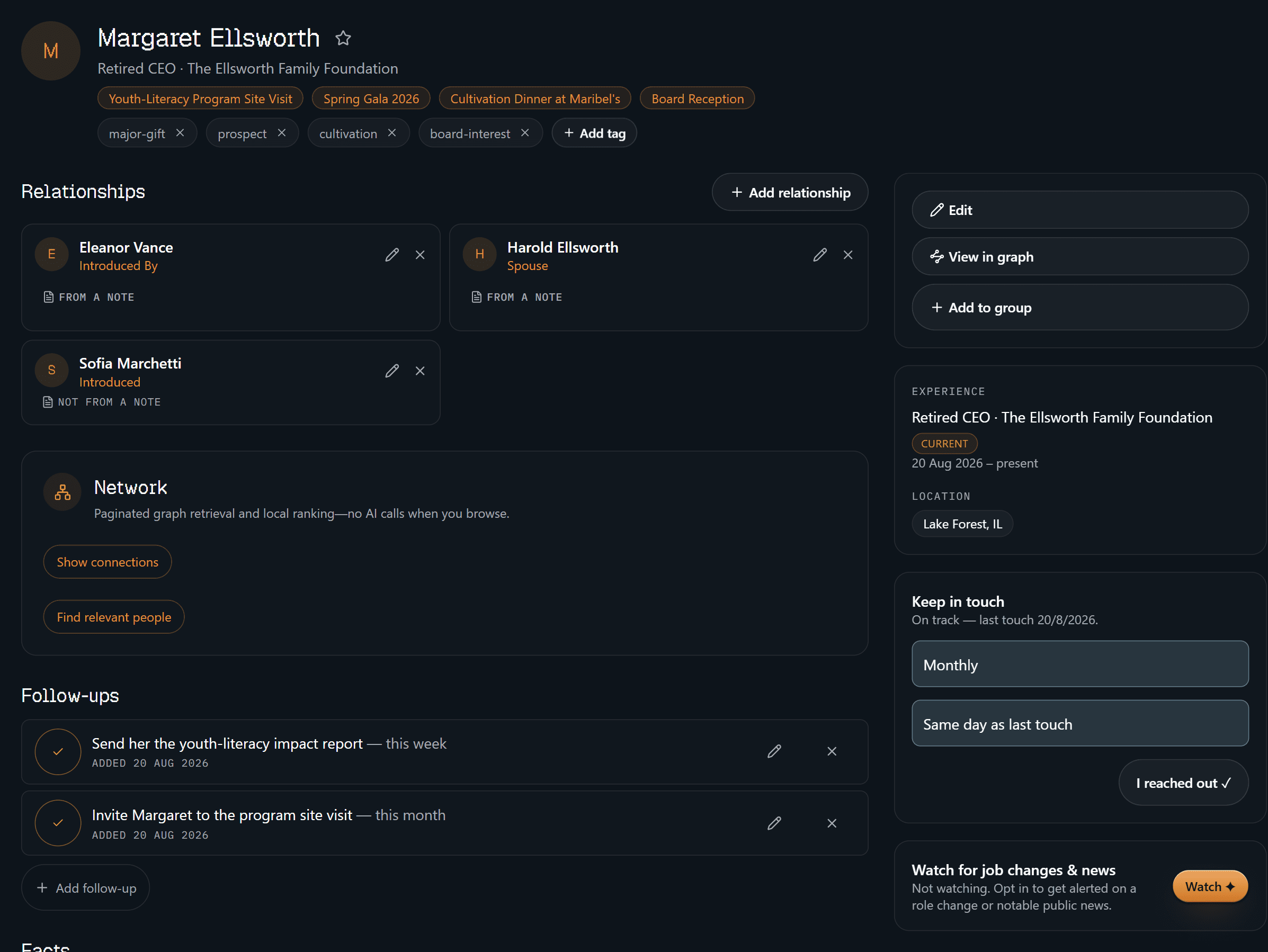
The identity block is the boring, load-bearing half: how you have filed her
(major-gift, prospect, cultivation, board-interest), the four events she
has been to, a monthly cadence that reads on track, and the two follow-ups you
owe her — the impact report this week, the site-visit invitation this month. It
is what you want on screen in the thirty seconds before you knock on the door.
Look at the relationships and you will see two marked FROM A NOTE and one
marked NOT FROM A NOTE. That third one is a relationship somebody typed in by
hand, and Dhaga says so rather than quietly dressing it up as evidence. A tool
that cannot tell you which of its own claims are sourced is not much use in a
field where getting it wrong sets a relationship back years.
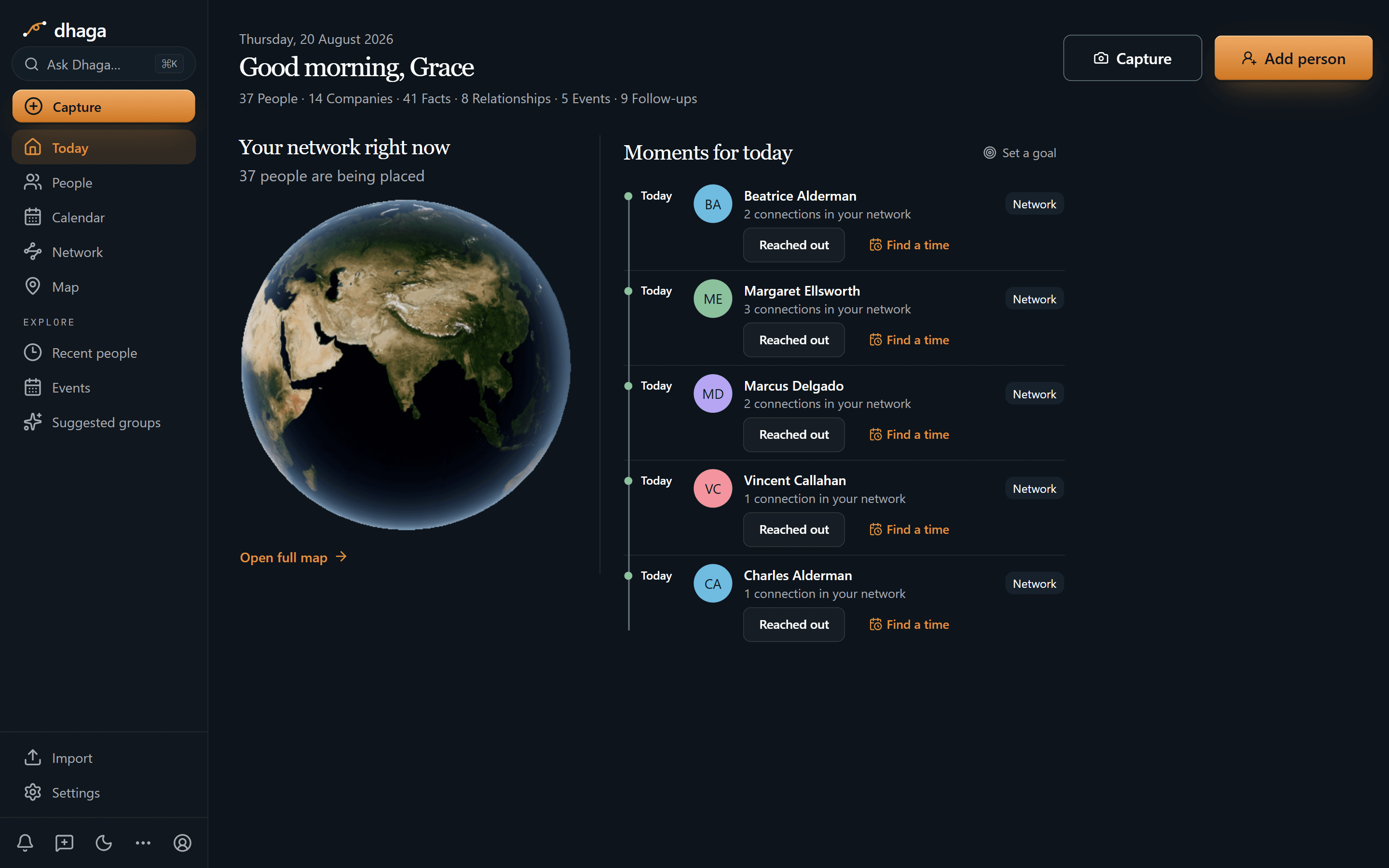
Margaret is in today's list on the cadence you set for her, alongside four other
people you meant to stay close to — each row a person rather than a task, with
one tap to log that you reached out or to find a time. The strip along the top is
the portfolio at a glance: 37 people, 41 facts, 5 events, 9 open follow-ups. What
you actually owe each person lives on their profile and in one Day/Week/Month
view at /app/plan; this screen is only about who has gone quiet.
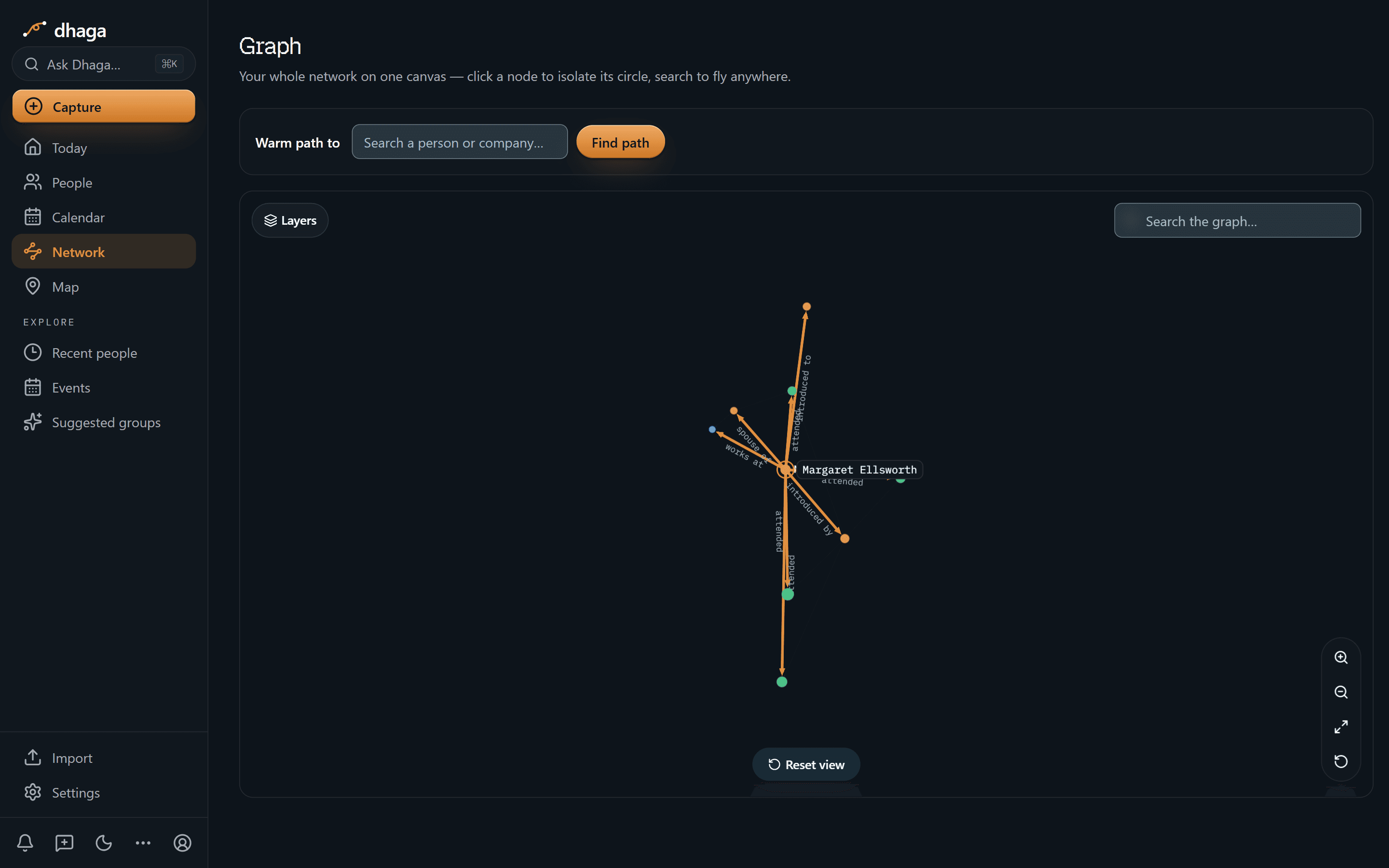
One hop out from Margaret and every edge is labelled with what it is: spouse of, works at, introduced by, introduced to, attended. Only she is named — the people at the other ends stay dots until you click one, and then it becomes the centre and you read its circle the same way. That is the difference between "I think the board chair knew her socially" and knowing which thread to pull.
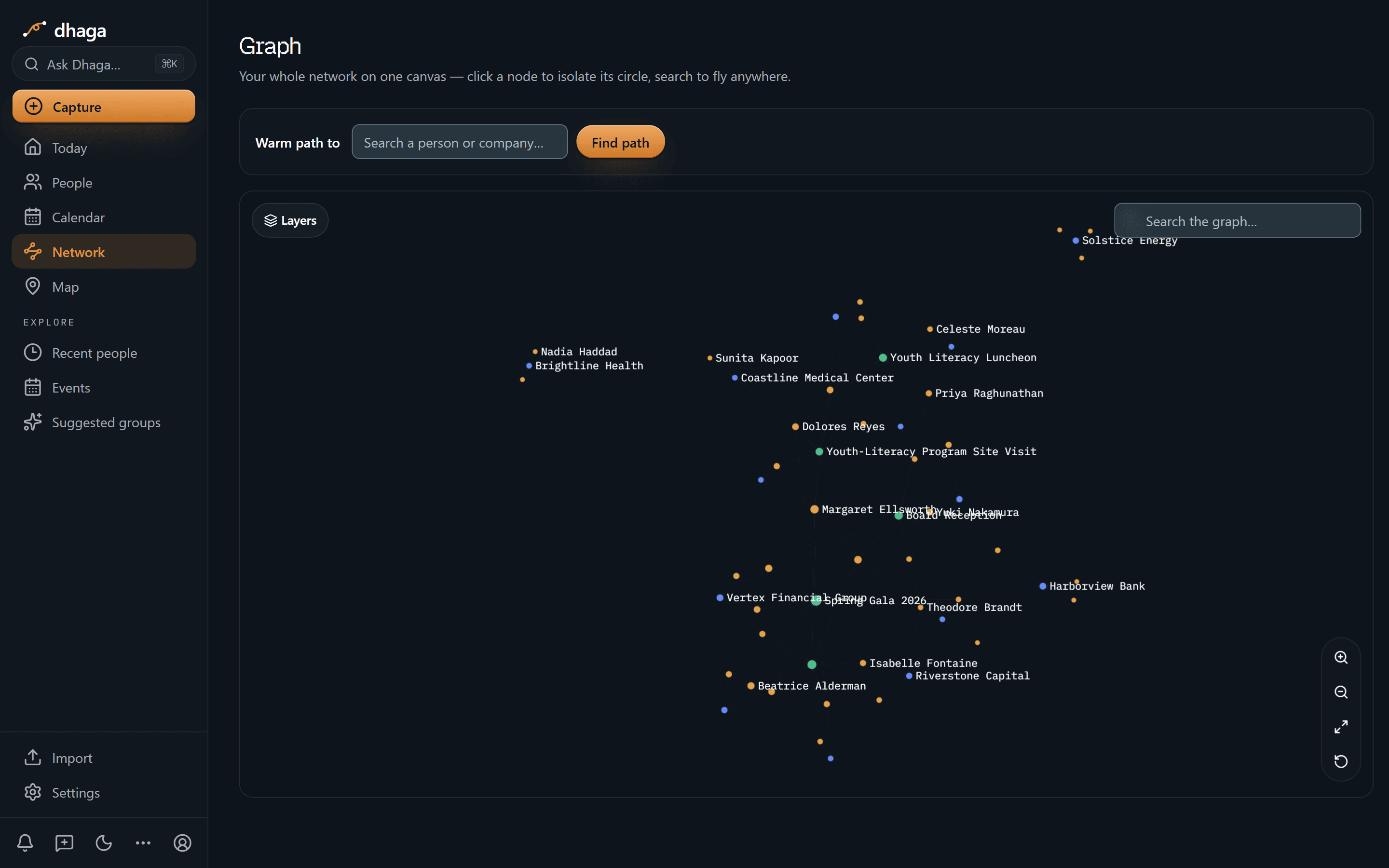
Zoom out and people, organisations and events sit on one canvas, colour-coded and labelled where there is room — the galas and the site visit as real nodes rather than tags, with the donors and the institutions arranged around them. The labels collide a little in the middle. So does the portfolio.
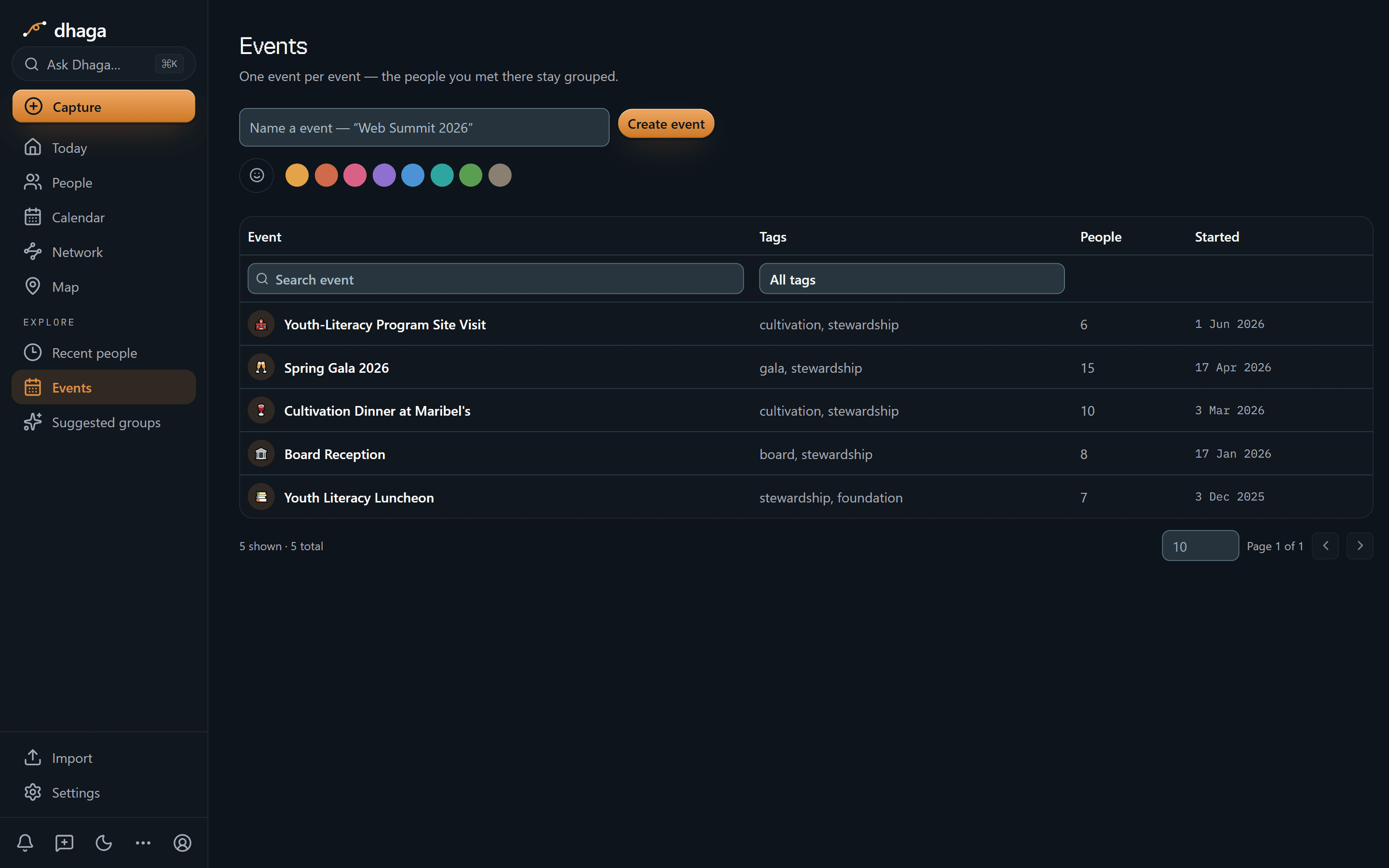
Spring Gala 2026 (15 people), the Cultivation Dinner (10), the Board Reception (8), the Youth Literacy Luncheon (7), the programme site visit (6) — each one keeping the people you met there grouped, so "we met at the gala" stays a fact rather than a hunch.
The 60-second version
- The cultivation lunch where notes would be rude → voice-note the debrief in the car and it lands as a note on that donor.
- A donor WhatsApps you a photo from the school visit → forward it to the bot and it becomes a note on that person.
- A gala and forty badges → scan a card or badge, front and back, into one merged contact.
- "Where did we hear she cares about literacy?" → a fact with a receipt back to the visit note, not a rumour that grew legs.
- The mid-level donor who quietly slipped → keep-in-touch cadence surfaces them before it has been a year.
- The board member who knows everyone → a real graph edge with its source note, not a memory.
- "Which donors have asked about outcomes?" → ask in plain English, answered only from your notes.
- You already work in Claude or ChatGPT → point them at your own graph over MCP.
Getting it in
- Voice, in the browser, on the drive back from the site visit — said aloud, filed as a note.
- Card or badge scan at the gala or the sector conference, front and back, into one contact.
- WhatsApp and Telegram — forward the thread or DM the bot; every inbound message is listed at
/app/settings/messaging/log(guide). Linking a channel needs Pro or Power. - Browser extension and web quick-add when you are reading about someone between meetings.
- Import from vCard or CSV, or sync Google and Outlook contacts.
Getting it out
Ask the questions a portfolio review asks, answered only from your own notes and graph:
- "Who haven't I seen this quarter?"
- "Who has asked about outcomes rather than the campaign total?"
- "Who did the board chair introduce me to that I never followed up with?"
When Dhaga doesn't know, it says so instead of inventing an answer. In a field where a tone-deaf ask costs years, "I don't have that yet" is both the safer and the more honest reply.
Or point your own AI tools at it. Dhaga runs an MCP server, so Claude, Cursor or ChatGPT can read your graph directly — "assemble what we know about Margaret before the site visit" — while you draft the briefing in the tool you already work in. It's on Pro and above, and reading costs no AI credits. How to connect it.
Where it sits next to the donor database
Different jobs. Keep both.
| Donor database | Dhaga | |
|---|---|---|
| Owns | Gift history, pledges, soft credits, receipting | The human context around each relationship |
| Built for | Reporting and gift accounting | Fast capture and personal recall |
| Answers | "What did they give, and to what?" | "Who is this person, and what did they tell me?" |
| When you leave | Stays with the organisation | Full export, any time |
A decade of small remembering
Major gifts aren't closed, they're cultivated, sometimes over ten years — and what carries them is remembering the small things a person told you, in their own words, at the right moment. That knowledge normally lives in one officer's head and walks out the door with them.
Capture the debrief before the next meeting starts, and let the cadence tell you who has gone quiet. Every fact carries a receipt, so when you tell a donor "you mentioned in March that you wanted to see the programme working", you can trust the March. None of this optimises anyone toward a number; it means the next conversation starts where the last one ended.
What we don't do
- We are not the system of record. No gift accounting, no pledges, no soft credits, no receipting — nothing here supports an 80G receipt, an audit trail, or any donor-reporting obligation your finance team carries.
- We don't research donors behind your back — or theirs. Enrichment is a button you press. Watching for public news does exist, but one contact at a time and opt-in: turn on Watch for someone and a nightly sweep re-checks each watched contact roughly once a week for a role change or notable public news, and what it finds arrives as an alert you either file as a note or dismiss — deletable either way. It needs a Pro or Power plan, stops at five watched contacts, and everyone you didn't tick is never looked up. Wealth screening is not a feature and is not on the roadmap.
- No full mobile app yet — web, extension and WhatsApp/Telegram are the capture surfaces, and Dhaga needs a network connection today.
What it costs
The free tier is real: 10 AI credits a month, and manual capture stays unlimited. Pro is ₹499/month, or $4.99 internationally, with Power above it. /pricing is the one place that shows what you would pay today, including any offer running there.
Every thread kept alive, so no donor is a stranger to whoever stewards them next. Start free.
Discussion
Lawyers & legal business development
A GC told you she's building an outside-counsel bench — and that your catch-ups stay social. Dhaga holds both sentences, each stamped with its note.
Community builders & super-connectors
Forty good conversations in one evening, and by the car park half are 'the one who did supply chains, I think'. That's where your best intros go to die.