Lawyers & legal business development
By Anchit Shrivastava ·
A GC told you she's building an outside-counsel bench — and that your catch-ups stay social. Dhaga holds both sentences, each stamped with its note.
The moment this earns its keep
A newly appointed General Counsel tells you over lunch that she's building out her outside-counsel bench and wants firms that are responsive and commercial, not just big-name. She also makes clear, in the same conversation, that your catch-ups stay social. Months later the panel is being decided. Knowing both sentences — and which lunch each one came from — is the difference between a call that lands and one that gets you quietly struck off the list.
The fact the referral turns on
Rachel Okonkwo is a seeded demo contact — a new GC at Meridian Health Systems, standing in for the client relationship you'd least like to misread.
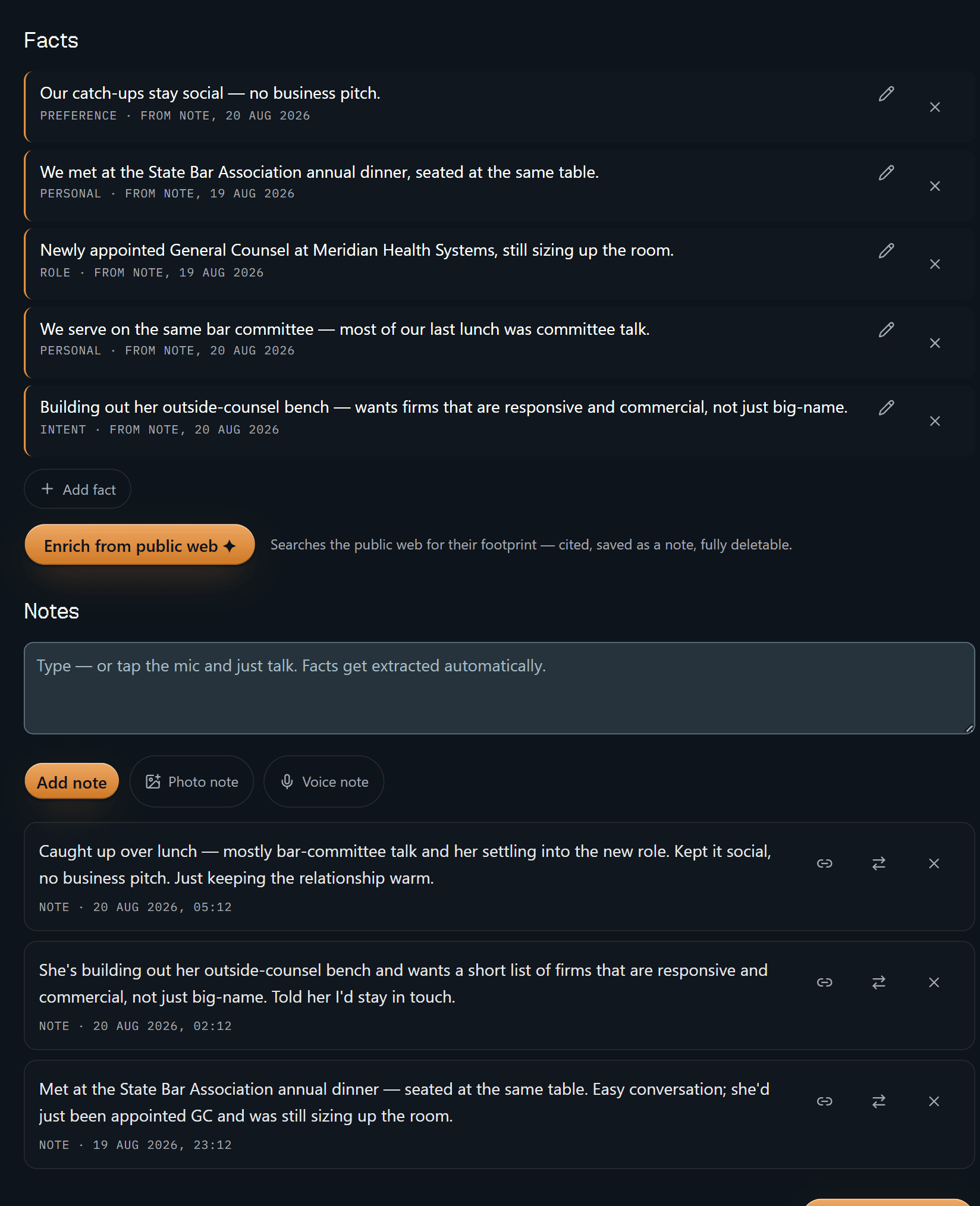
Five facts, each with a type — PREFERENCE, PERSONAL, ROLE, INTENT — and each
stamped FROM NOTE with the date of the note it came from. The dates differ,
because the notes differ: "we met at the State Bar Association annual dinner"
traces to the 19 August note saying exactly that; "our catch-ups stay social —
no business pitch" traces to the 20 August lunch. Scroll a little and those
notes are right there in your own words.
That receipt is the point. A relationship fact you can't source is a rumour you told yourself, and this is a profession where the difference matters. Delete the note and the facts derived from it are tombstoned with it.
Everything else on this page is convenience.
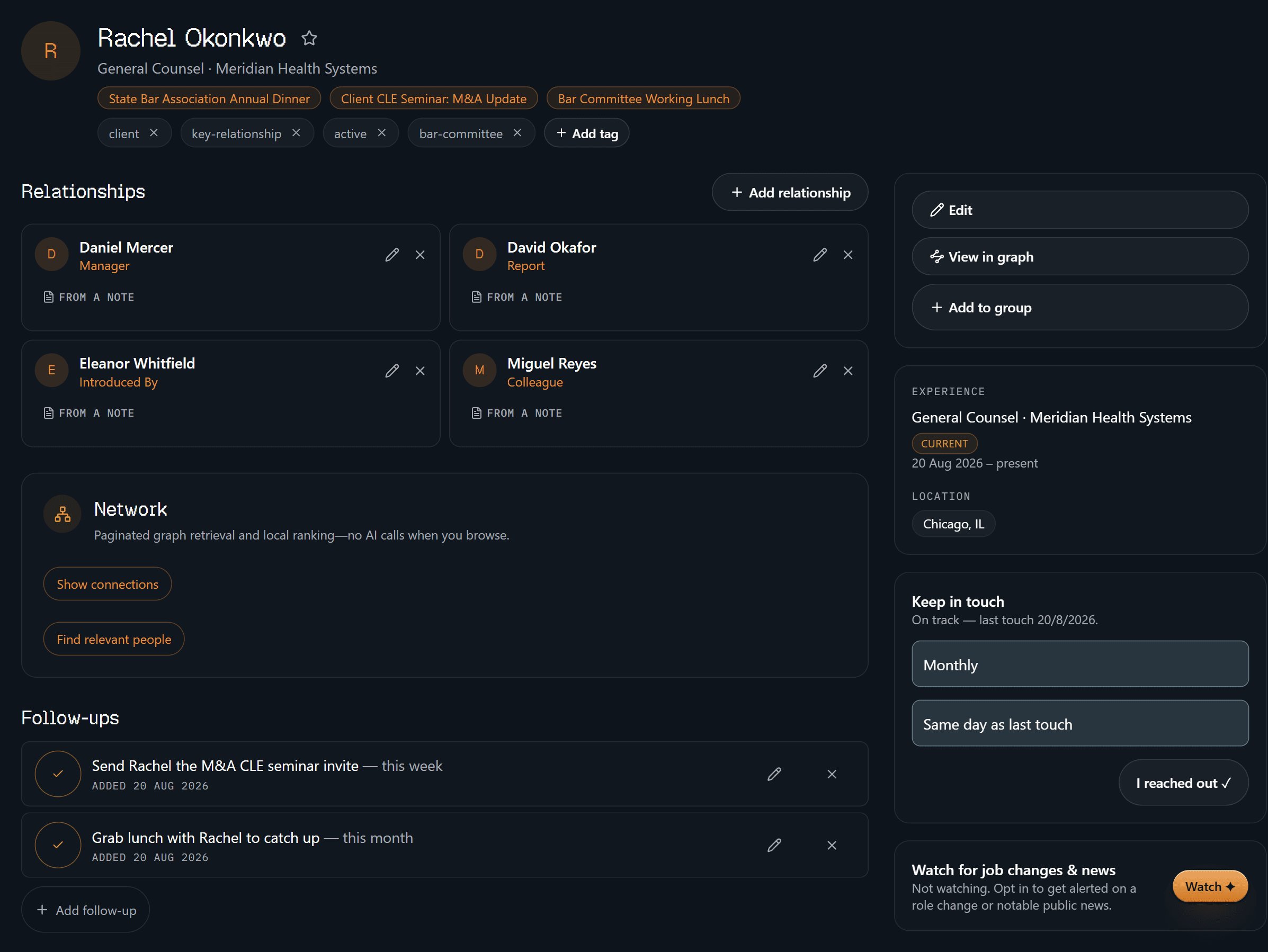
The identity half: where you've met her (bar dinner, CLE seminar, committee
lunch), how you've filed her (client, key-relationship, active,
bar-committee), and four relationships — her manager, her report, the person
who introduced you, a colleague — every one marked FROM A NOTE rather than
asserted. Down the right: current role, Chicago, a monthly keep-in-touch cadence
reading on track, and one button to log that you reached out. The two
follow-ups you owe her sit in the middle of the page, not in a separate app.
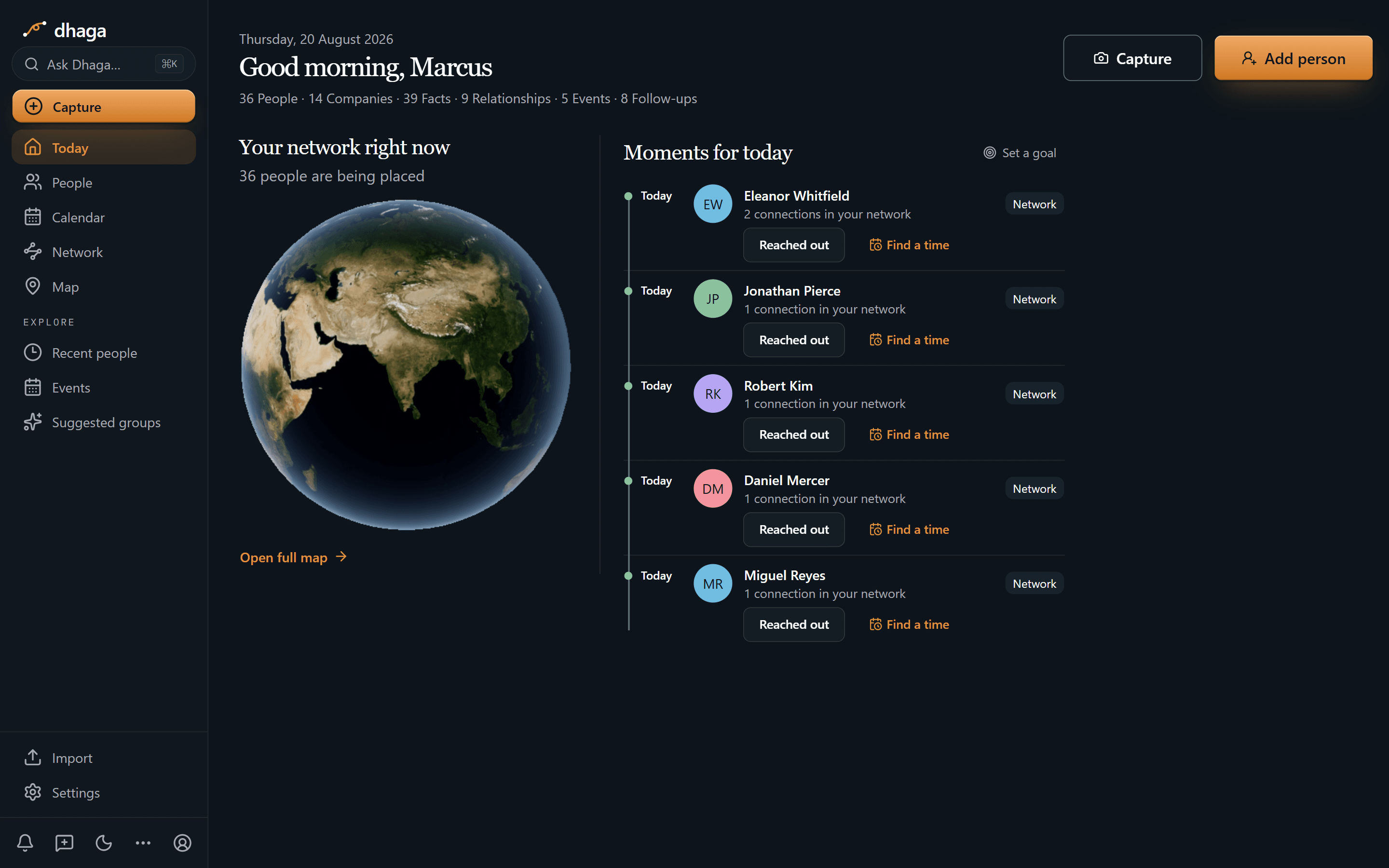
Rachel isn't on this screen, which is the system working: she's on track. What you get instead is five people worth a nudge today, each row saying why it's there — in this shot, all five surfaced through who they connect to in your network — with Reached out and Find a time in reach. Along the top, the whole graph as counts: 36 people, 14 companies, 39 facts, 9 relationships, 5 events, 8 follow-ups.
This is not your task list. What you actually owe a named person lives on their
profile and in one Day/Week/Month view at /app/plan.
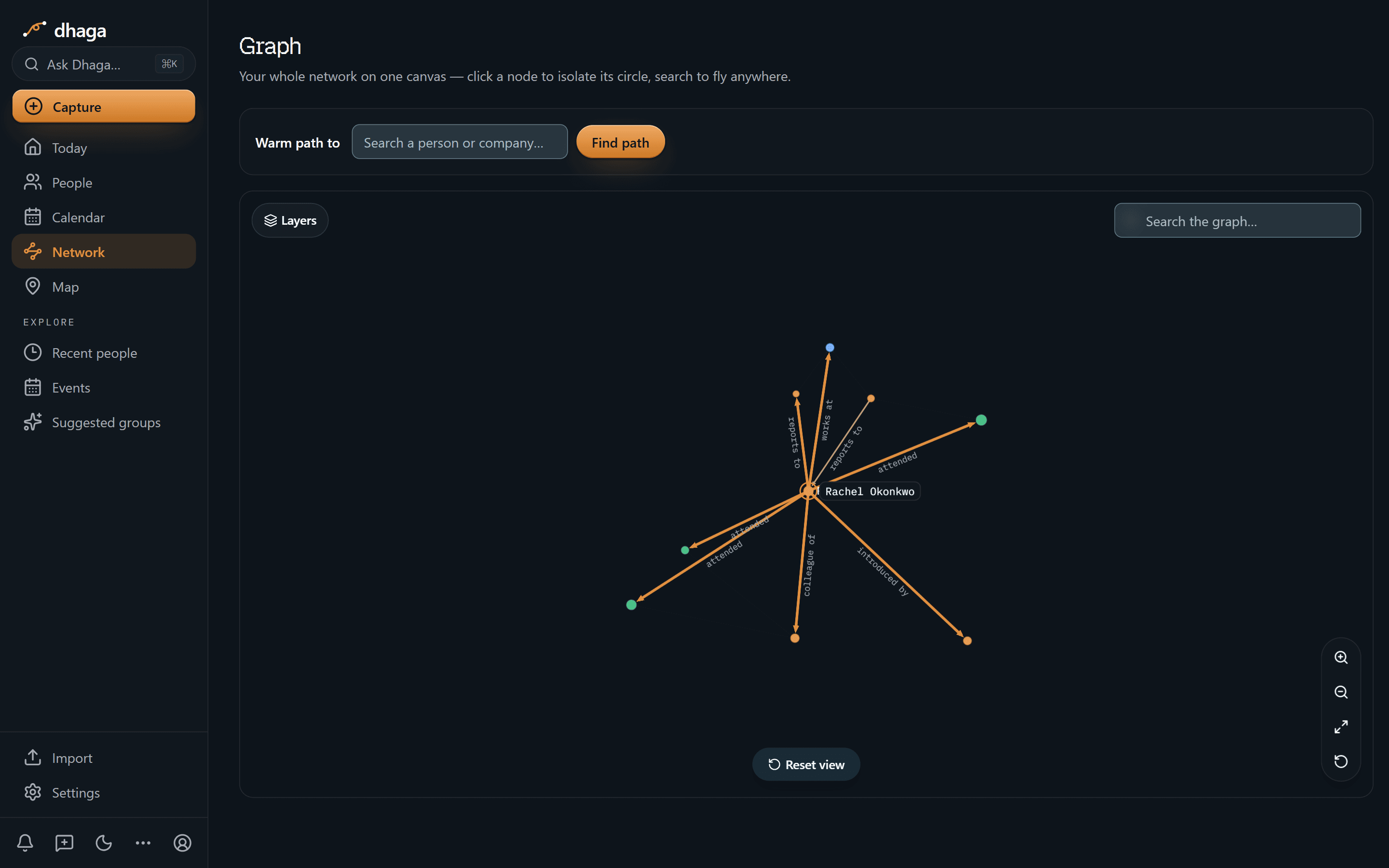
One hop out from Rachel and the referral path stops being a hunch: introduced by, colleague of, reports to, works at, attended. The neighbours stay dots until you click one, at which point it becomes the centre and its own circle reads the same way. Which is how you answer "how do I actually know this person" without three emails and a guess.
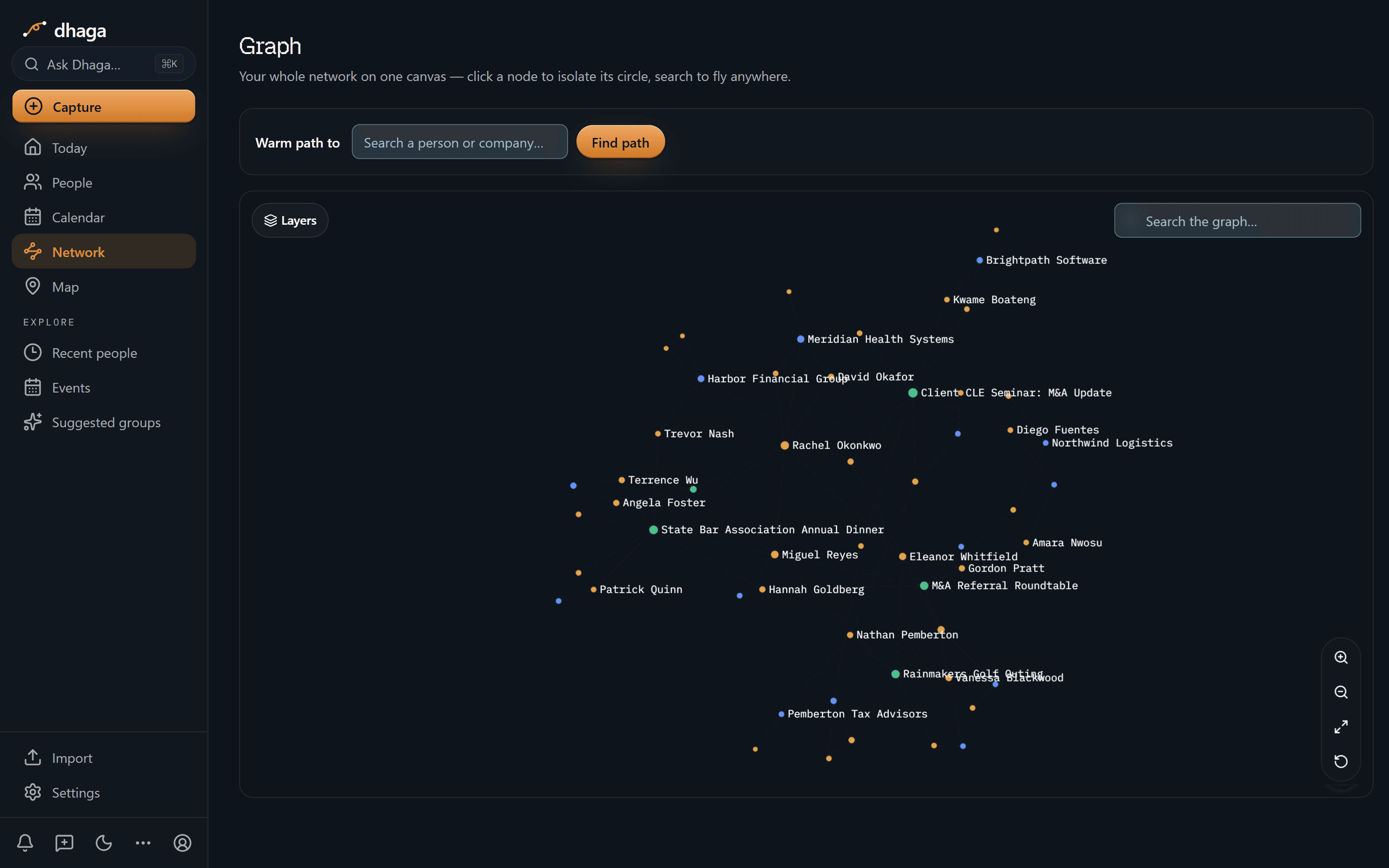
Zoomed out, people, firms and events sit on one canvas with their names on: Meridian Health Systems beside Rachel Okonkwo, Pemberton Tax Advisors beside Nathan Pemberton, the Rainmakers Golf Outing and the M&A Referral Roundtable holding their own attendees. A book of business is a mixed graph, and this is what one honestly looks like.
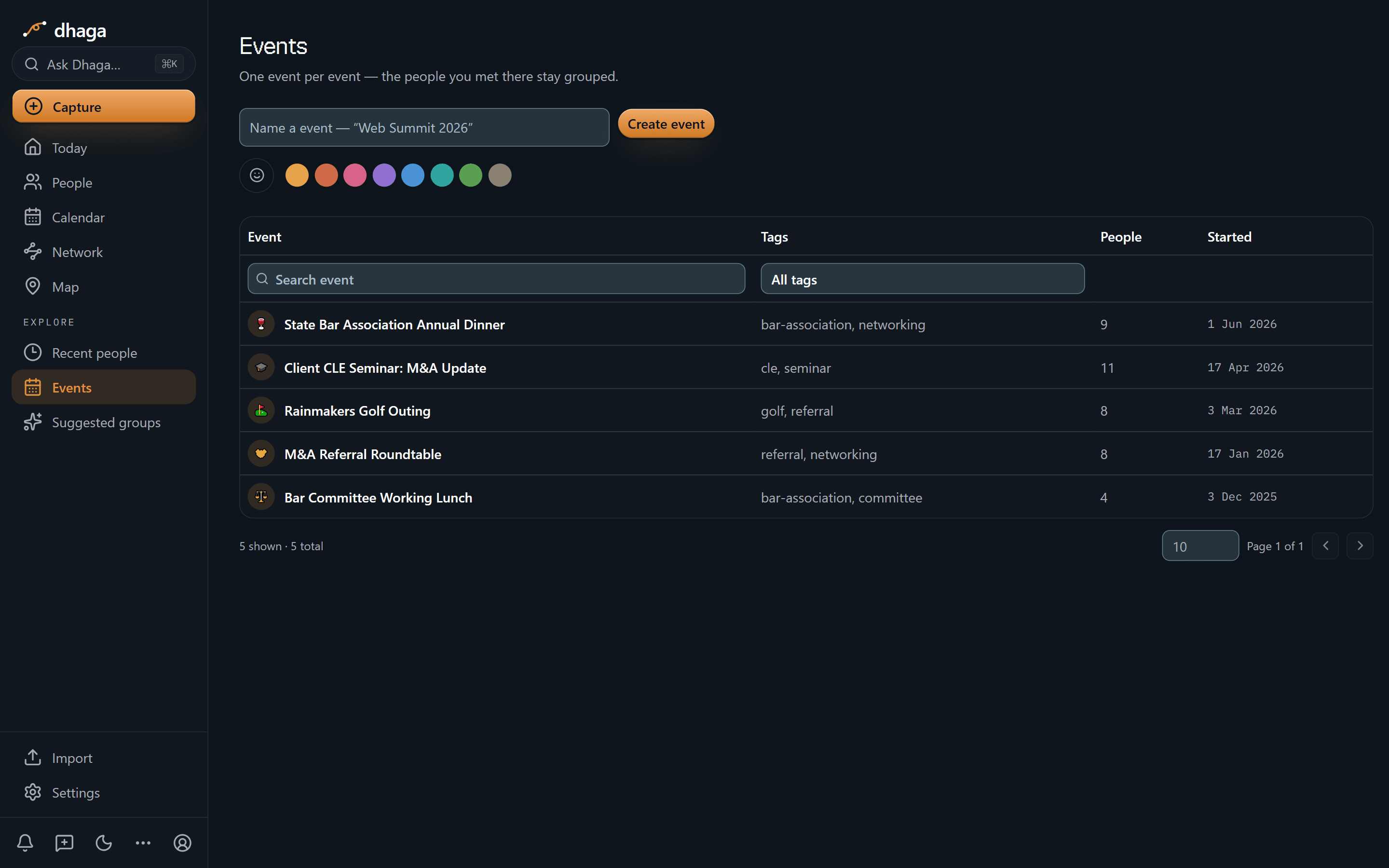
The State Bar dinner with nine people, the CLE seminar with eleven, the golf outing and the referral roundtable with eight each, the committee lunch with four. "We met at the bar dinner" becomes a row you can open rather than something you're fairly sure about.
The 60-second version
- A stack of cards from the CLE → scan front and back in one go, merged into one contact.
- The debrief you'd skip on the drive home → say it into the browser and it lands as a note.
- The referral that arrived on WhatsApp → forward it and it lands as a note on the right person.
- "Did she really send me that matter?" → every fact and every relationship carries a receipt back to the note.
- Clients you meant to call between matters → keep-in-touch cadences and a daily view put the quiet ones in front of you.
- Cross-serving you can't see → people, firms, events and tags on one graph.
- "Which referral sources have I not spoken to this quarter?" → ask in plain English, answered only from your own notes.
- You already work in Claude or Cursor → point them at your own graph over MCP.
Getting it in
- Card and badge scan — at the CLE, the mixer, the bar dinner; front and back into one contact.
- Voice in the browser — the debrief you'd otherwise skip, spoken into a note.
- WhatsApp and Telegram — forward a message or DM the bot; every inbound message is listed at
/app/settings/messaging/log(guide). - Browser extension and web quick-add — pull someone off a firm profile while you're researching.
- Import — vCard or CSV, plus Google and Outlook contact sync, so a career's worth of contacts seeds the graph on day one.
Getting it out
Ask it the way you'd ask an associate:
- "Which referral sources haven't I thanked this year?"
- "Which former clients have I not spoken to since the matter closed?"
- "Who do I know at the new GC's old firm?"
Answers come only from what you actually captured. When Dhaga doesn't know, it says so rather than inventing a name — which is the only version of this a lawyer should be willing to act on.
Or point your own AI tools at it. Dhaga runs an MCP server, so Claude, Cursor or ChatGPT can read your graph — and add a note or a follow-up — from inside whatever you already have open. Draft the reconnect note against the real history rather than a summary you pasted in. It needs Pro or Power, and reading costs no AI credits. How to connect it.
Nurture the sources nobody reminds you about
Referral sources are the engine of a book and the easiest to neglect, because there's no open matter to remind you they exist. The accountant, the banker, the lawyer in the adjacent practice: those relationships need tending precisely when nothing is happening. Give each one a keep-in-touch cadence and Dhaga surfaces them when the thread goes quiet — with the context that makes the call sincere rather than a reciprocity ledger.
Where the data actually sits
On Dhaga Cloud your graph lives in our managed Postgres, encrypted at rest and in transit, with every table row-level-security-scoped to your account so one signed-in user cannot read another's rows. That is real isolation between customers; it is not the same claim as "nobody at Dhaga can read it", and /privacy names exactly who can. Cloud AI calls happen when you press the button — they run on our Anthropic key, and Anthropic does not train on data sent through its API. Short classification steps, such as routing a chat message, are first asked of Jev from TypeSafe, which sees the message text and the names and companies involved, returns a typed answer, and does not train on API data either. Browser dictation runs one of two engines: a speech model in the browser, where the audio never leaves your machine, or — where the deployment has server speech-to-text configured — an upload transcribed by our provider, like any other cloud AI call. Export everything as CSV, vCard or a full JSON dump whenever you like. Self-hosted deployment exists as an enterprise arrangement — a conversation, not a download.
What we don't do
- This is not a matter file. No conflicts checks, no docketing, no matter management, no trust accounting — and it satisfies no retention, disclosure or conflicts obligation you carry. It holds people, not matters.
- Privileged and confidential material does not belong here. Capture that a source values quick turnarounds; never capture the facts of a matter. And nothing Dhaga produces is legal advice or an opinion on your ethical duties.
- We don't monitor your contacts. Job-change and news alerts do exist, but one contact at a time and only because you ticked them: turn on Watch on a profile and a once-daily sweep looks for a role change or notable public news. It needs a Pro or Power plan and stops at five watched contacts. A hit arrives as an alert you can dismiss; nothing is written to your graph unless you choose to file it as a note. Everyone you didn't tick is never looked up.
- There's no full mobile app. Capture works from a phone browser and from WhatsApp or Telegram; the native app is a spike, and Dhaga needs a network connection today.
What it costs
The free tier is real: 10 AI credits a month, and manual capture stays unlimited. Pro is ₹499/month, or $4.99 internationally, with Power above it. /pricing is the one place that shows what you would pay today, including any offer running there.
A thread you never have to drop, across matters and across firms. Start free
Discussion
Management consultants & professional-services firms
Your former client resurfaced as a COO with a mandate. Dhaga remembered the turnaround you ran, who put you before that board, and the one-pager you owe.
Nonprofit fundraising & development officers
A donor tells you at lunch why literacy matters to her. Eighteen months later, Dhaga still knows what she said — and which note she said it in.