Real estate agents & brokers
By Anchit Shrivastava ·
Pre-approved to $850k but staying under $780k, a loan officer, a flagged listing. Dhaga holds all three details for each buyer, each with its source note.
The moment this earns its keep
Saturday morning, ten minutes out from a showing at 18 Cedar Court. She's pre-approved to $850k but told you on the financing call she wants to stay under $780k. The lender is Marco Diaz at Summit Lending. She loved the light at the last house and thinks the commute is a bit long. None of that is in your head any more — and every line of it points back to the call it came from.
The facts the showing turns on
Priya Raman is a seeded demo contact standing in for an active buyer.
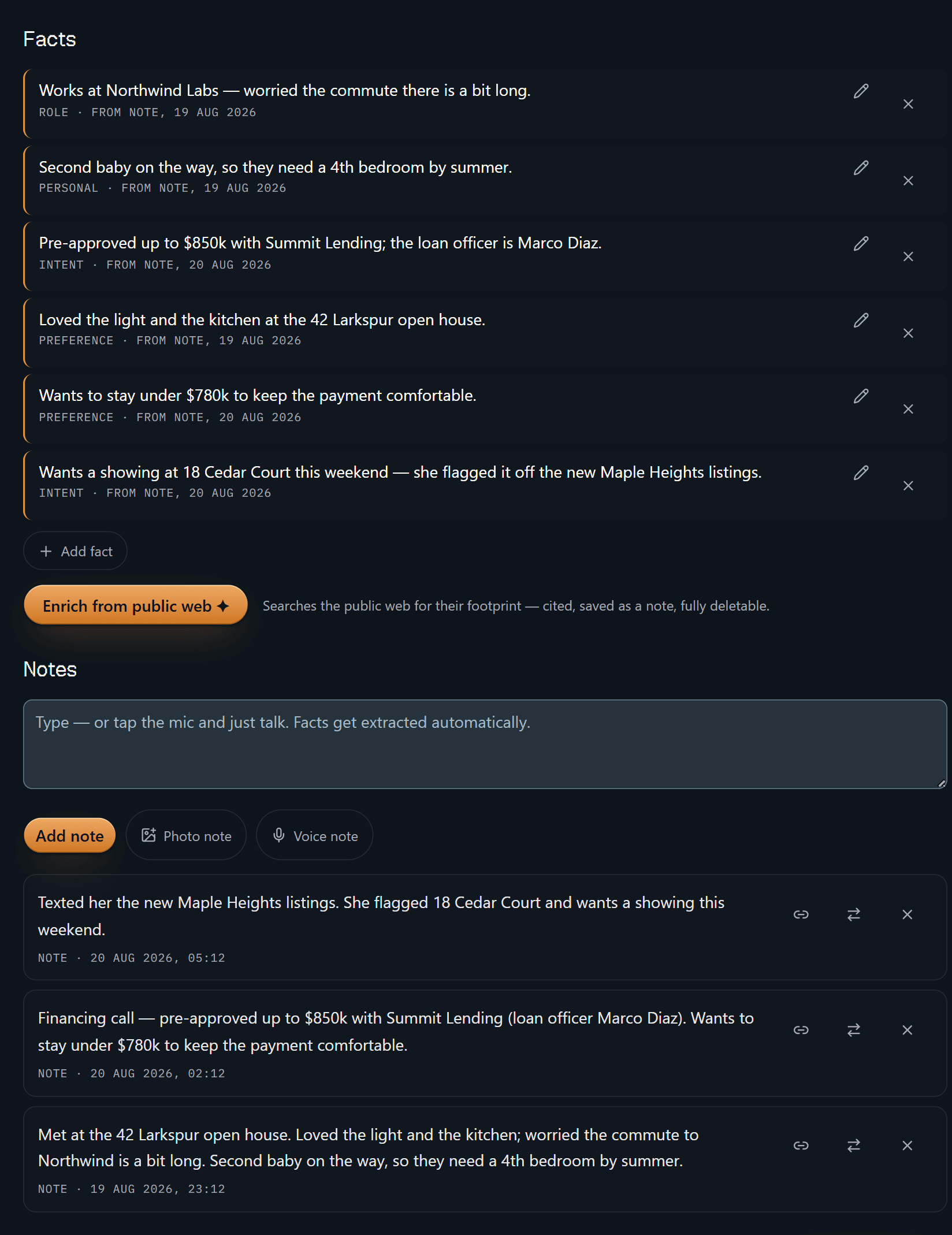
Six facts, three notes, and every fact stamped with the note it came from.
"Pre-approved up to $850k with Summit Lending; the loan officer is Marco Diaz"
and "Wants to stay under $780k to keep the payment comfortable" both read
FROM NOTE, 20 AUG 2026 — the financing call sitting two panels below them.
"Loved the light and the kitchen at the 42 Larkspur open house" reads
19 AUG 2026, which is the open-house note. The dates differ because the
sources differ, and each one points at the right one.
Nothing on that list was typed in as a fact. The composer underneath says it plainly — type, or tap the mic and talk, and the facts get pulled out. Delete the note and the facts derived from it are tombstoned with it. A claim with no source isn't worth keeping, least of all a number you're about to write into an offer.
That is the whole product in one screen. Everything after it is convenience.
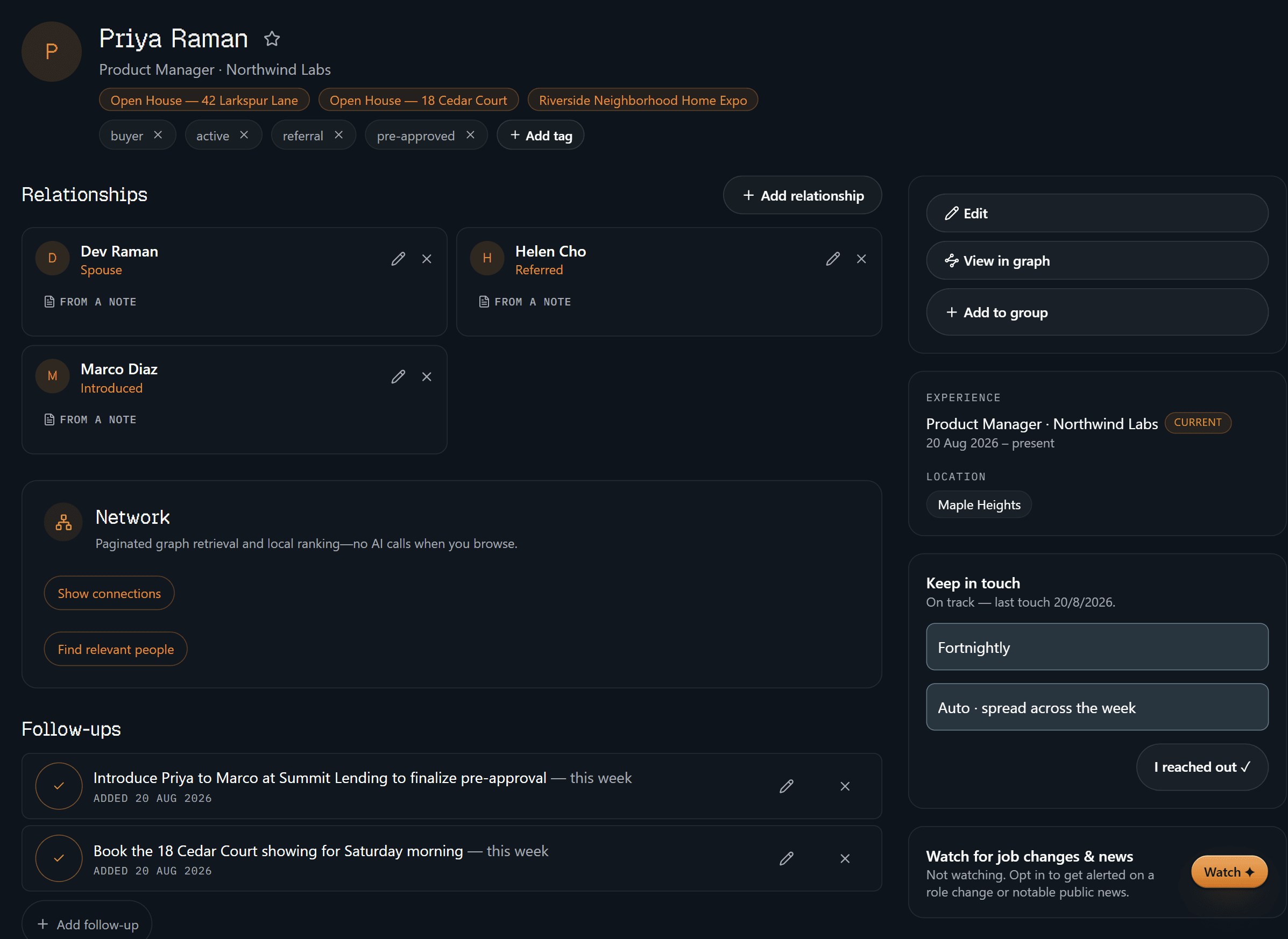
The same receipt rule runs on relationships: Dev Raman (spouse), Helen Cho
(referred), Marco Diaz (introduced), each stamped FROM A NOTE rather than
asserted. Two follow-ups sit below them, both added 20 Aug — introduce her to
Marco to finish the pre-approval, and book Saturday morning at 18 Cedar Court.
Along the top are the three events you've met her at. Keep-in-touch says
fortnightly, on track. And bottom right, "Watch for job changes & news" is
sitting off, because it is opt-in for one person at a time.
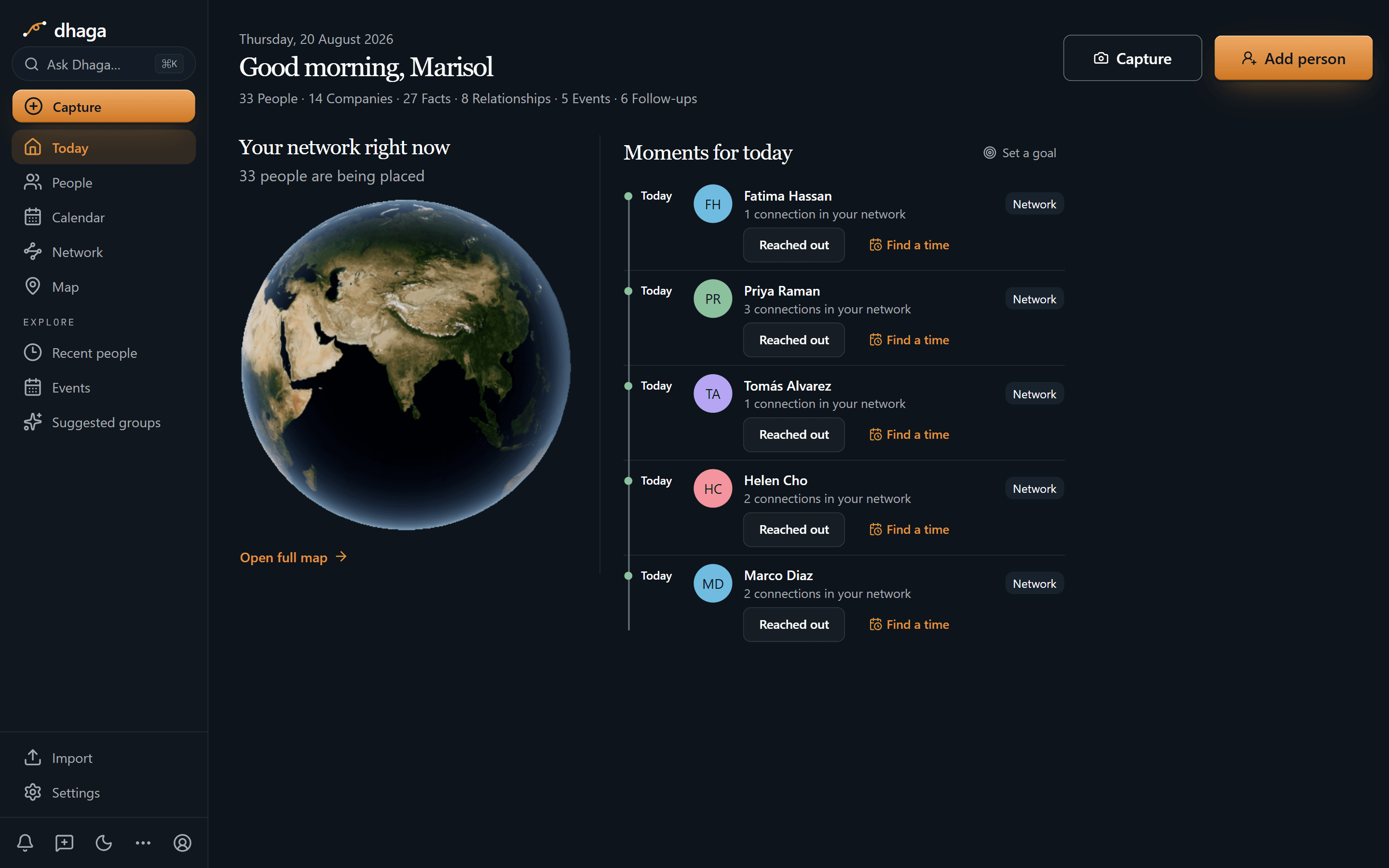
Priya is second in today's list, alongside four others due on the cadence you
set for them. Each row gives you one tap to log that you reached out, or to find
a time. The strip along the top is the whole account at a glance: 33 people, 14
companies, 27 facts, 8 relationships, 5 events, 6 follow-ups. Note what this
screen is not — it's cadence, not a to-do list. What you actually owe a person
lives on their profile and in one Day/Week/Month view at /app/plan.
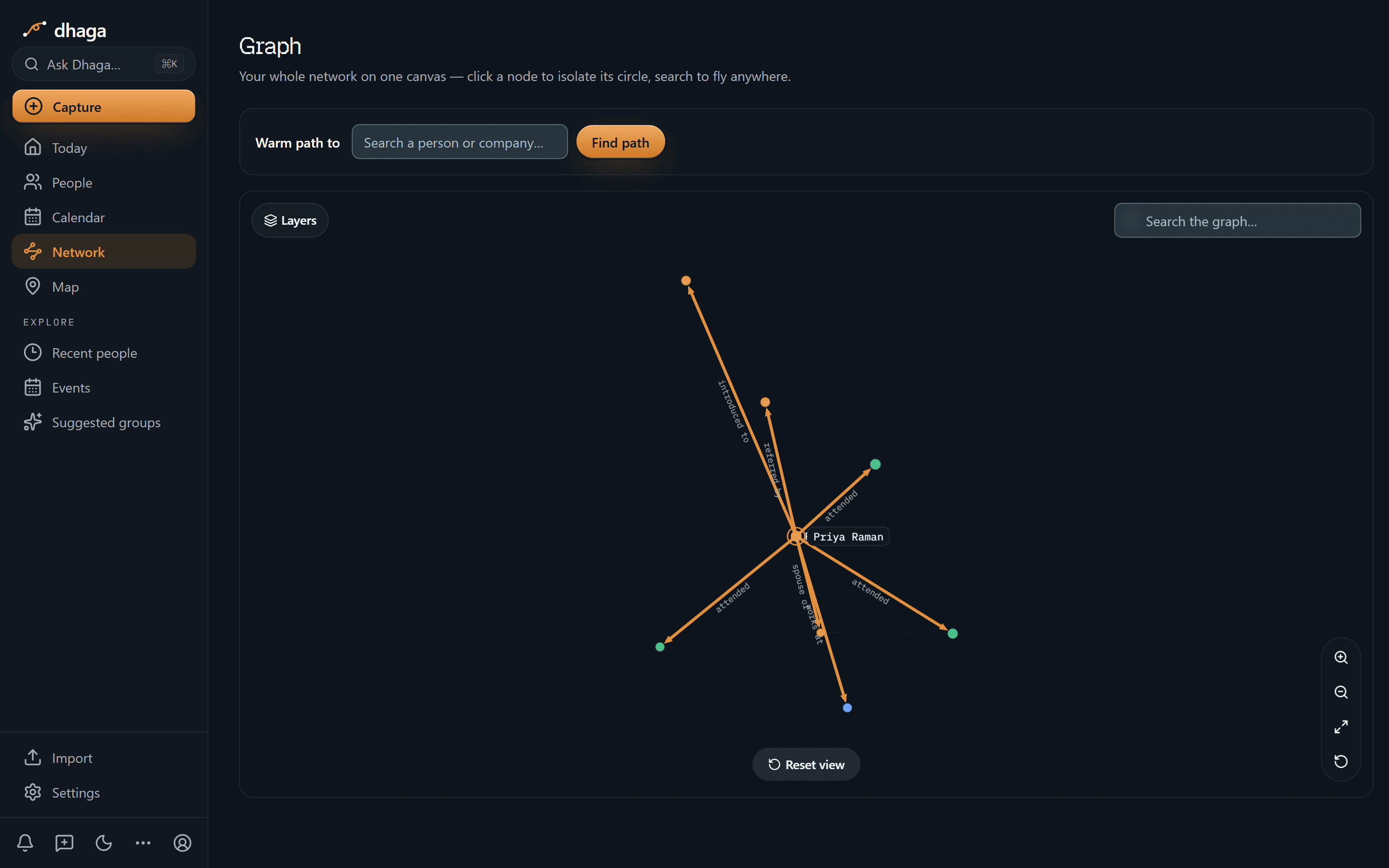
Centre her in the graph and the neighbours stay anonymous dots until you click one; only the node you've isolated is named. What's readable is the label on every line — spouse of, referred by, introduced to, works at, and attended for each event she turned up to. That's the difference between "someone sent her to me" and knowing whose name goes in the thank-you.
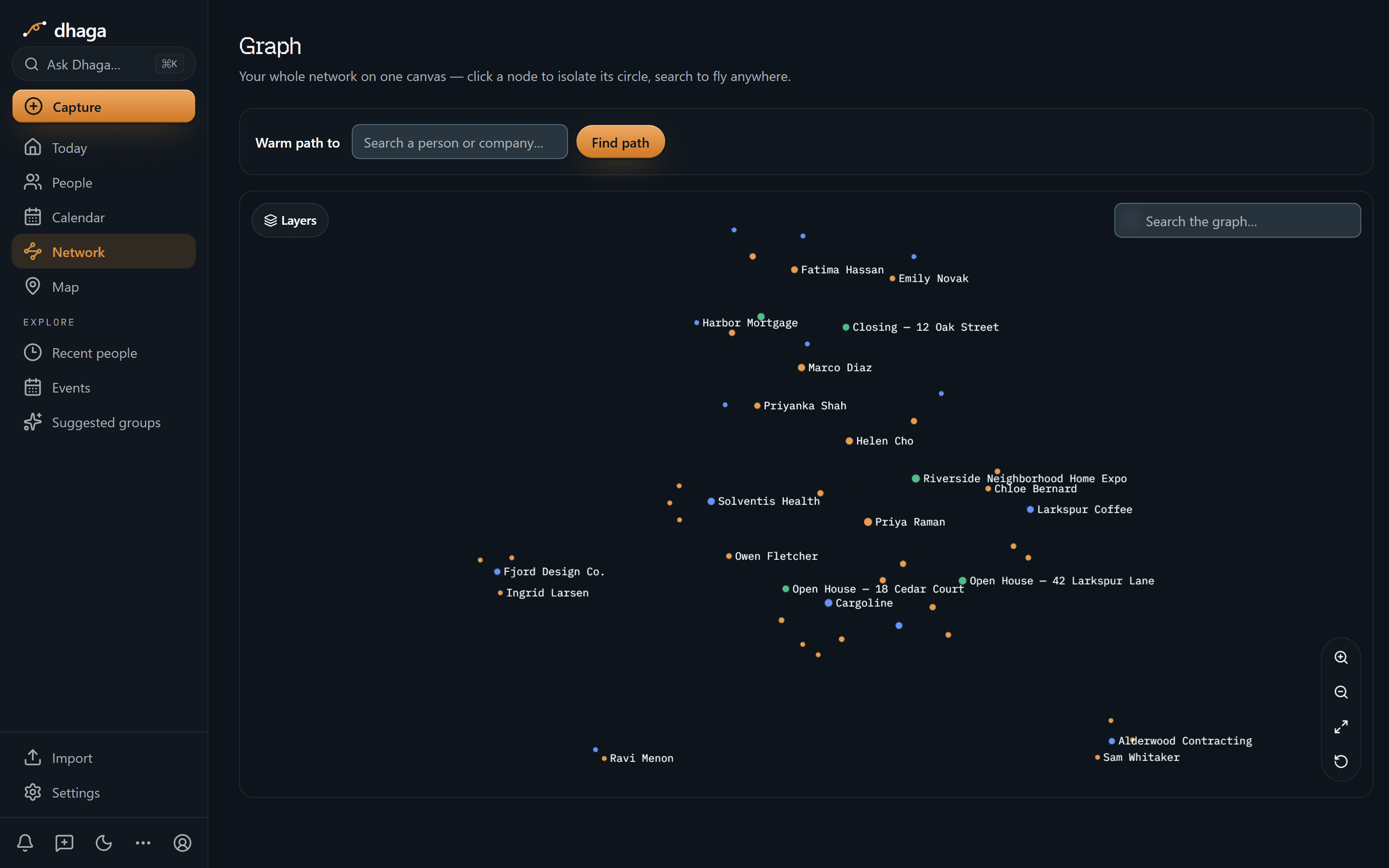
Zoom out and people, companies and events share one canvas: Harbor Mortgage and Alderwood Contracting sitting near Closing — 12 Oak Street and the Riverside Neighborhood Home Expo, with Priya Raman, Marco Diaz and Helen Cho among the names. Thirty-three people is a small book, and this is a demo account — but the picture is the same shape at three hundred.
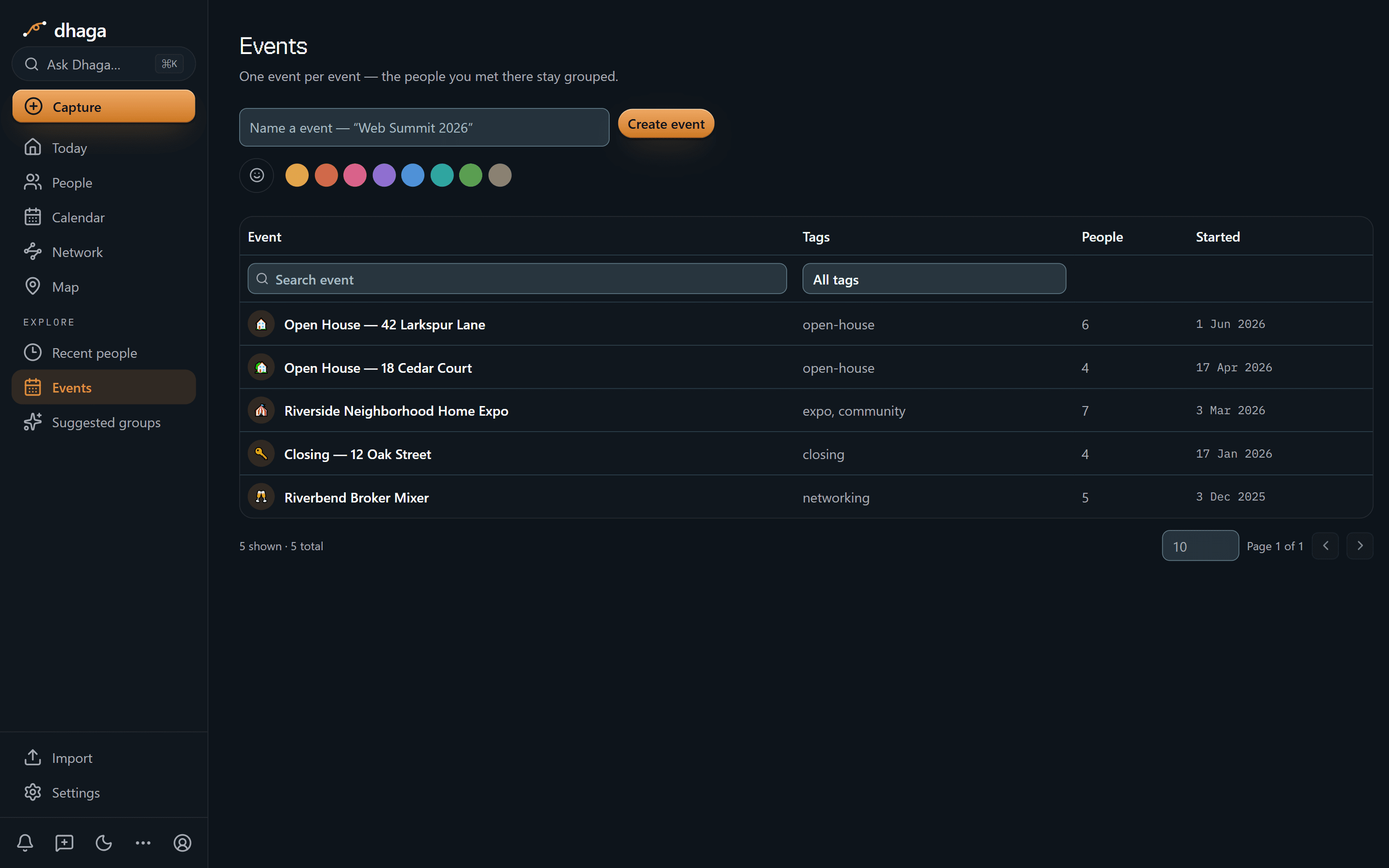
Two open houses, the Riverside expo, a closing and a broker mixer, with 6, 4, 7, 4 and 5 people attached to them. "We met at the Larkspur open house" stops being a hunch and becomes a row with a headcount.
The 60-second version
- A phone full of names and no context → scan a card or an open-house sign-in, front and back, merged into one contact.
- The showing debrief you'd type at a stoplight → say it instead; browser voice capture turns it into a note.
- Half your leads arrive on WhatsApp → forward the message and it becomes a note on the right person.
- "Where did I get that they're pre-approved?" → the fact carries the date of the note it came from, and the note is right there.
- "Who was looking in Riverside under $500k?" → ask in plain English, answered only from your own notes.
- Leads that die in silence → keep-in-touch cadences and a daily brief put the people going quiet in front of you each morning.
- Referrals you never trace → a real graph edge with a source note, not a memory.
- You already work in Claude or ChatGPT → point them at your own graph over MCP.
Getting it in
- Card and sign-in scan — front and back in one go, so you're not typing in the car.
- Voice in the browser — walk out of the showing and say it; it lands as a note.
- WhatsApp and Telegram — forward a message or DM the bot; every inbound message is listed at
/app/settings/messaging/log(guide). - Browser extension and web quick-add — paste an online lead the moment it lands.
- Import — vCard or CSV, plus Google and Outlook contact sync, so your whole sphere comes across on day one.
Getting it out
Ask it what you'd ask a good assistant, and the answers come from your own notes and nowhere else:
- "Which leads haven't I followed up in two weeks?"
- "Who referred Priya, and what did I promise them?"
- "Show me everyone I met at an open house this year."
When Dhaga doesn't know, it says so instead of inventing an answer — which is the only version of this that's safe to quote a client back to themselves.
Or point your own AI tools at it. Dhaga runs an MCP server, so Claude, Cursor or ChatGPT can read your graph and write back to it — add a note, create a contact, open or close a follow-up — from wherever you already work. It's on Pro and above, and reading costs no AI credits. How to connect a client.
Past clients are the whole business
A closing isn't the end of a relationship, it's the start of the valuable one.
| The moment | What Dhaga holds | Why it earns business |
|---|---|---|
| Closing anniversary | The closing as an event, with everyone who was at it | A "how's the house?" note that reads as personal |
| A thrilled client | That they were thrilled, and the note that says so | The right moment to ask for a review or referral |
| Something they told you | A move, a renovation, a job change | A reason to call that isn't "know anyone selling?" |
Follow-ups, your own events and a connected Google or Microsoft calendar all sit
in one Day/Week/Month view at /app/plan, so the anniversary and the Saturday
showing live in the same place.
What we don't do
- We are not a transaction manager. No listings, no MLS, no e-signature, no compliance file, no commission tracking. Dhaga holds the people; your brokerage systems hold the deal.
- We don't pick houses or neighbourhoods. Dhaga holds what the client told you — bedrooms, budget, timing, commute — and hands it back with the note it came from. It doesn't recommend where anyone should live, and it never will.
- We are not a lead marketplace. Your sphere is not resold, mined or shared. Enrichment is a button you press on one person, cited and deletable — never a background crawl over your clients.
- We don't monitor your sphere. Job-change and news alerts do exist, but one contact at a time and opt-in: turn on Watch for someone and a daily sweep looks for a role change or notable public news, and surfaces it as an alert you can dismiss or save as a note that deletes like any other. It needs a Pro or Power plan, stops at five watched contacts, and everyone you didn't tick is never looked up.
- There's no full mobile app yet — web, the extension and WhatsApp/Telegram are the capture surfaces, and Dhaga needs a network connection today.
What it costs
The free tier is real: 10 AI credits a month, and manual capture stays unlimited. Pro is ₹499/month, or $4.99 internationally, with Power above it. /pricing is the one place that shows what you would pay today, including any offer running there.
If you've ever lost a deal because you lost the thread, this is the fix. Start free
Discussion
By profession
Your network is your livelihood, yet it lives in business cards and a phone full of names with no context. Pick the guide that matches your work.
Dhaga for financial advisors & wealth managers
A client mentions the buyer, the tax worry and the grandkids' 529s across three conversations. Dhaga kept all six details, each stamped with its note.