Dhaga for financial advisors & wealth managers
By Anchit Shrivastava ·
A client mentions the buyer, the tax worry and the grandkids' 529s across three conversations. Dhaga kept all six details, each stamped with its note.
The moment this earns its keep
Three conversations in two days: an annual review, a sale update the next morning, a coffee about the grandkids. Six things worth remembering came out of them — and when you walk into her next meeting, the thing holding all six, each with the note it came from and the date that note was written, isn't you.
The facts the next review turns on
Eleanor Thornton is a seeded demo client — the founder of a manufacturing business, about a year out from selling it.
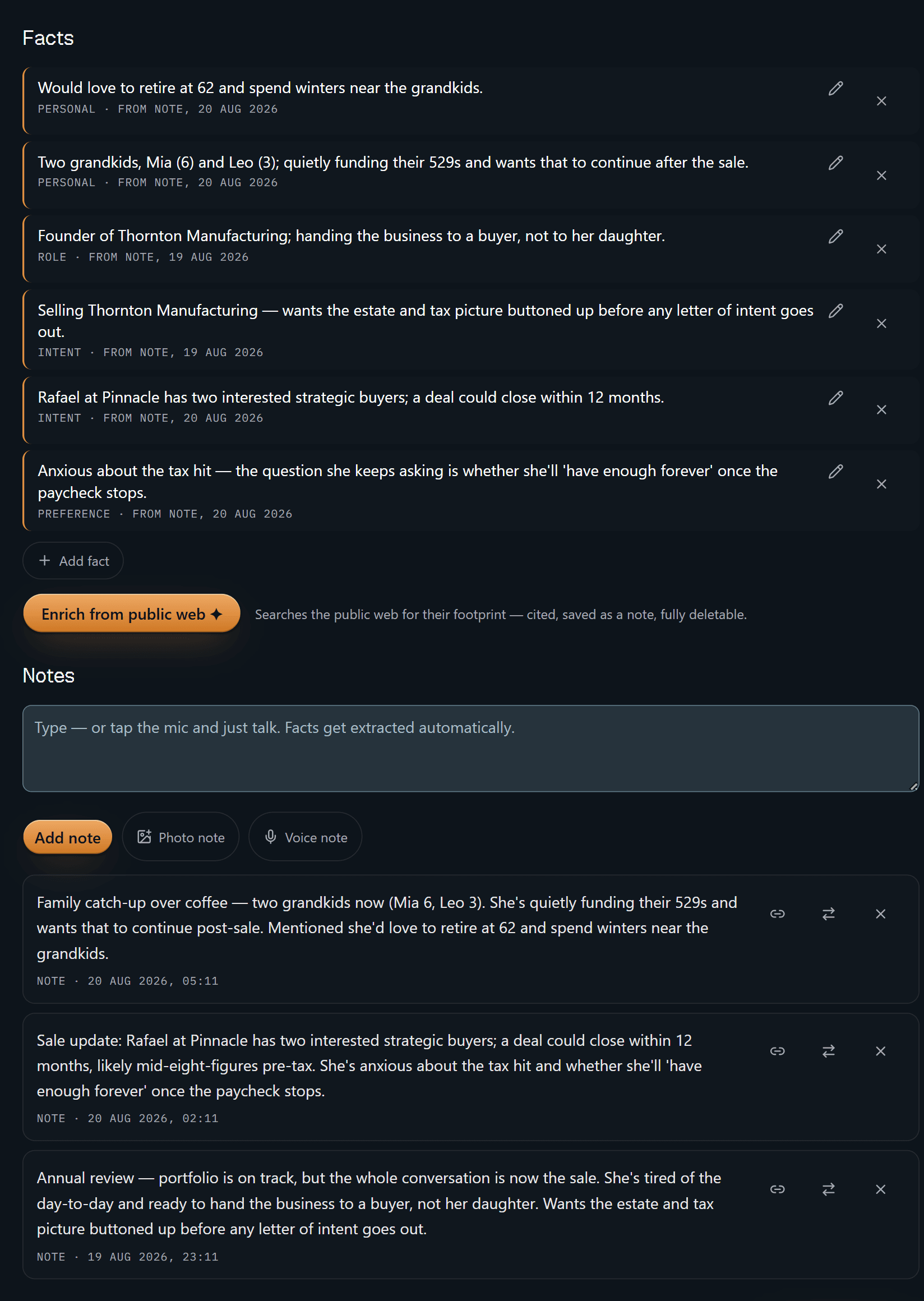
Six facts, six receipts. Each line carries its kind — PERSONAL, ROLE, INTENT,
PREFERENCE — and then FROM NOTE and a date, and the dates are not all the same
one. "Handing the business to a buyer, not to her daughter" traces back to the
annual review on 19 August; "Rafael at Pinnacle has two interested strategic
buyers" to the sale update written a few hours later. Scroll a little and the
notes those lines were read out of sit right underneath, in the words you
captured them in. Delete a note and the facts derived from it are tombstoned
with it. A claim you can't source is worth nothing in this job, and quoting one
back to a client is worse than nothing.
The single control on that screen that reaches outside your own notes says so in plain language — searches the public web for their footprint, cited, saved as a note, fully deletable — and only when you press it.
That is the whole product in one screen. The rest is convenience.
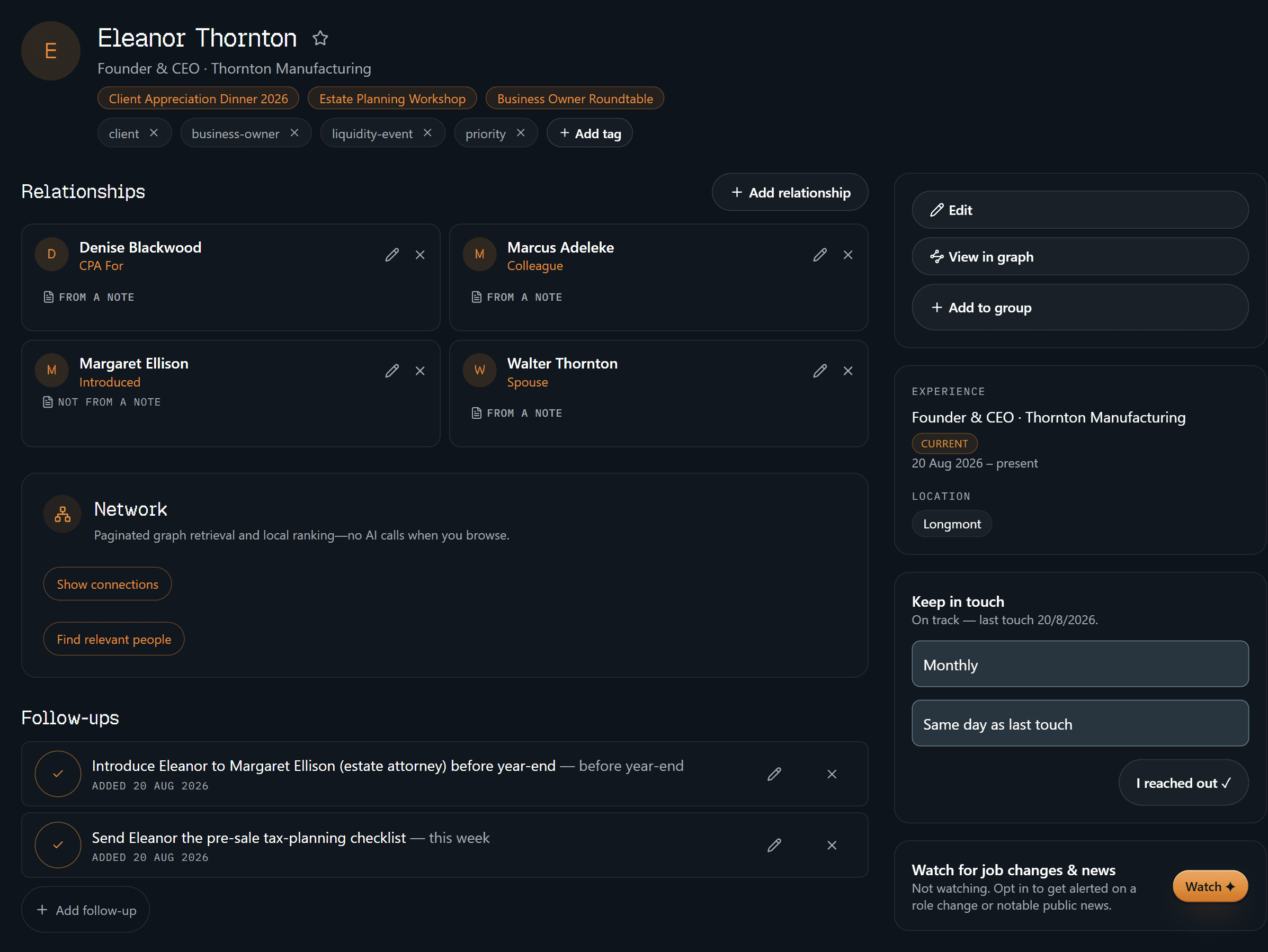
The identity block is the boring, load-bearing half: what she does, how you've
filed her (client, business-owner, liquidity-event, priority), the three
events you've had her at, a monthly cadence currently reading on track, and the
people around her — her CPA, a colleague, her spouse, and the estate attorney
you're introducing her to. Three of those four relationships are stamped
FROM A NOTE. The fourth says NOT FROM A NOTE, because you typed it in
yourself. Dhaga would rather show you which is which than let the two look alike.
Underneath sit the two things you actually owe her: the introduction to the estate attorney before year-end, and the pre-sale tax-planning checklist this week.
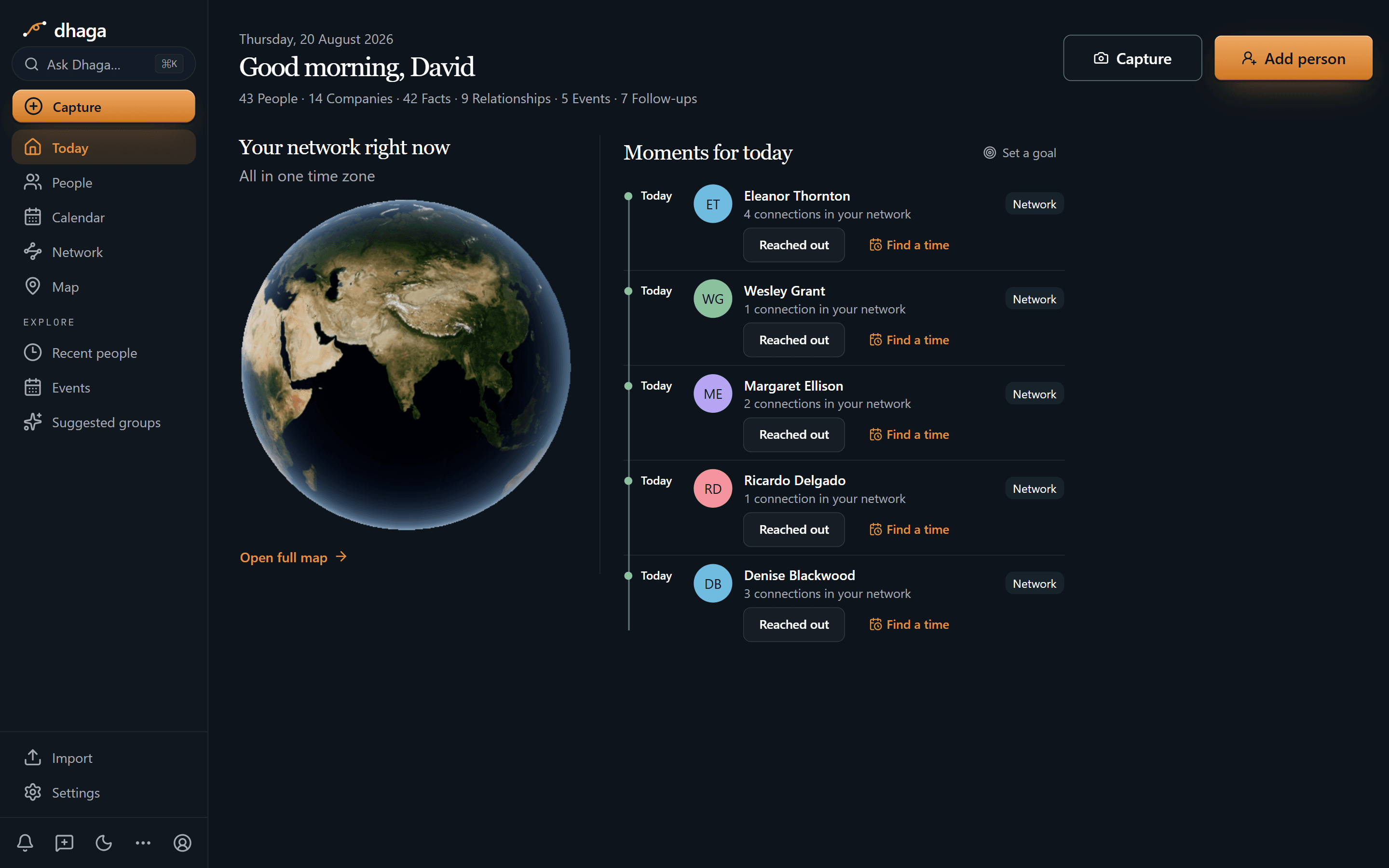
Home is cadence, not a task list. Five people are due a reach-out today, Eleanor
among them, each with Reached out and Find a time beside the name. The strip
along the top is the book at a glance — 43 people, 14 companies, 42 facts, 9
relationships, 5 events, 7 follow-ups. Note that the follow-ups are counted
here, not listed: what you owe one household stays on that household's profile,
and every open promise lands together in one Day/Week/Month view at /app/plan.
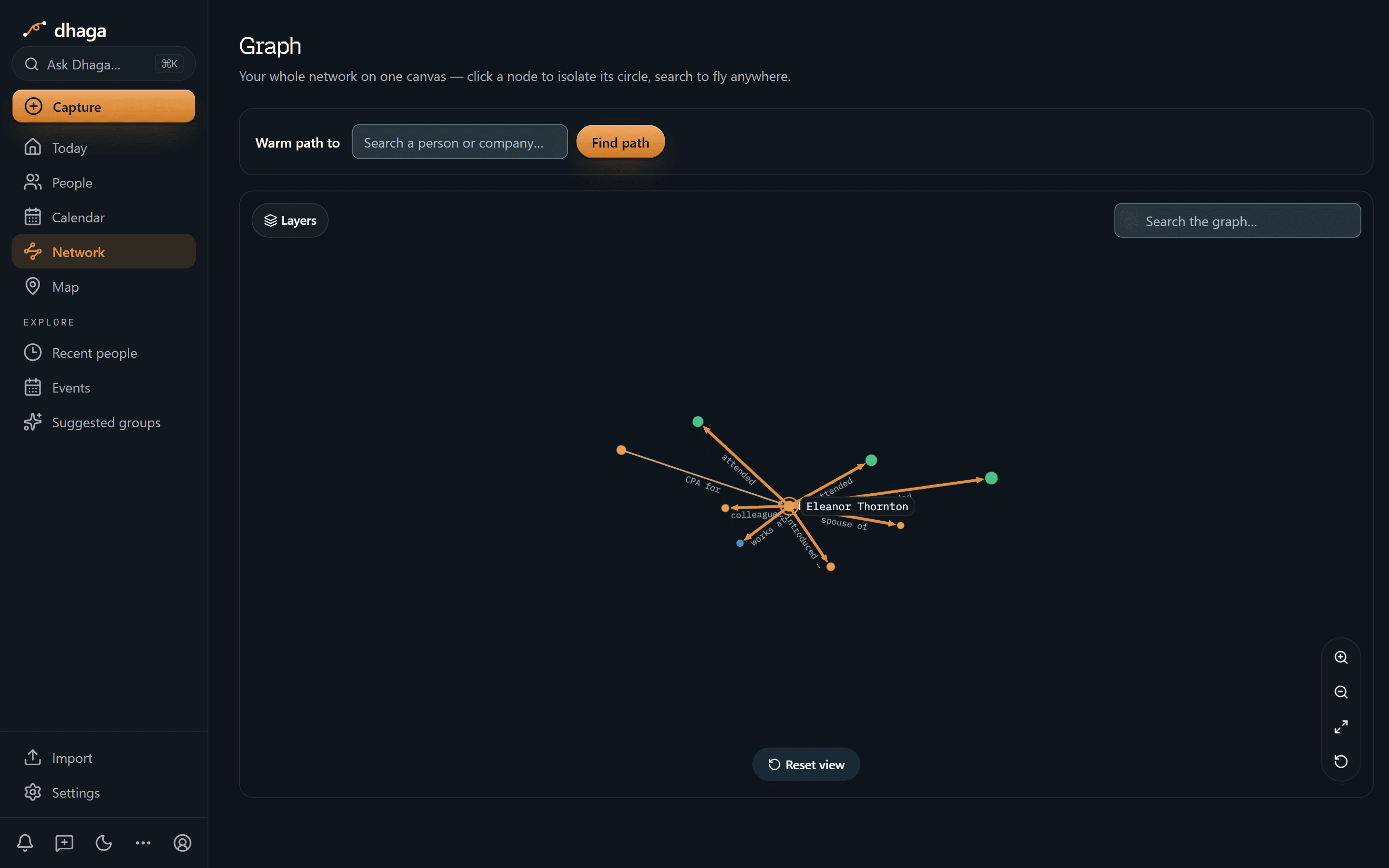
Click Eleanor and she becomes the middle of the picture, with each line labelled for what it is: CPA for, colleague, spouse of, introduced, works at, attended. At this zoom only the centred person is named — the neighbours are dots until you click one and it takes the centre, with its own circle read the same way. That's the difference between "somebody's CPA sent her over" and knowing exactly which thread to pull.
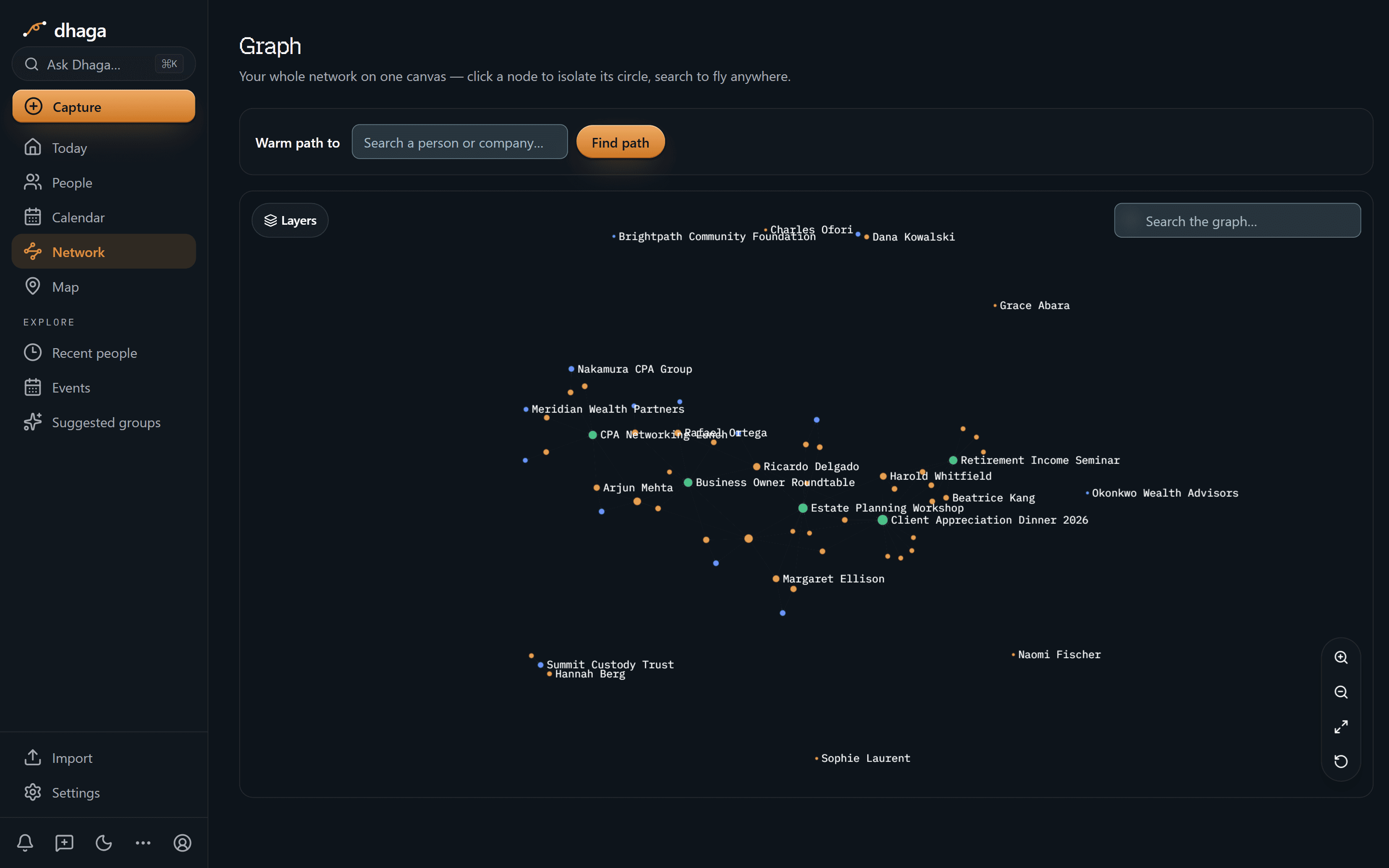
Zoom out and the hubs carry names: clients, the CPAs and attorneys who send you work, firms like Nakamura CPA Group and Meridian Wealth Partners, and the five events threaded through all of it. That is the referral web that normally lives in one person's head, drawn from notes instead.
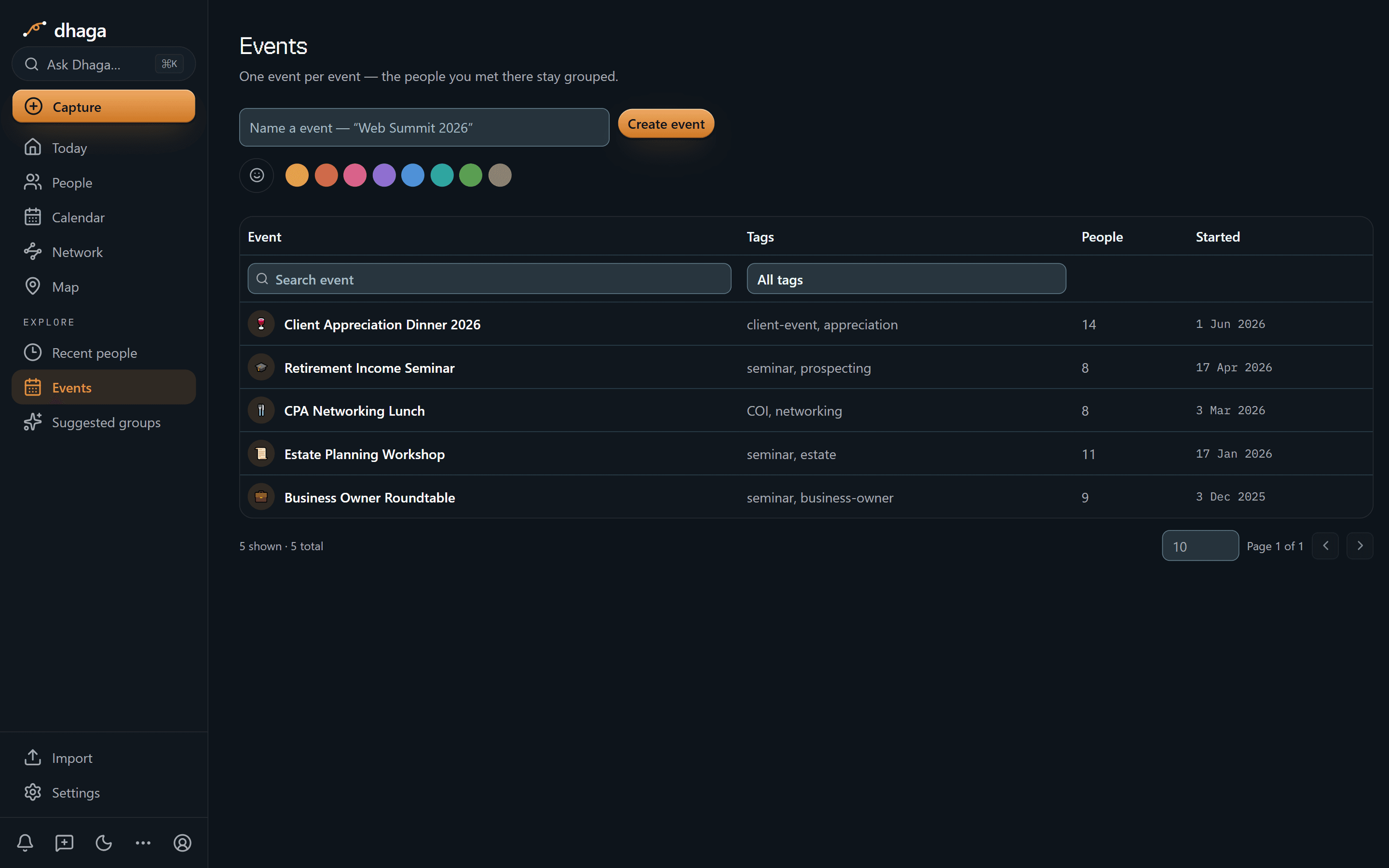
The client appreciation dinner in June with 14 people, the estate planning workshop in January with 11, the CPA networking lunch in March with 8. Each event keeps the people you met there grouped, so "we met at the estate workshop" stays a fact rather than a hunch.
The 60-second version
- The aside on the walk to the car → a voice note in the browser, spoken before you've reached the car.
- The client who WhatsApps you → forward the message and it becomes a note on that household.
- A COI lunch and a pocket of cards → scan front and back in one go, merged into one contact.
- "Who has a liquidity event in the next 18 months?" → Ask Dhaga in plain English, answered from your notes alone.
- A detail you can't source → every fact and every relationship either shows the note it came from or admits it has none.
- Reviews you walk into cold → keep-in-touch cadence surfaces the household before it goes quiet, not after.
- The referral web living in your head → people, firms and events on one graph: who introduced whom, and which COI keeps turning up.
- You already work in Claude or ChatGPT → point them at your own graph over MCP.
Getting it in
- Voice, in the browser, on the walk back to the car — straight into a note.
- WhatsApp and Telegram — forward the thread or DM the bot; every inbound message is listed at
/app/settings/messaging/log(guide). - Card and badge scan — a COI lunch or a conference, front and back, into one contact.
- Browser extension and web quick-add — a referral partner's bio, a client's company news.
- Import — vCard or CSV, plus Google and Outlook contact sync.
Getting it out
Ask in plain English, answered only from your own notes and graph:
- "Who mentioned selling a business this year?"
- "Which households have a child starting college next fall?"
- "Which of my clients came through the CPA I met at the networking lunch?"
When Dhaga doesn't know, it says so instead of inventing an answer. In a field where being confidently wrong is the expensive failure mode, that restraint is the feature.
Or point your own AI tools at it. Dhaga runs an MCP server, so Claude, Cursor or ChatGPT can read your graph directly — pull everything I know about the Thornton household before Thursday — while you draft in the tool you already work in. It's on Pro and above, and reading costs no AI credits. How to connect it.
Life events are the whole game
A retirement, an inheritance, a business sale, a new grandchild: these are the
moments advice actually changes, and the moments another advisor is circling.
Record them the day you hear them and they stop being memory and start being
something you can query — with a keep-in-touch cadence so the household doesn't
drift, and /app/plan holding your follow-ups next to your connected Google or
Microsoft calendar in one Day/Week/Month view.
What we don't do
- Dhaga is not a book of record. Not a compliance or supervision system, not an archive, not a place for anything reportable. It holds people and what was said to you — never account numbers, balances or holdings. Positions, suitability, KYC and communications retention stay in your CRM and at your custodian, which remain the systems of record.
- We are not the advice. Nothing here is a recommendation engine or a suitability check. It remembers people; the judgment is yours.
- We don't monitor your book. Job-change and news watching does exist — it's the Watch button on the profile above — but one contact at a time and opt-in. It needs a Pro or Power plan and stops at five watched contacts; a nightly sweep re-checks the ones you ticked, each on a rotation of several days. What it finds arrives as an alert you either file as a note or dismiss — nothing enters your graph unless you say so, and that note deletes like any other. Everyone you didn't tick is never looked up.
- No full mobile app yet — web, extension and WhatsApp/Telegram are the capture surfaces.
What it costs
The free tier is real: 10 AI credits a month, and manual capture stays unlimited. Pro is ₹499/month, or $4.99 internationally, with Power above it. /pricing is the one place that shows what you would pay today, including any offer running there.
The advisors who keep clients for thirty years never dropped a detail. That's a system, not a memory. Start free.
Discussion
Real estate agents & brokers
Pre-approved to $850k but staying under $780k, a loan officer, a flagged listing. Dhaga holds all three details for each buyer, each with its source note.
B2B sales & account executives
Your CRM tracks the deal, not the eight people who decide it — and when your champion changes companies, it files your warmest lead as a dead contact.