Management consultants & professional-services firms
By Anchit Shrivastava ·
Your former client resurfaced as a COO with a mandate. Dhaga remembered the turnaround you ran, who put you before that board, and the one-pager you owe.
The moment this earns its keep
The VP Ops you ran an Ironwood turnaround with is now COO at Atlas Freight, with a fresh supply-chain mandate and a Q4 planning cycle closing in. You get one coffee to be useful in — and the thing holding the 18% downtime number, the name of the person who walked you into that board, and the one-pager you owe him this week wasn't you.
The fact the next engagement turns on
David Nkosi is a seeded demo contact: the former client who just became the person with the budget.
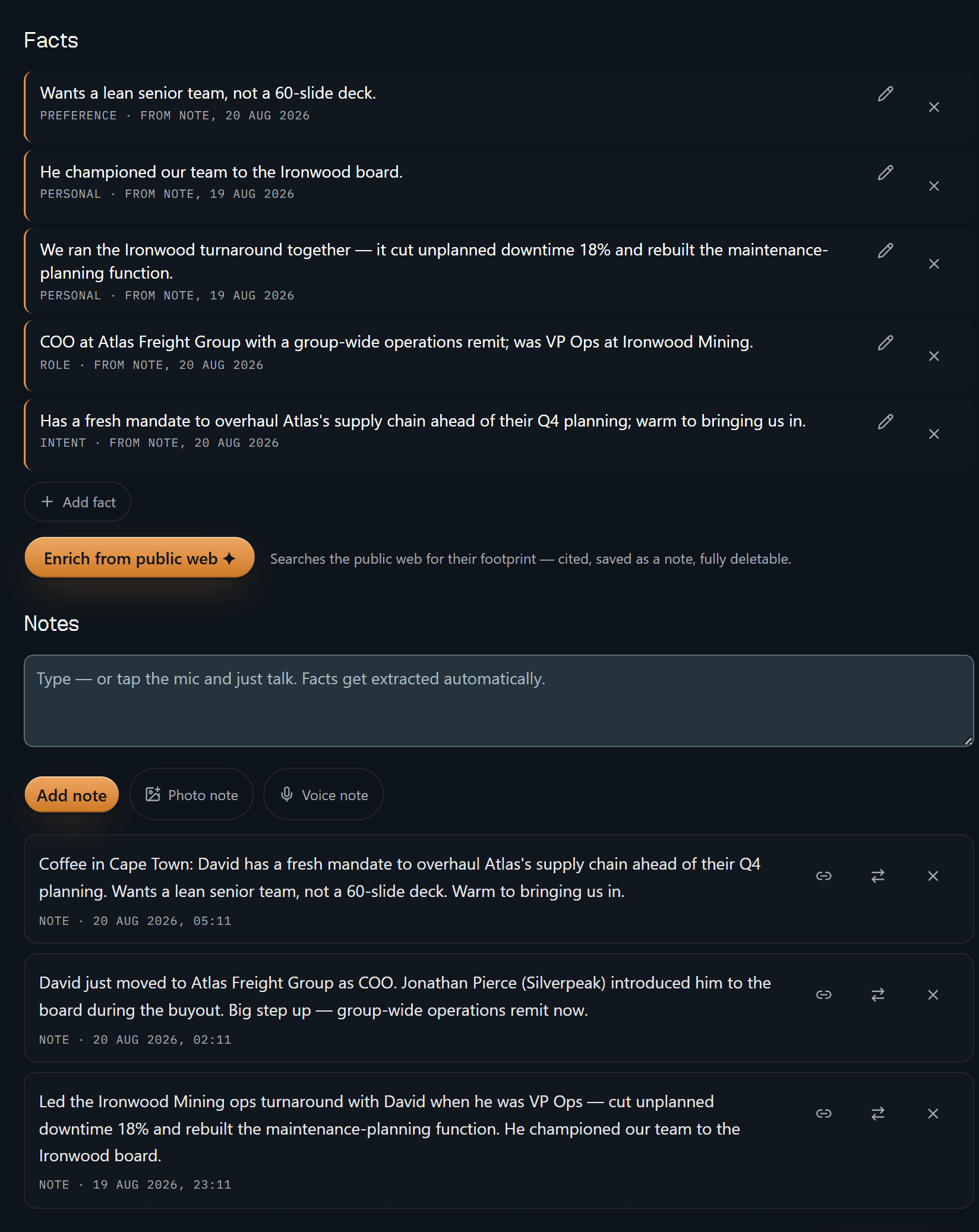
Five facts, five receipts. "Has a fresh mandate to overhaul Atlas's supply chain ahead of their Q4 planning; warm to bringing us in" is stamped FROM NOTE, 20 AUG 2026 — and the 20 August note sitting underneath it is the coffee in Cape Town it was extracted from. "We ran the Ironwood turnaround together — it cut unplanned downtime 18%" is stamped 19 August, and traces to a different note written that evening. Each fact carries its own date because each one came out of its own note, and nothing here is a claim you'd have to defend from memory.
Delete a note and the facts derived from it are tombstoned with it. That matters more in professional services than almost anywhere else, because what you are actually selling is that you remember the business correctly.
The amber button below the facts is the only public-web lookup on this screen, and it is a button: "Searches the public web for their footprint — cited, saved as a note, fully deletable." Nothing runs until you press it.
That is the whole product in one screen. The rest is convenience.
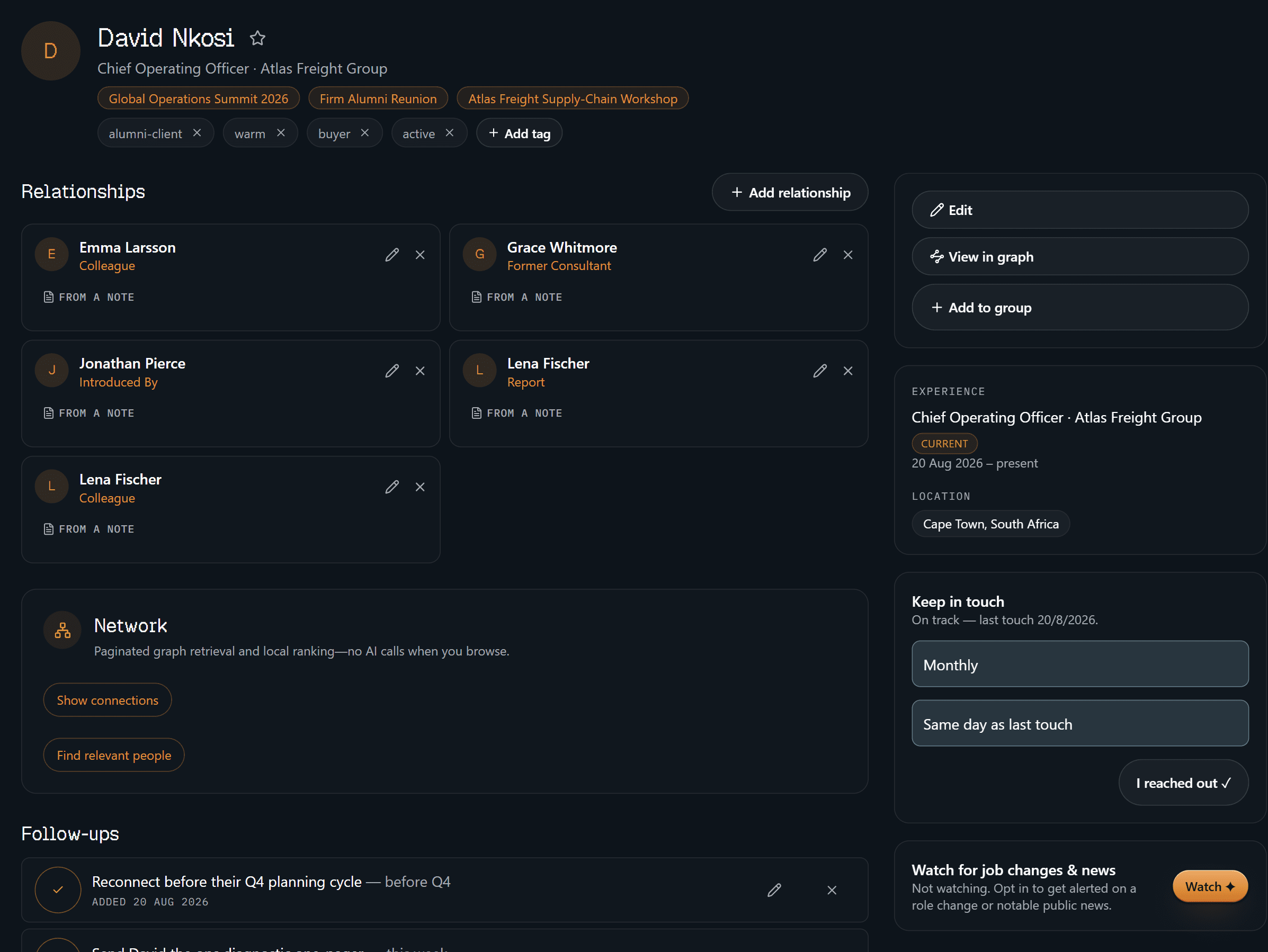
The identity block is the boring, load-bearing half: what he runs now, the three
events you've met him at, how you've filed him (alumni-client, warm,
buyer), monthly keep-in-touch, on track. Every relationship card carries the
same stamp the facts do — FROM A NOTE — including Introduced By · Jonathan
Pierce, which is the sentence you actually need before you ask for anything.
Underneath sit the follow-ups: reconnect before their Q4 planning cycle, send
the ops diagnostic one-pager this week.
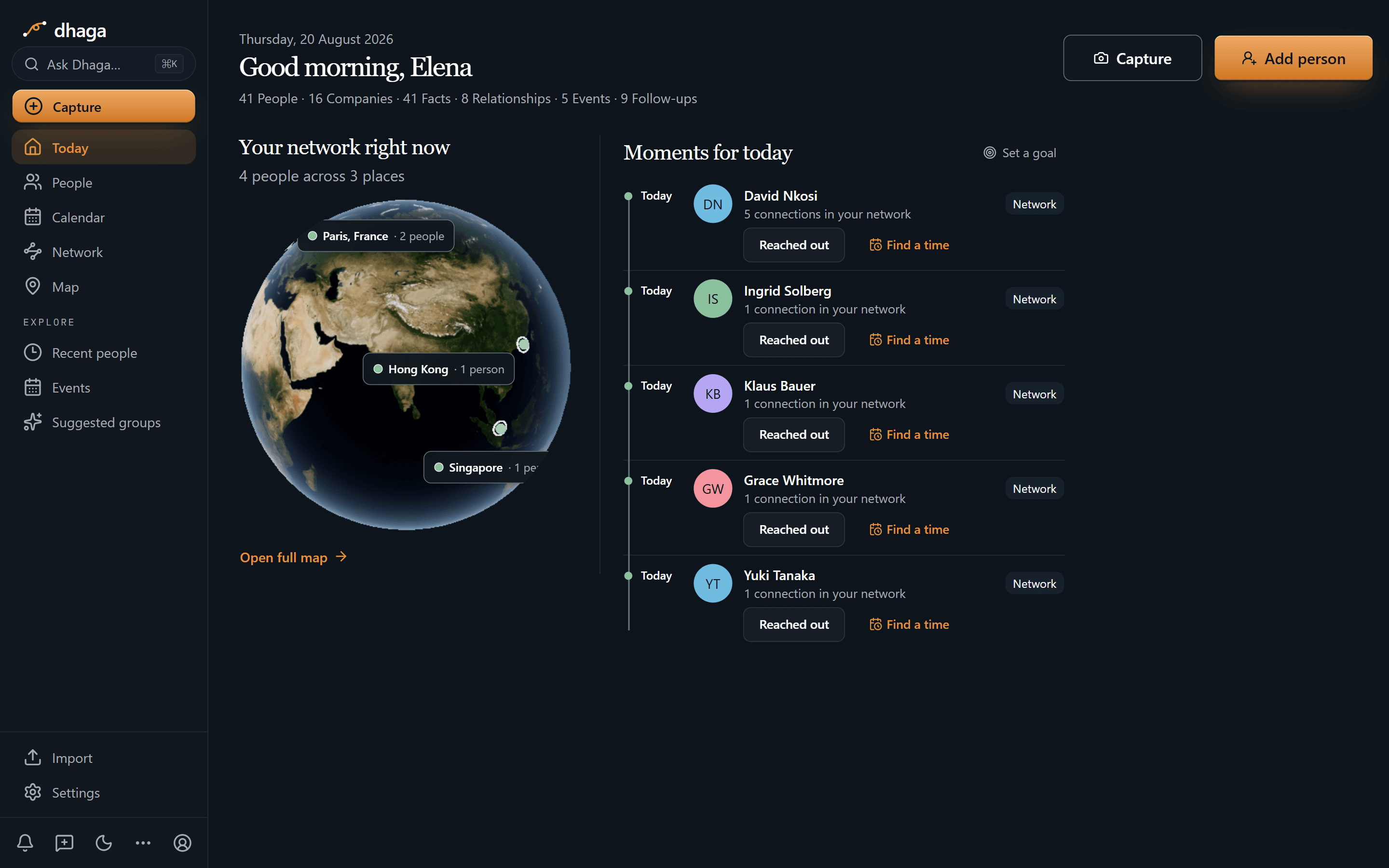
David is at the top of today's moments, on the monthly cadence you set for him,
alongside four other people you meant to stay close to. The strip along the top
is the graph at a glance — 41 people, 41 facts, 9 open follow-ups. What this
screen deliberately is not is your task list: those nine follow-ups live on
their contacts' profiles and in one Day/Week/Month view at /app/plan, so
nothing here is a to-do that lost the person it belonged to.
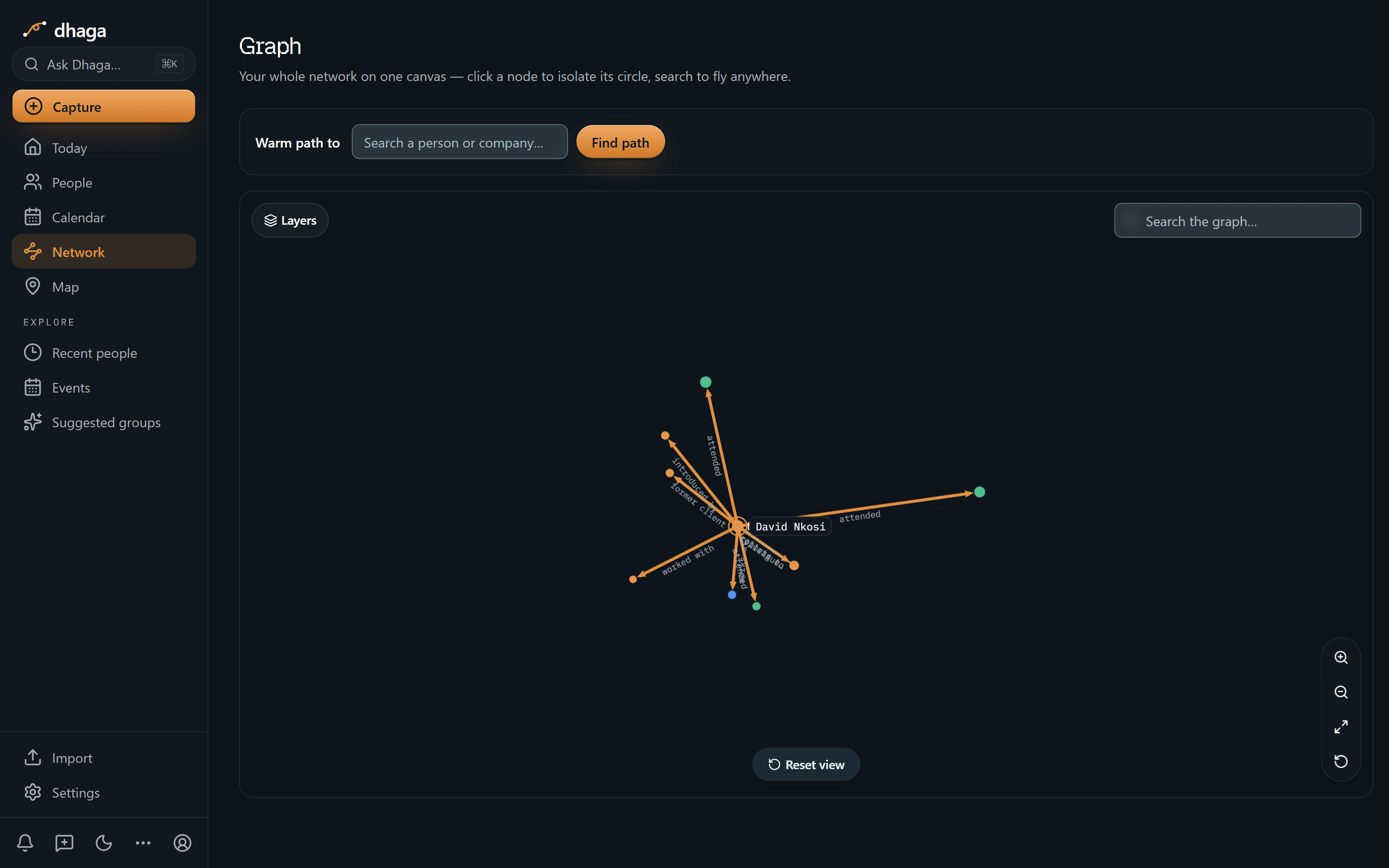
One hop out from David, and the lines are labelled with what they are: worked with, former client, introduced by, attended. The neighbours are unlabelled dots on purpose — click one and it becomes the centre with its own circle, read the same way. That's the difference between "someone from the Ironwood job knows them" and knowing which thread to pull.
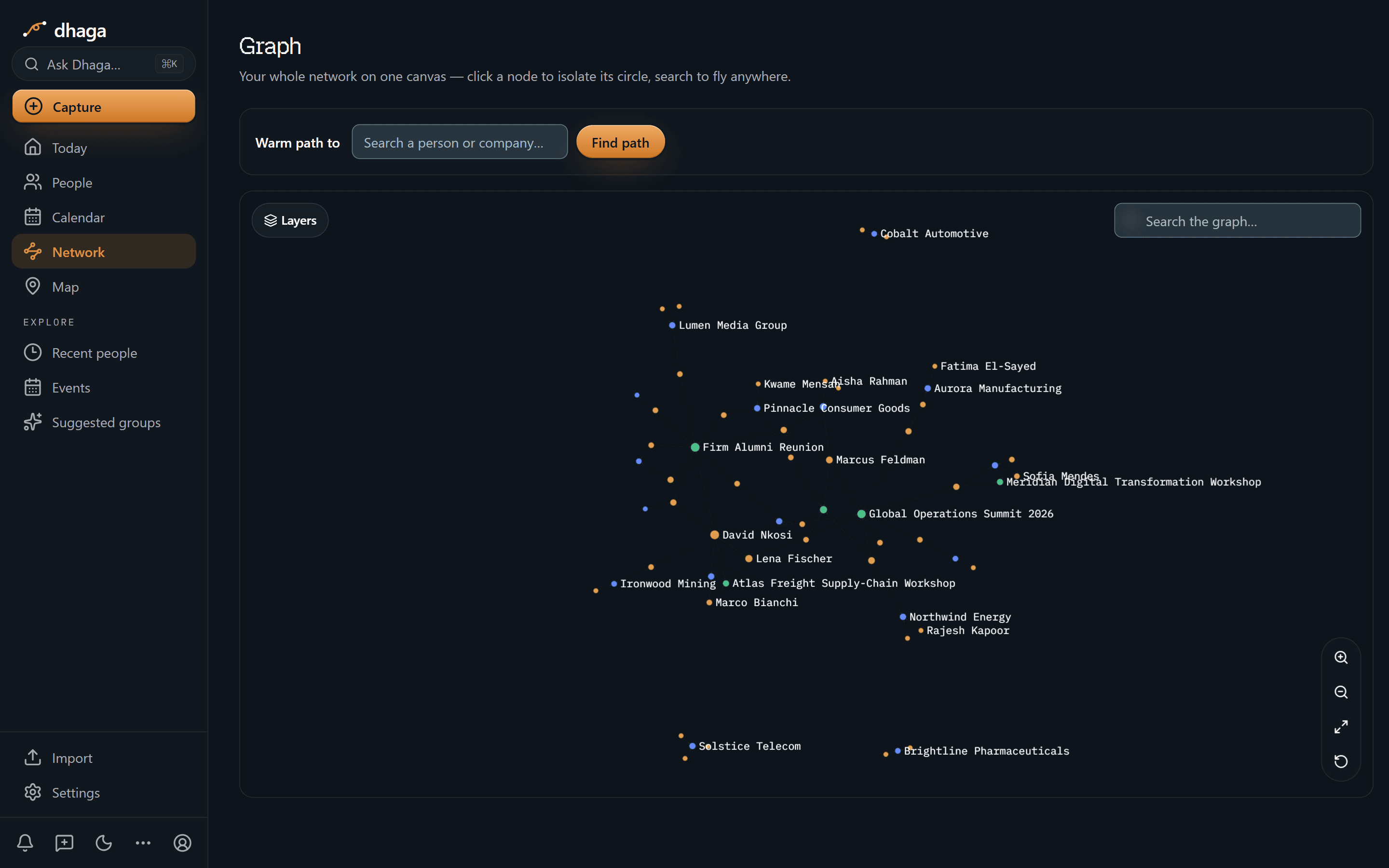
Zoom out and the named hubs are the shape of a consulting book: clients and ex-clients (Ironwood Mining, Northwind Energy, Pinnacle Consumer Goods, Aurora Manufacturing), the people inside them, and the events that introduced you — the Firm Alumni Reunion and the Global Operations Summit sitting in the middle of it like the junctions they are.
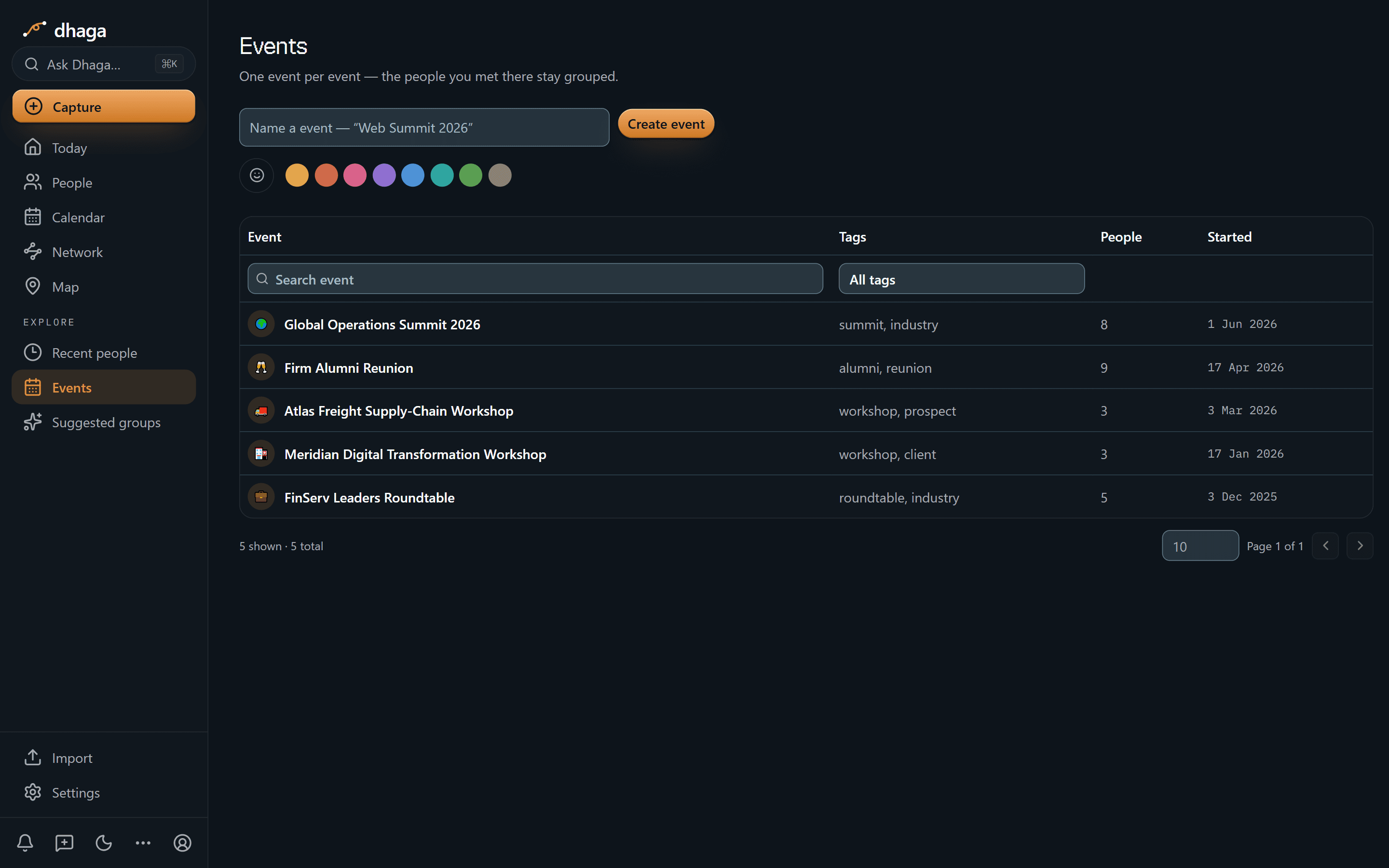
Five events, each with its own headcount and tags: the Firm Alumni Reunion (9
people, alumni), the Global Operations Summit (8, industry), a client
workshop and a prospect workshop, three people each. "Who was at the ops summit?"
is a question with an answer rather than a scroll through your camera roll.
The 60-second version
- You meet twelve people on an engagement and remember four → scan a card or badge, front and back in one go, merged into one contact.
- The debrief you promise to write up and never do → talk instead; browser voice capture turns it into a note.
- The detail that arrived in a WhatsApp thread → forward it and it becomes a note on the right person.
- "Who have I not touched since the last project?" → Ask Dhaga in plain English, answered only from your own notes.
- You don't trust what an AI extracted → every fact and every relationship shows the note it came from.
- Reconnects that live in a spreadsheet nobody opens → keep-in-touch cadence, surfaced as today's moments.
- Stakeholders scatter across companies → people, firms and events on one graph, so "who worked with whom" survives the reorg.
- You already live in Claude or Cursor → point them at your own graph over MCP.
Getting it in
- Card and badge scan at the reception desk — front and back, one contact.
- Voice, in the browser, walking out of the workshop — spoken, not typed.
- WhatsApp and Telegram — forward the thread or DM the bot; every inbound message is listed at
/app/settings/messaging/log(guide). - Browser extension and web quick-add — paste anything with a person in it.
- Import from vCard or CSV, or sync Google and Outlook contacts — so your network isn't trapped in a firm system you lose on the way out.
Getting it out
Ask in plain English, answered only from your own notes and graph:
- "Which former clients are now at a different company?"
- "Who from the Meridian project have I not spoken to this year?"
- "Who do I know in healthcare ops, and who introduced us?"
When Dhaga doesn't know, it says so instead of inventing an answer — which is the only version of this that's safe to take into a client conversation.
Or point your own AI tools at it. Dhaga runs an MCP server, so Claude, Cursor or ChatGPT can read and write your graph directly — nineteen tools, from search and warm-path lookup to filing a note. Draft the reconnect in the tool you already work in, against the real history you have with that COO rather than a summary you pasted in. It's on Pro and above, and reading costs no AI credits. How to connect it.
The alumni network is the pipeline
Every firm knows this quietly: the people who left are your best future clients. Most manage that asset with an annual email and a LinkedIn group nobody reads.
| The relationship | What Dhaga holds | Why it earns work |
|---|---|---|
| A colleague who went client-side | Where they went, what they own | A buyer who already trusts your work |
| An alum who moved again | The full trail of moves, each with its note | You reconnect with context, not a cold "congrats" |
| Someone you mentored | That the relationship was real, and when | A reason to reach out that isn't transactional |
What we don't do
- We are not a delivery system. No proposals, no staffing, no time and billing, no client file. Dhaga holds the human layer around the work — confidential engagement material belongs elsewhere.
- We don't monitor your address book. Job-change and news alerts do exist, but one contact at a time and opt-in: tick Watch on someone and a daily sweep looks for a role change or notable public news, then files what it finds as an alert on their profile with a link to its source — you either save it as a note or dismiss it. It needs a Pro or Power plan, stops at five watched contacts, and everyone you didn't tick is never looked up. Everything else, Dhaga knows because you told it.
- There's no full mobile app yet — web, extension and WhatsApp/Telegram are the capture surfaces, and Dhaga needs a network connection today.
What it costs
The free tier is real: 10 AI credits a month, and manual capture stays unlimited. Pro is ₹499/month, or $4.99 internationally, with Power above it. /pricing is the one place that shows what you would pay today, including any offer running there.
If you've ever lost the thread on a client who moved on right as they became a buyer, that's the whole reason this exists. Start free.
Discussion
Founders & startup CEOs
An investor said come back at $10k MRR. You just crossed $12k. Dhaga is the thing that remembered who said it, when, and what you promised them on the way out.
Lawyers & legal business development
A GC told you she's building an outside-counsel bench — and that your catch-ups stay social. Dhaga holds both sentences, each stamped with its note.