B2B sales & account executives
By Anchit Shrivastava ·
Your CRM tracks the deal, not the eight people who decide it — and when your champion changes companies, it files your warmest lead as a dead contact.
The moment this earns its keep
A name lands in your inbox from a company you've never sold into. You have met him before: he championed you at Northwind Logistics last year, right up until the budget froze. Your CRM has that filed under a closed-lost deal. The thing that can tell you what he cared about, who introduced you and what you still owe him is not your CRM — and on a bad week it isn't your memory either.
The facts the deal turns on
Meet Marcus Feld, VP Engineering at Cargoline Freight — a seeded demo contact playing champion on this account.
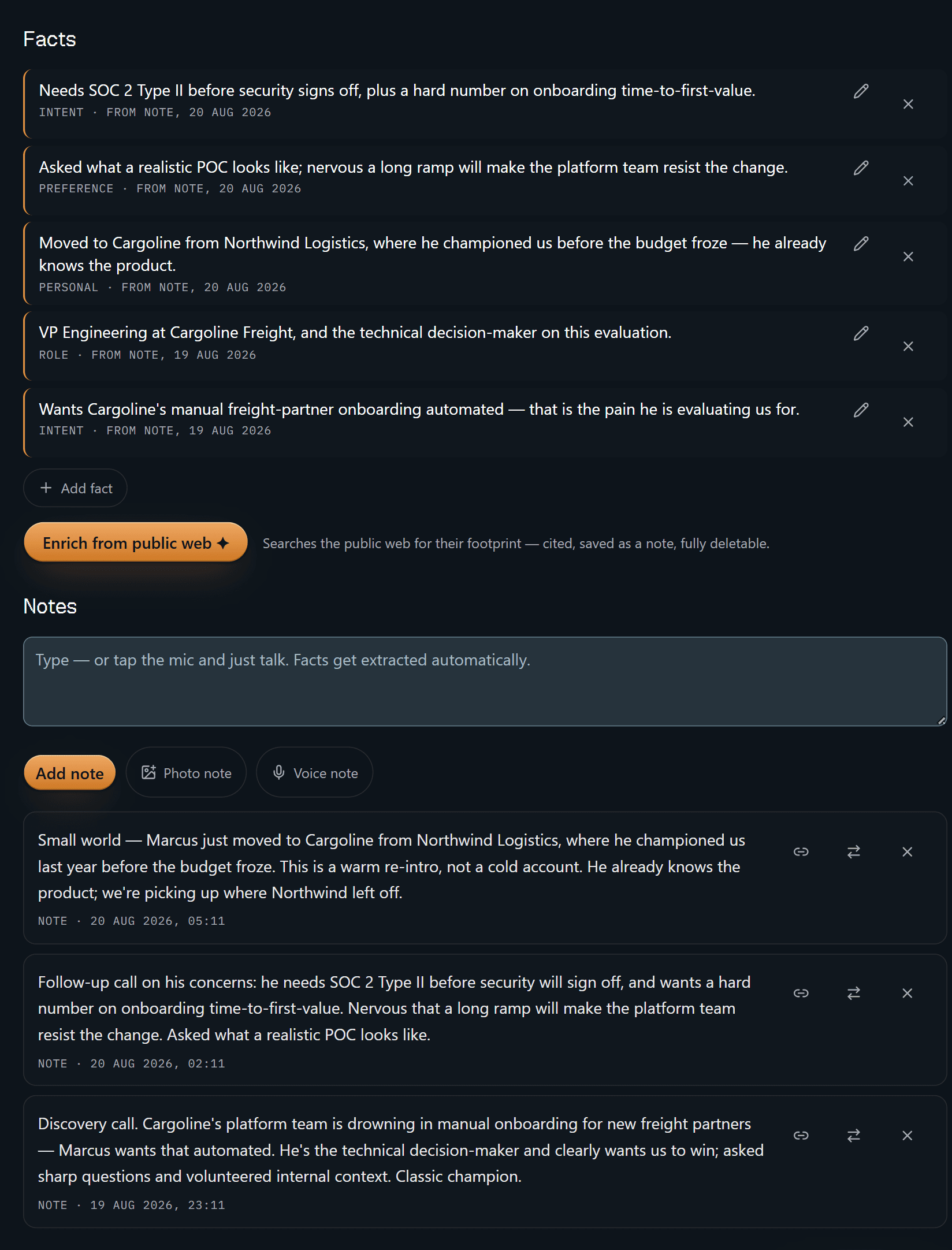
Five facts, and every one carries a receipt: FROM NOTE, 20 AUG 2026,
FROM NOTE, 19 AUG 2026 — the date differs per fact because each traces back to
a different call. The notes sit right underneath, in the words you actually
dictated. "Needs SOC 2 Type II before security signs off" isn't something you
half-remember from a call; it's a line you can walk back to the follow-up call it
came out of. Delete that note and the facts derived from it are tombstoned with
it. A claim with no source isn't worth taking into a deal review.
Note the third one — moved to Cargoline from Northwind Logistics, where he championed us before the budget froze. That's the whole re-intro, standing in the open on a profile, instead of buried in a closed opportunity.
That is the product in one screen. The rest is convenience.
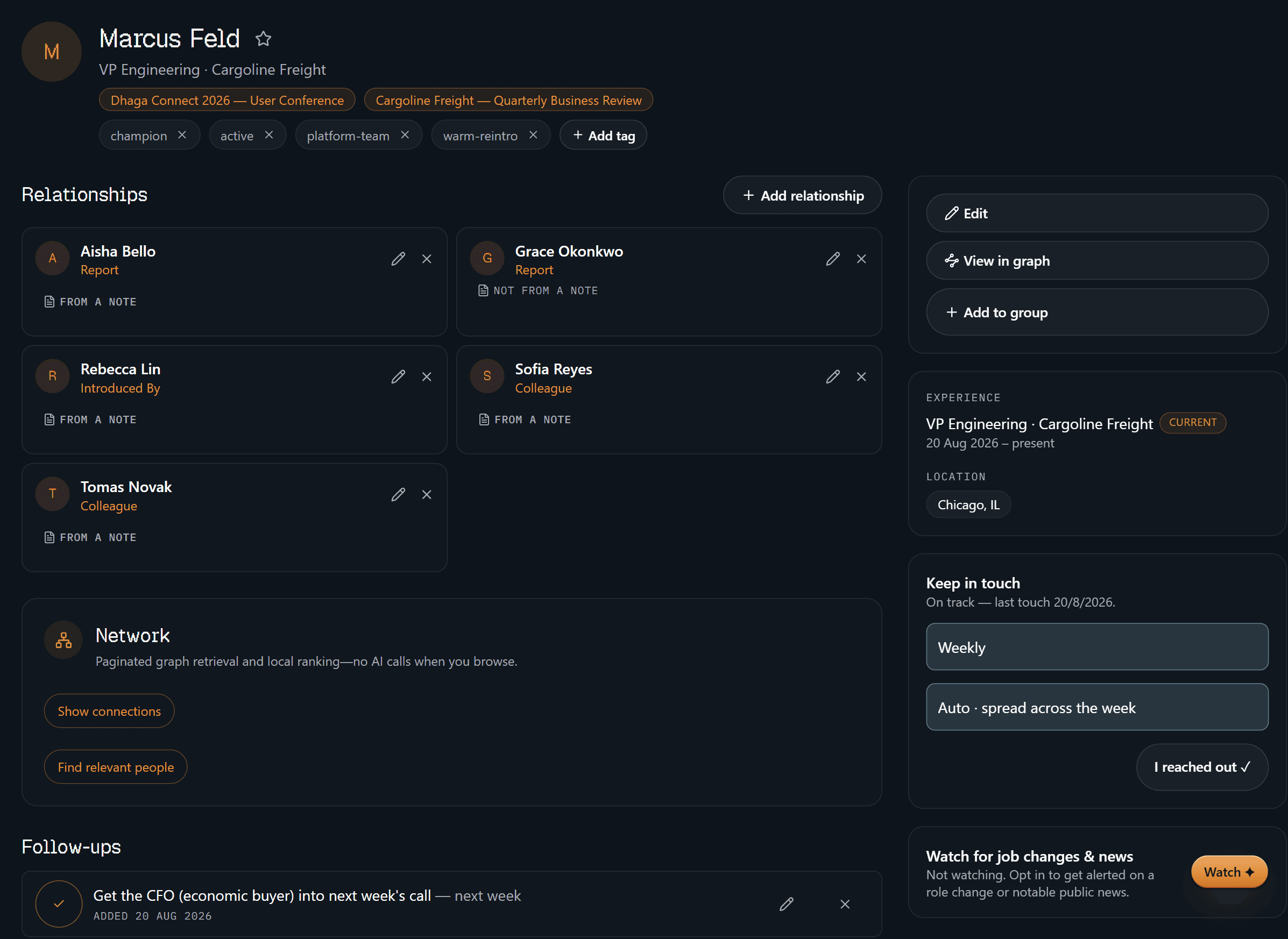
Here's the account map for one stakeholder: two of his reports, a colleague, and
the person who introduced you. Four of the five are stamped FROM A NOTE — click
through and you land on the note that recorded the relationship. The fifth says
NOT FROM A NOTE, plainly, because you typed that one in yourself. Being told
which is which is the point; a stakeholder map you can't audit is just a diagram.
Down the right rail: where he works and since when, where he sits, a weekly keep-in-touch cadence Dhaga spreads across the week on its own, and the one follow-up you actually owe — get the CFO (economic buyer) into next week's call. The economic buyer isn't a field on an account record here. It's a promise with a date on it.
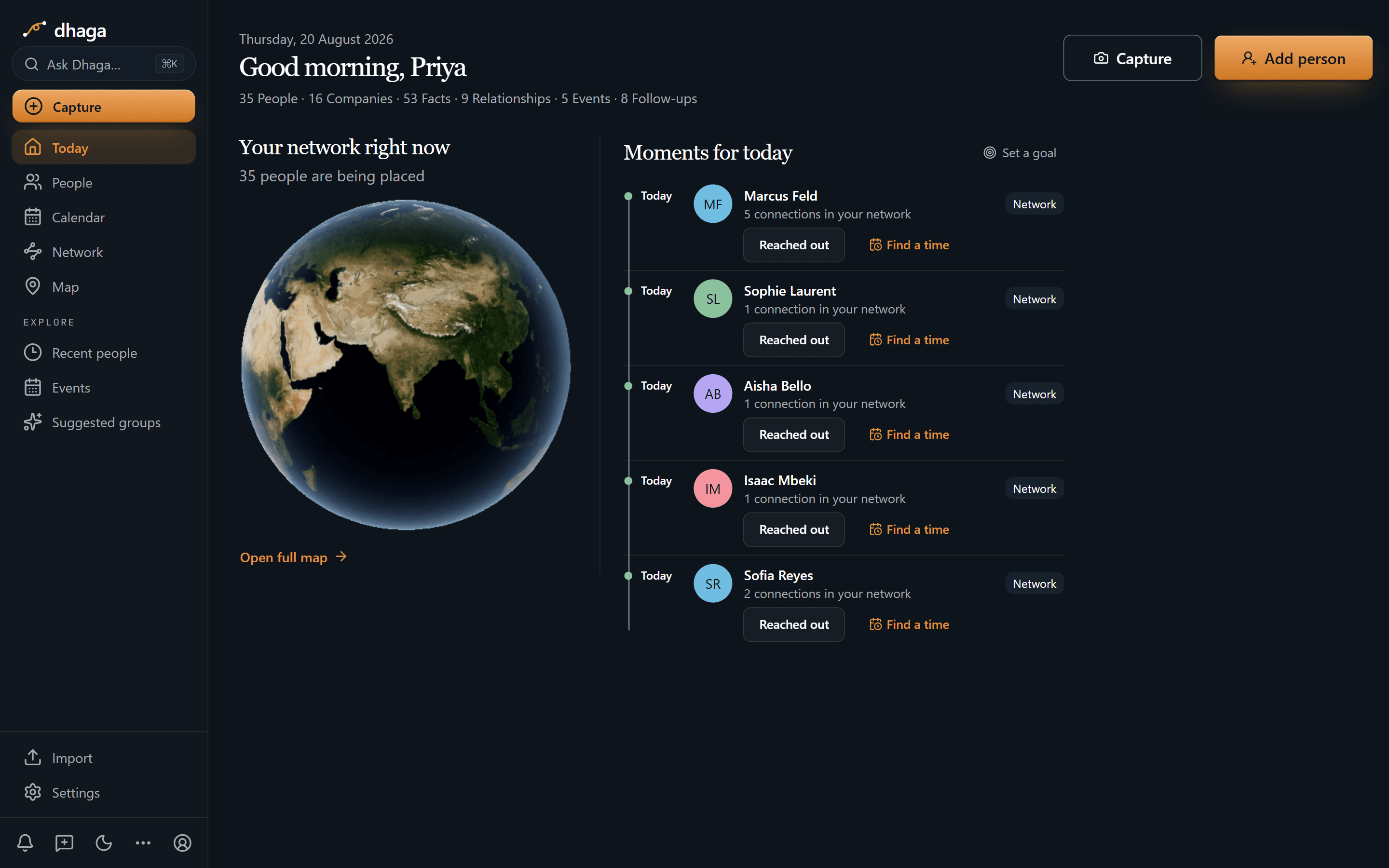
Marcus is top of today's list on the cadence you set for him, next to four other
people you meant to stay close to — each row showing how many of your other
contacts they already connect to. The strip along the top is the book at a
glance: 35 people, 16 companies, 53 facts, 9 relationships, 5 events, 8
follow-ups. This screen is the cadence half — who is due a touch today. What you
owe each person sits on their profile and in one Day/Week/Month view at
/app/plan.
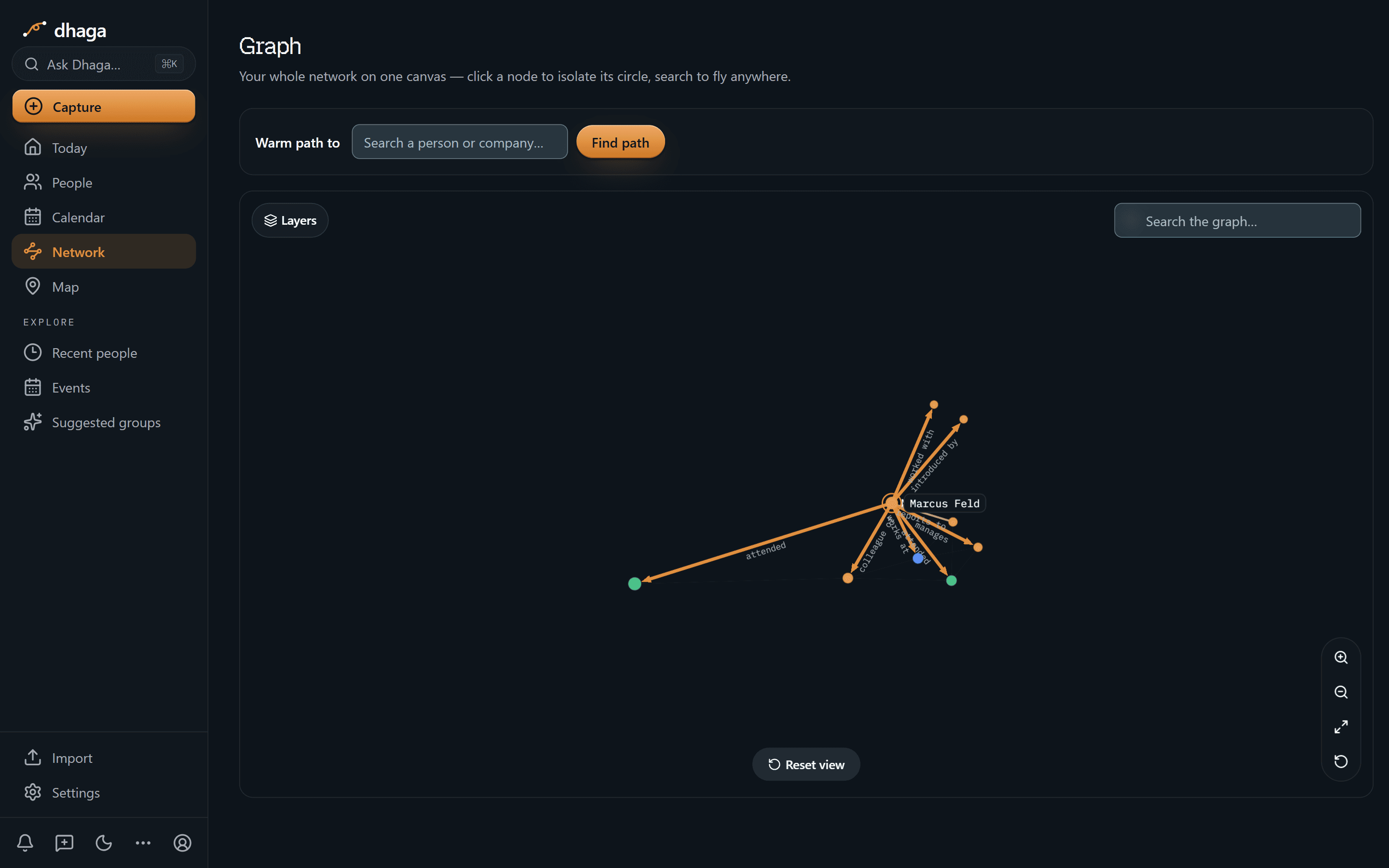
The multi-threaded account as a picture. Only the node you clicked is named — the rest stay dots until you click one and it takes the centre — but the edges are labelled, which is the half that matters: reports to, manages, colleague, introduced by, works at, attended. That's the difference between "someone on his team mentioned procurement" and knowing which thread to pull.
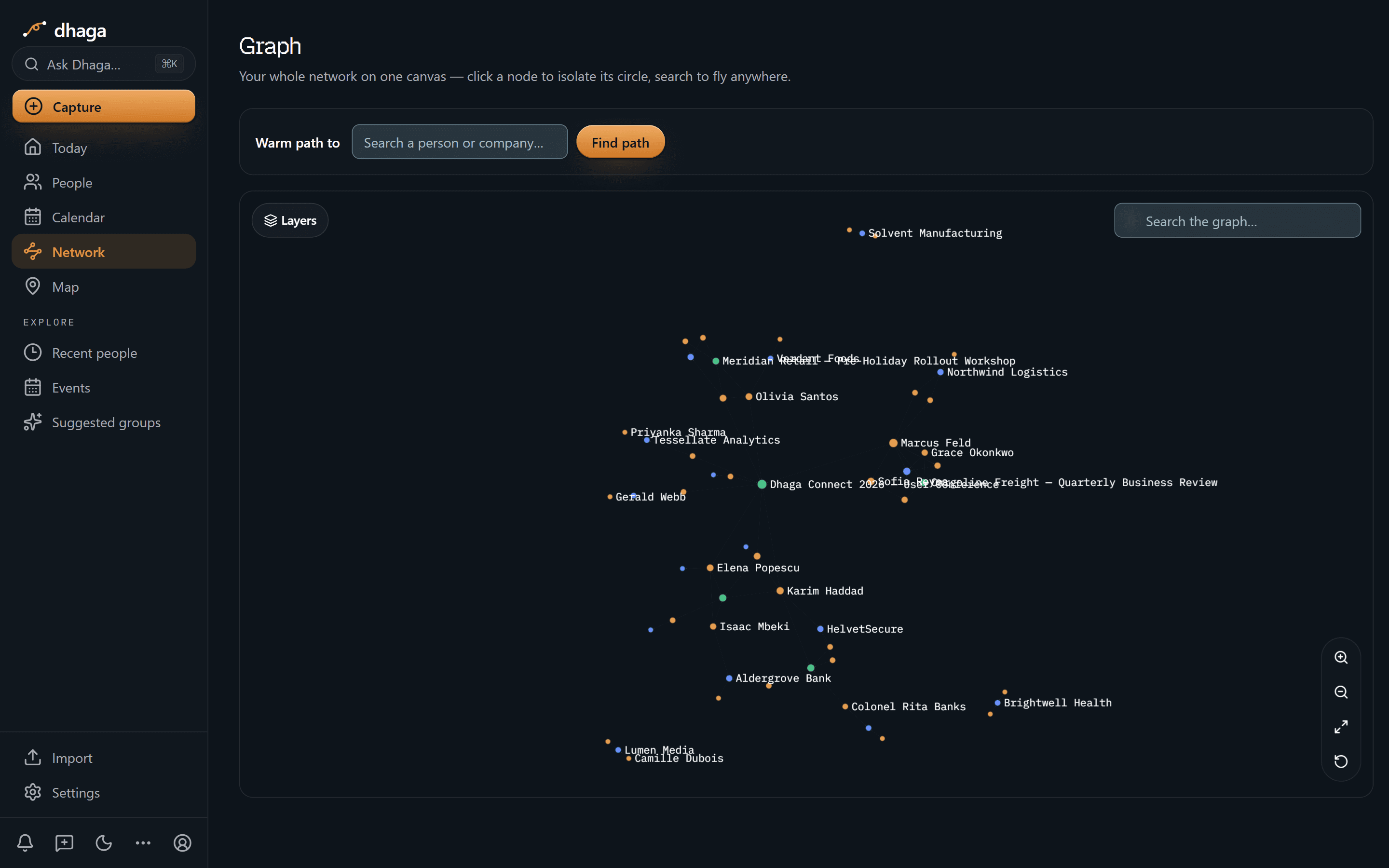
Zoom out and the names come back: people in one colour, companies in another, events in a third — Cargoline and Northwind both sitting there as real nodes, with the people who moved between them. The Warm path to box at the top is the version you'll use under time pressure: name a person or a company, and it walks the graph for a route in.
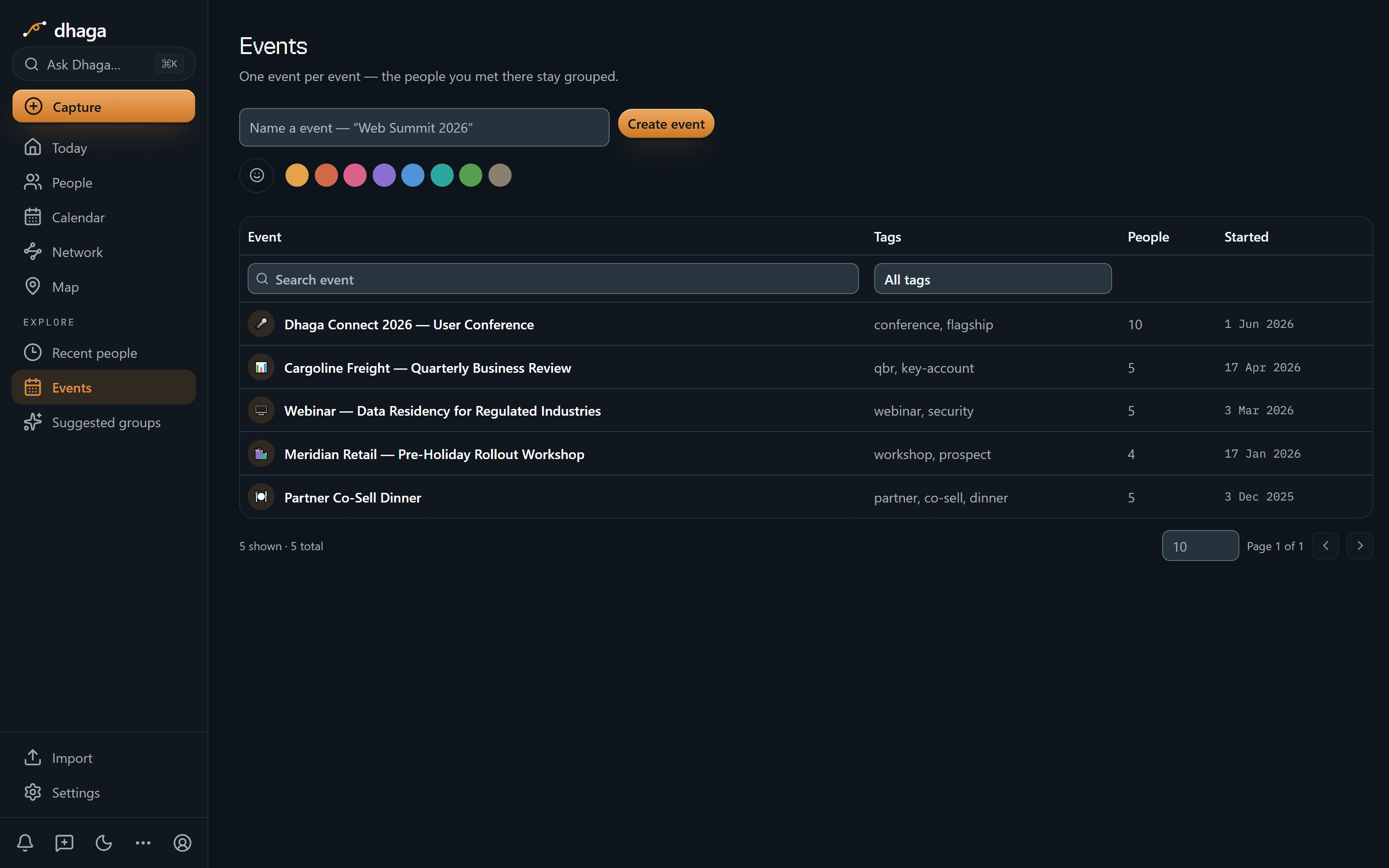
The QBR, the user conference, the security webinar, the partner dinner. Five events, four to ten people each, so "where did I meet this person" is a lookup rather than a guess — and the two Marcus attended are chips at the top of his profile.
The 60-second version
- The account map lives in your head → a private graph of people, companies and events, with reports-to and introduced-by as real edges.
- You debrief in a car park, not at a desk → browser voice capture, spoken straight into a note; card and badge scan, front and back, into one contact.
- Your best notes are messages you already sent → forward a WhatsApp or Telegram message and it lands as a note on the right person.
- "What did the CFO actually care about?" → Ask Dhaga in plain English, answered only from your notes. It says it doesn't know rather than inventing a position.
- You half-remember who told you what → every fact and every relationship keeps a receipt back to its source note.
- Follow-ups slip between calls →
/app/plan: one Day/Week/Month/List view over follow-ups, your events and a connected Google or Outlook calendar. - Your champion changed companies → one durable person with the intro path intact, not a row on a closed deal.
- You already think inside Claude or Cursor → point them at your own graph over MCP.
Getting it in
- Voice, in the browser between meetings — spoken straight into a note.
- Card or badge scan, front and back, merged into one contact.
- WhatsApp and Telegram — forward the thread or DM the bot. Every inbound message is listed at
/app/settings/messaging/log, so nothing lands silently (guide). - Browser extension and web quick-add — paste anything with a person in it.
- Import from vCard or CSV, or sync Google and Outlook contacts.
Getting it out
Ask Dhaga plain questions, answered only from your own notes and graph:
- "Who are the stakeholders at Cargoline and where does each one stand?"
- "Which of my closed-lost contacts have changed companies?"
- "Who do I know who could introduce me to their VP of Sales?"
If you never captured where the security lead stands, it says so. In a job where a confidently wrong answer loses a deal, that's the useful reply.
Or point your own AI tools at it. Dhaga runs an MCP server, so Claude, Cursor or ChatGPT can read your graph directly — draft the account plan in the tool you already work in, with your real stakeholder map underneath instead of a pasted summary. It's on Pro and above, and reading costs no AI credits. How to connect it.
Where Dhaga sits next to your CRM
| Team CRM | Dhaga | |
|---|---|---|
| Owns | Pipeline, forecast, stage | Your relationships and their context |
| Built for | Management reporting | Fast capture and personal recall |
| Stakeholder map | Fields on an account | A graph of who knows whom |
| When you leave | Stays behind | Goes with you — full export, any time |
The CRM answers "how's the pipeline?" for your manager. Dhaga answers "who do I know, what do they care about, and how do I reach them?" for you.
The champion who changed companies
Your champion leaves, lands somewhere bigger, and in the CRM becomes a dead row on a closed deal. In reality they are the warmest lead you will ever get at a brand-new account.
Dhaga treats a person as durable. Note the move — a forwarded message is enough — and the history follows them: what they cared about last time, who introduced you, which of their old colleagues you also know. Both companies stay in the graph, so the move reads as a move rather than a deletion, and the relationship shows its source note. Before you spend someone's social capital on an intro, you can check where that connection actually came from.
What we don't do
- We are not your system of record. Keep the pipeline, forecast and compliance trail where your team expects them.
- We don't monitor your address book. Job-change and news alerts do exist, but one contact at a time and opt-in: turn on Watch for someone and a daily job web-searches for a role change or notable public news. It needs a Pro or Power plan and stops at five watched contacts, each re-checked every few days rather than every night. A hit arrives as an alert you can dismiss, and nothing touches the graph until you add it as a note yourself — so the receipt rule holds even here. Everyone you didn't tick is never looked up.
- Enrichment is a button, not a background process. "Enrich from public web" sits on the profile because you press it: it searches for their public footprint, cites what it found, saves it as a note, and you can delete it.
- No full mobile app yet — web, extension and WhatsApp/Telegram are the capture surfaces.
What it costs
The free tier is real: 10 AI credits a month, and manual capture stays unlimited. Pro is ₹499/month, or $4.99 internationally, with Power above it. /pricing is the one place that shows what you would pay today, including any offer running there.
One dropped thread costs more than a year of this. Start free and capture your next stakeholder call by voice.
Discussion
Dhaga for financial advisors & wealth managers
A client mentions the buyer, the tax worry and the grandkids' 529s across three conversations. Dhaga kept all six details, each stamped with its note.
Recruiting & executive search
A Staff role opens that matches what a passive candidate told you six weeks ago. Dhaga remembered her terms, her timing, and which call each came from.